ATS Series Installation Manual14
15. Coding a Transmitter
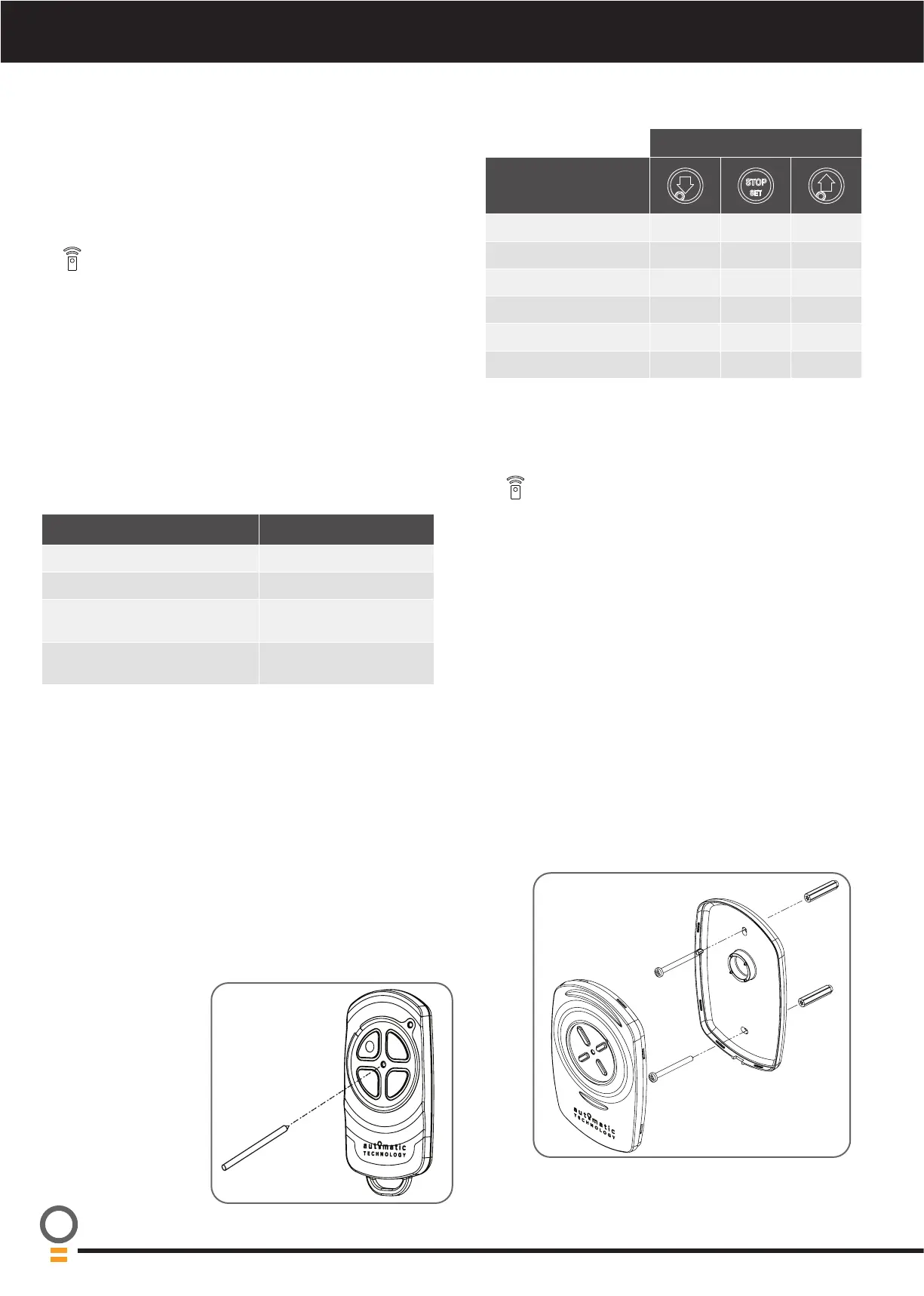
15.1 Storing the Transmitter Code
The opener can only be operated from remote control
transmitters that have been programmed into its memory.
Up to 64 codes can be stored in the memory.
a. Press the MODE button repetitively until the TRANSMIT
LED is lit.
b. Press and HOLD the button/s indicated in the table to
set the required transmitter function. The opener will
start to flash rapidly and beep.
c. Press one of the four (4) buttons on the transmitter until
the beeper and main light starts to flash rapidly, then
release transmitter button.
d. Press the remote control button again until the main
light stops flashing rapidly.
e. Release both buttons. Press the MODE button to exit.
The transmitter button is now coded, press to test.
NOTE: Refer to the Light indicator table for the details of
the transmitter status.
BUTTON
TRANSMITTER
FUNCTION
Open / Stop / Close
HOLD
PET (Pedestrian) Mode
HOLD
Open
HOLD
Light
HOLD HOLD
Vacation Mode
HOLD HOLD
Aux Output
HOLD HOLD
* The button coded for open only function can close the door if you
hold the button for 4 seconds, when the door is fully open..
MAIN LIGHT & BEEPER TRANSMITTER STATUS
Light ON & 2 short beep Button added
Light OFF & 2 short beep Button removed
Light 2 FLASHES, then OFF & 2
long beeps
Remote control deleted
4 FLASHES, then OFF & 4 long
beeps
Memory full
15.2 Remotely Coding Transmitters
Using this method transmitters can be coded without
access to the opener’s control panel as long as a
pre-coded transmitter is available.
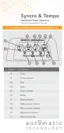
a. Take any pre-coded transmitter. Press the button for the
function to be duplicated and release.
b. Using a small needle / pen, press and hold firmly for two
seconds the middle button, through the Coding Hole
until the unit starts flashing and beeping.
c. Within ten (10) seconds take the additional transmitter
you wish to code. Hold the new transmitter’s button
for two seconds the unit will flash and beep faster, then
release for two seconds
d. Press and hold again for two seconds until the flashing
and beeping stops and then release.
e. The opener will
falsh and beep to
indicate result. (see
table above)
f. Wait for ten (10)
seconds and then
press the new
transmitter’s button
to test.
15.3 Erasing All Transmitter Codes
a. Press the MODE button repetitively until the TRANSMIT
LED is lit.
b. Press and hold the MODE button for 10 secs, let the
MODE button go when the beeper and main light stops
flashing.
c. Follow steps a - e in Storing the Transmitter Code to
code new transmitters.
15.4 Vacation Mode
a. To turn on Vacation mode and lock out all remotes, press
the button on the remote programmed with Vacation
Mode for 4 seconds.
b. To turn off Vacation Mode, press the transmitter button
programmed to vacation mode to turn off.
15.5 Installation of the Wall Mounted Transmitter
a. Store the transmitter code as per instructions in 15.1 or
15.2.
b. Test the transmitter button.
c. Mount the transmitter in a convenient location, yet out
of reach of children and at least 1.5m off the ground.
d. Make sure the door is visible from this location.





 To Next Page