Automatic Technology ofce location
Head Ofce 6-8 Fiveways Blvd, Keysborough 3073 Phone (03) 9791 0200
ata-aust.com.au
Prefixed trademarks are the property of Automatic Technology (Australia) Pty Ltd
ABN 11 007 125 368. © 2020 Automatic Technology Australia Pty Ltd.
ATS Series Installation Manual26
a. Switch power on and the BLUE LED on the CLOSE button
will start to flash to indicate that the opener is ready to
set the Close travel limit
b. Press the MODE button repetitively until the TRANSMIT
LED is lit.
c. Press and HOLD the CLOSE button
to set the Open /
Stop / Close function. The Main light will start to flash rapidly.
d. Press and hold button 1 on the transmitter, then release
transmitter button.
e. Press and hold button 1 on the remote control button again
until the main light stops flashing rapidly.
f. Release both buttons. The transmitter button is now coded,
press to test and observe the speed of the door through a
full cycle.
g. The drive speed is set to the fastest setting by default. This
may not be suitable for larger doors or for single piece doors:
CLOSE limit:
i. Using the programmed transmitter, press and hold the
button 4 to close. To inch the door, single presses of
the button 4 will move the door to desired CLOSE limit.
We recommend the CLOSE limit position being the first
point of contact of the rubber strip ( at the bottom of the
door) with the ground.
ii. If the door overshoots, press the OPEN button 1 on the
remote to move the door in the OPEN direction.
iii. When the door is at the desired CLOSE position, press
the SET button 2, the GREEN LED on the OPEN button
will now flash.
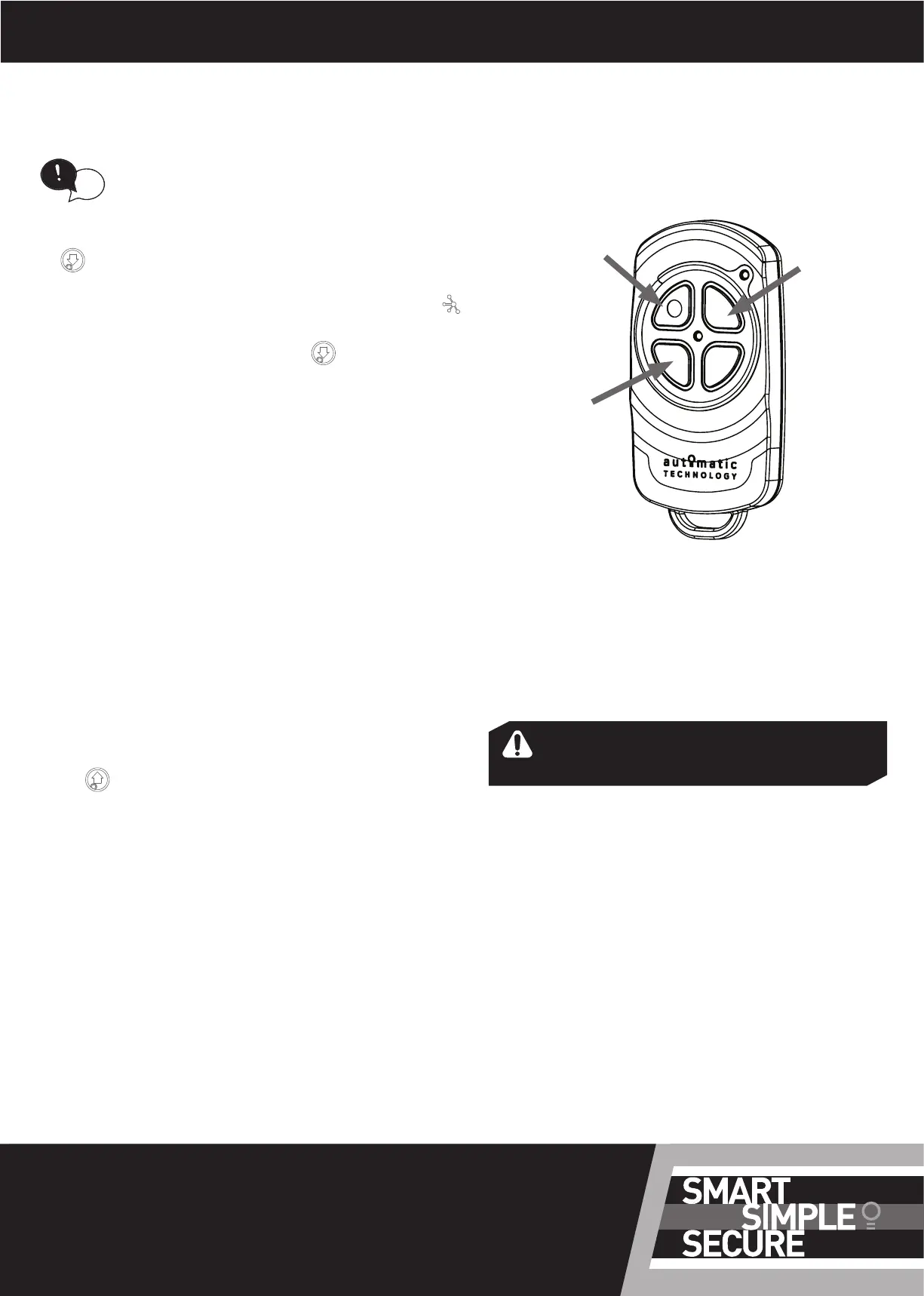
G - Setting limits via Transmitter
Button 1
(inch Open)
Button 2
(Set)
Button 4
(inch Close)
OPEN limit:
i. Using the programmed transmitter, press and hold
the button 1 to open. To inch the door, single presses
of the button 1 will move the door to desired OPEN
limit. We recommend the OPEN limit position being
the height of the garage opening
ii. If the door overshoots, press the CLOSE button 4 on
the remote to move the door in the CLOSE direction.
WARNING! The door will automatically close,
open and close again after the next step.
Ensure that nothing is in the door’s path.
iii. When the door is at the desired OPEN position, press
the SET button 2. The door will now automatically
close and open to calculate the safety obstruction
settings.
The SPEED setting on the opener can not be
adjusted when setting limits via the transmitter.
Follow section 12.1 to set limits and adjust speed.
tip





 To Previous Page