57
600 Series
Maintenance and service
If counterweights are added or removed
16. Calibration of the load sensor
Risk of tipping over - The load
sensor may not give correct
information if it is not calibrated
after adding or removing
counterweights. The load sensor
must be calibrated if you add or
remove two or more AVANT rear
weights (+/- 58 kg).
Risk of tipping of the loader
and crushing under lowering
load - Do the calibration on at,
solid ground, and do not go near
the boom of the loader. During
the calibration procedure of the
load sensor it is necessary to lift a
heavy load, deliberately causing
the loader to tip forward.
• Use the loader boom only just
enough to lift the rear wheels of
the ground.
• Keep your hands and feet away
from the rear wheels while doing
the calibration.
• Do not allow anyone to stay at
the driver’s seat of the loader
while adjusting the load sensor
-Accidental movements of the
loader can injure!
• Remove the cover panels from
the rear of the loader before you
start the calibration procedure.
• Lift only solid objects when doing
the calibration. If you lift soft
materials e.g. sand with bucket,
the loader can move if sand
starts to drain from the bucket.
• Keep away from the hot parts
of the engine while doing the
calibration.
To calibrate the load sensor:
1. Add or remove the counterweights from the loader.
2. Remove the engine cover plate and the lower left side
rear cover plate.
3. Lift something so heavy with the loader that the rear
wheels lift off the ground.
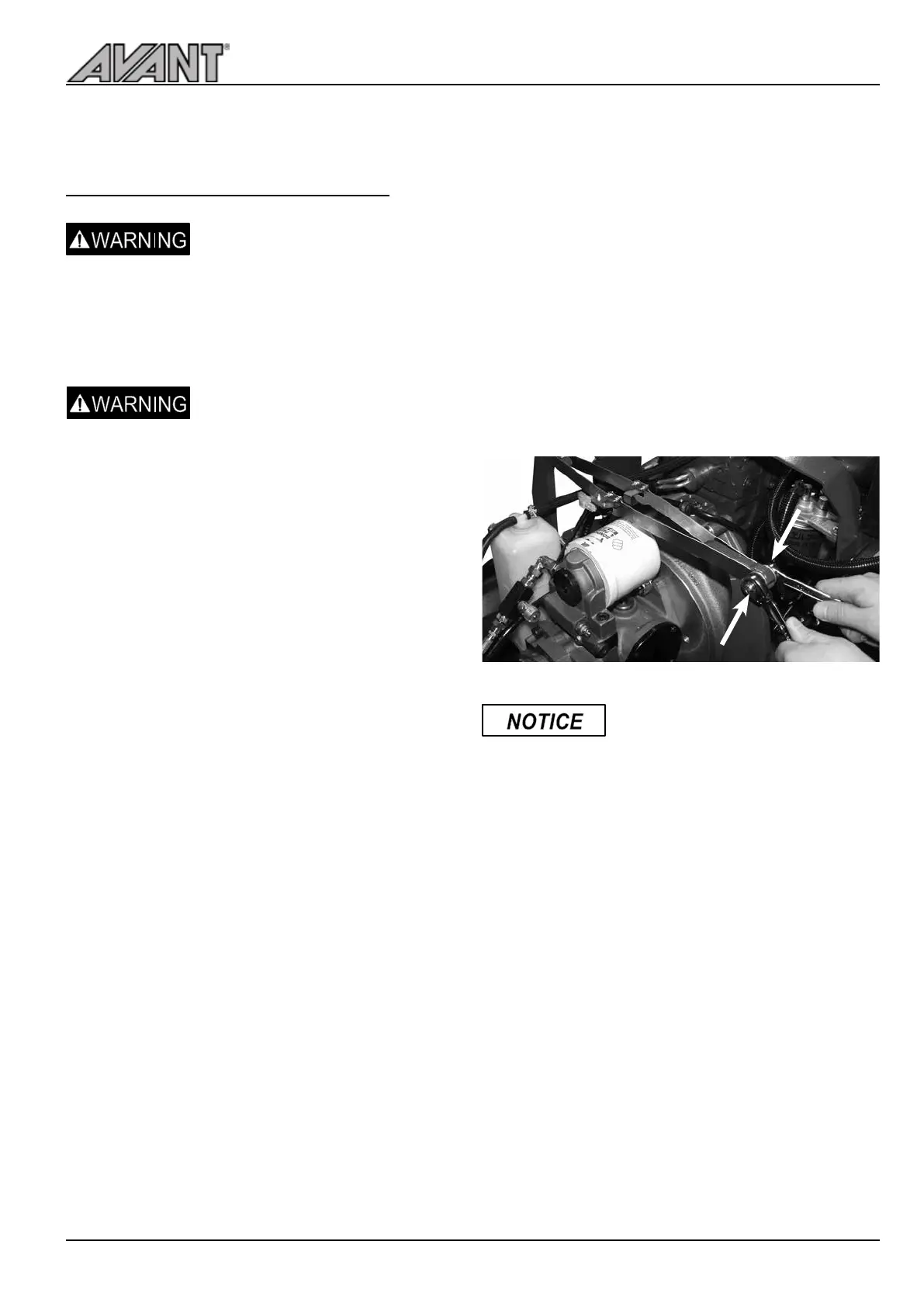
4. Open the screw pointed by the arrows (see picture
below) with two 13 mm keys. As the two steel strips
come in contact and trigger the switch, tighten the
screw.
5. Lower the rear wheels back to the ground and mount
the cover plates.
6. Check function of the load sensor.
The rear wheels must be lifted by
using the loader boom in order
that the adjustment can be done
correctly. The rear of the loader
can not be lifted with a jack in order
to do the calibration correctly.



 To Next Page