EasyManua.ls Logo

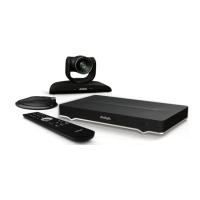
Avaya Scopia XT Executive - User Manual

Avaya Scopia XT Executive
125 pages
Print Icon
To Next Page IconTo Next Page
Loading...
Avaya Scopia
®
XT Series User Guide
Release 9.1
December 2017
Avaya - Proprietary. Use pursuant to the terms of your signed agreement or Avaya policy.
DRAFT—December 15, 2017—1:33 PM (UTC)

Table of Contents

Other manuals for Avaya Scopia XT Executive

Questions and Answers

  • J
    Joseph HughesSep 23, 2025
    Why I cannot download Scopia[®] XT Control installation package for Avaya Scopia XT Executive Conference System?
    • S
      stephanierogersSep 23, 2025
      If you cannot download the Scopia[®] XT Control installation package for your Avaya Conference System, and you are using the Yosemite operating system, use the Finder tool on your Mac to locate the application that you want to open. This is because Yosemite does not allow you to download packages obtained from outside of the Apple Mac Applications store.
  • J
    Jennifer ScottAug 23, 2025
    What to do if Avaya Conference System does not make calls due to IPv6 network error?
    • B
      brookericeAug 23, 2025
      If your Avaya Conference System network does not make calls due to a network error, and the network is based on IPv6 while the endpoint is configured to support only IPv4, enable the endpoint to support IPv6.
  • J
    Jason WellsAug 25, 2025
    Why do I experience audio or video disruptions like static on Avaya Scopia XT Executive Conference System?
    • S
      Shawn WalkerAug 26, 2025
      To prevent electromagnetic interference during your Avaya Conference System meeting, avoid using cellular phones. Also, if using a laptop, keep it away from the microphone to minimize noise.
  • K
    Kristin CookeAug 27, 2025
    How to fix Avaya Conference System XT Remote Control Unit when it does not function?
    • M
      Michelle AyalaAug 27, 2025
      If the Avaya XT Remote Control Unit isn't working, first replace the battery. If that doesn't solve the issue, configure the XT Remote Control Unit code on the XT Codec Unit to match the code set on the remote.
  • E
    edwin75Aug 27, 2025
    What to do if I cannot share presentation from my computer on Avaya Conference System?
    • P
      Patricia GibsonAug 27, 2025
      Ensure the VGA/DVI cable is securely connected between your computer and the XT Codec Unit. Also, check that your computer's output resolution is supported by the Avaya XT Series.
  • M
    Michelle DeleonSep 16, 2025
    Where to connect USB headset on Avaya Scopia XT Executive Conference System?
    • V
      Victoria WernerSep 16, 2025
      If you are using a USB headset with your Avaya Conference System XT Series, ensure it is connected to the lower USB port on the device.
  • H
    Hannah MccormickSep 13, 2025
    Why I cannot send or receive video during Avaya Scopia XT Executive Conference System call?
    • H
      hcastilloSep 13, 2025
      If you cannot send or receive video during a call on your Avaya Conference System, you may experience video problems when calling older endpoints that are not fully compliant with more recent standards. The endpoint administrator must disable specific video codec if there is any compliance issue with older endpoints.
  • A
    Anna ColemanSep 14, 2025
    How to fix the lack of synchronization between audio and video on Avaya Scopia XT Executive?
    • Y
      Yvonne FitzgeraldSep 15, 2025
      If there is a lack of synchronization between audio and video on your Avaya Conference System, one of the optional video devices, an optional camera or a video converter, may be causing the video delay. Configure lip sync settings to resolve this issue.
  • W
    wendy97Sep 5, 2025
    What to do if other party cannot see or hear me on Avaya Scopia XT Executive?
    • K
      Kelly HarrisonSep 6, 2025
      If the other party cannot see or hear you when using the Avaya Conference System, ensure that your Microphone Pod is correctly connected to the system. Also, verify that the Video Privacy and Mute functions are not enabled. Finally, check that your Call Type is set to Audio & Video, and not Audio Only.
  • M
    Mr. Troy MorganSep 3, 2025
    Why I cannot control Avaya Scopia XT Control endpoint with keyboard and mouse?
    • A
      aweberSep 3, 2025
      If you cannot control the Avaya Scopia[®] XT Control endpoint with your keyboard and mouse, ensure your computer and the XT Series are connected to the network, and that the DVI cable is properly connected to the XT Executive. Check via the XT Series web interface that only your computer is connected to the XT Executive.

Avaya Scopia XT Executive Specifications

General IconGeneral
Frame RateUp to 60fps
Zoom10x optical zoom
Network ProtocolsH.323, SIP
Data SharingH.239, BFCP
Dual StreamYes
Video Outputs2 x HDMI
Video Resolution1080p
Video StandardsH.263, H.264, H.264 High Profile
Audio StandardsG.711, G.722, G.722.1, G.728
MicrophoneIntegrated microphone array
ConnectivityEthernet, Wi-Fi
Firewall TraversalH.460
Video InputsHDMI, DVI-I
Audio Inputs1 x 3.5mm jack
Audio Outputs1 x 3.5mm jack
DisplayIntegrated display
Operating SystemLinux-based

Related product manuals