EasyManua.ls Logo

AVer CAM520 Pro3 - Remote Functions and Shortcuts

AVer CAM520 Pro3
68 pages
Print Icon
To Next Page IconTo Next Page
To Previous Page IconTo Previous Page
Loading...
5
button and preset position button 0-9
to load a saved camera position.
Repeat steps if needed.
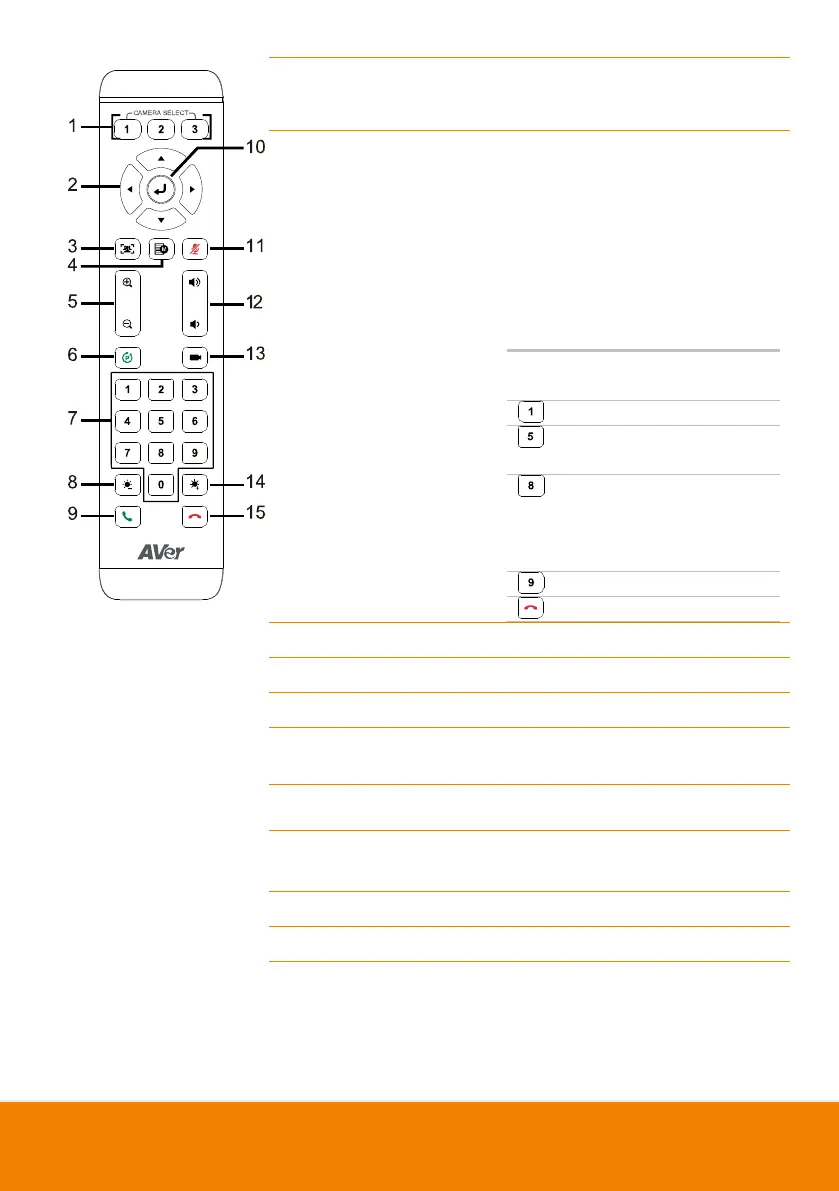
7. Preset Position/Number
Buttons
Preset position buttons are used in
conjunction with the Preset button to
save positions. There are a total of 10
presets.
Press the preset button first and then
press 0~9 for the camera to move to
the saved position.
Shortcuts
Press and
Hold
To
for 2 sec
Turn on/off WDR
for 2 sec
Turn on/off
SmartFrame
for 2 sec
Turn on/off RTMP
streaming (when
RTSP and RTMP
is on)
for 2 sec
Enter sleep mode
for 6 sec
Reboot
8. Brightness -
Decrease the brightness.
9. Call/Answer
Answer a call or start a call.
10. Enter
Not supported.
11. Mute/Un-mute
Speakerphone
Not supported.
12. Volume Up/Down
Not supported.
13. Preset Hot Key
Press to move the camera to the
preset position the user has set.
14. Brightness +
Increase the brightness.
15. Hang Up
End the call.

Related product manuals