EN
41
EN
40
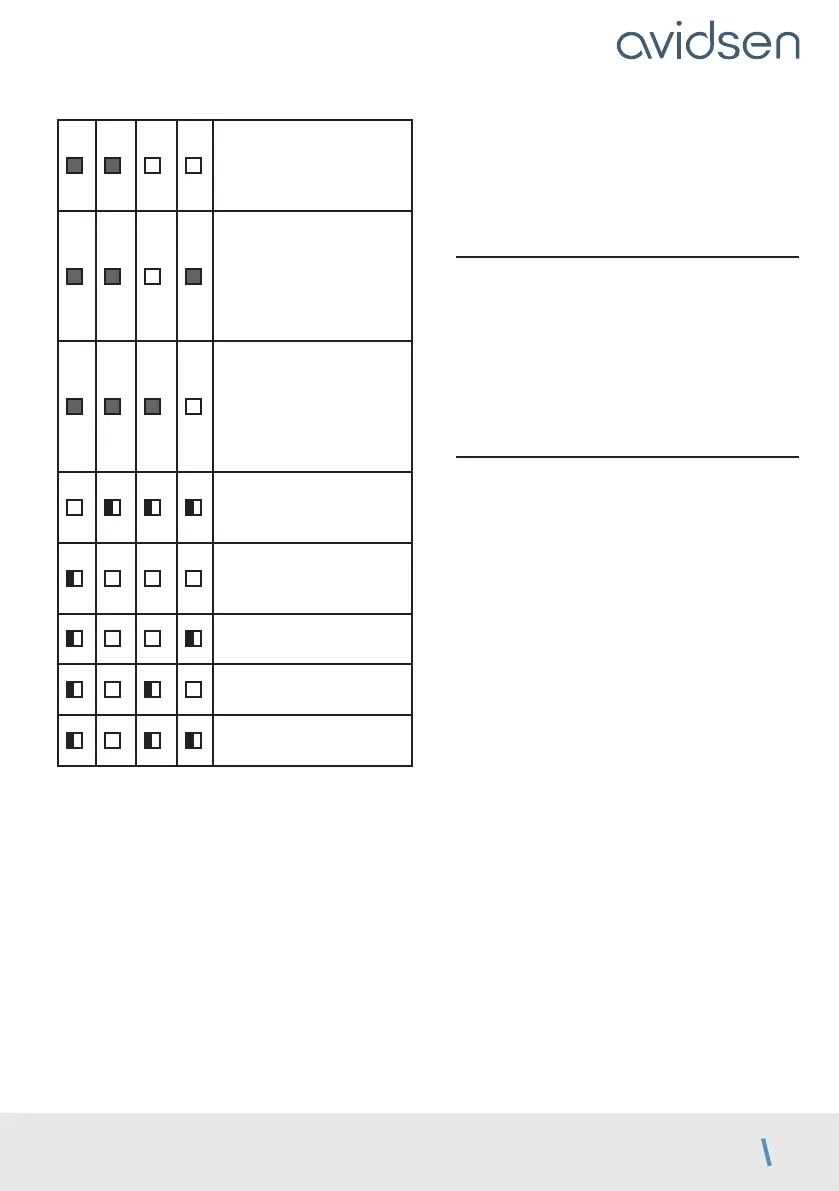
In phase 1, panel M2 did
not reach a stop after
opening for 60s or cable
section too weak?
In phase 1, motor
M1 was not detected
(contact failure, electronic
card problem?).
Review motor
connections.
In phase 1, motor
M2 was not detected
(contact failure, electronic
card problem?).
Review motor
connections.
In phase 1 (opening),
M1 is not recognised.
Note 1.
In phase 1 (opening),
M2 is not recognised.
Note 1.
In phase 2 (closing), M1 is
not recognised. Note 2.
In phase 2 (closing), M2 is
not recognised. Note 2.
Self-learning was
interrupted by the user.
Note 1: many possible causes:
• The motor was not recognised as compatible
with the electronic card.
• There is a fault in the motor.
• The section of the motor cable is too weak
• A gust of wind prevented the system from
recognising the motor.
Repeat the self-learning procedure and assist
the panel opening process during the start of
phase 2 if wind speed remains high.
Note 2: many possible causes:
• The motor was not recognised as compatible
with the electronic card.
• There is a fault in the motor.
• The section of the motor cable is too weak.
Try again by repeating the self-learning process.
2.8. Programming remote controls
It is possible to open both panels (gate) or a single
panel (pedestrian) by remote control.
On a remote control, it is possible to decide
which button will be used as the gate command
and which button will be used as the pedestrian
command.
2.8.1. Programming with the card
Note:
It is possible to programme a remote control once,
then use the “copy” function that allows you to
programme additional remote controls without
using the electronic card, via a remote control
that has already been programmed. (This is useful
when additional remote controls are available
for programming without having to open the
electronic control box).
Programming a button for the GATE OPENING
command:
• Press “–” for 3 seconds and L1 will switch on.
• Press OK and L1 and L4 will turn on alternately.
• Within the next 10 seconds, press the remote
control button for memorisation.
• If the red LEDs all turn on for 1 second, this
means that memorisation is successful.
• If the red LEDs all flash 3 times, this means
that the system has waited for more than 10
seconds without receiving valid information.
Restart the programming.
Programming a button for the Pedestrian
OPENING command:
• Press “–” for 3 seconds and L1 will switch on.
• Press “+” and L1 will switch off and L2 will switch
on.
• Press
OK
and L1 and L4 will turn on alternately.
• Within the next 10 seconds, press the remote
D - BEGINNING OPERATION



 To Next Page