EN
53
EN
52
F - MAINTENANCE AND UPKEEP
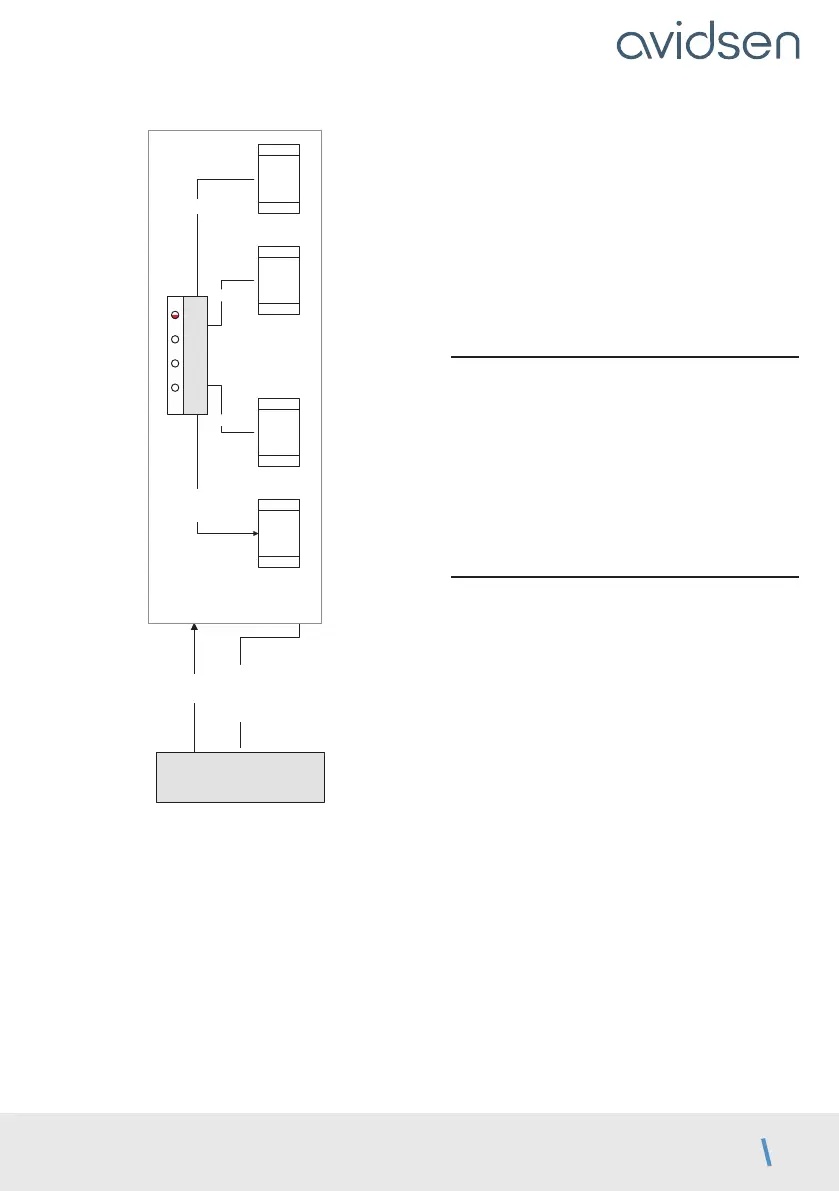
OK 3s
mode manuel
Mode manuel
ouvre
M1
ferme
M1
ouvre
M2
ferme
M2
PROG OK
PROG et –
– +
MENU 0
L1 L2 L3
L4
• PROG and “+” can be pressed simultaneously,
for example to open both panels at the same
time.
• To exit, press PROG and “–” simultaneously
(press and release).
• Otherwise, after a minute with no action on a
button, the system will automatically exit manual
control.
In addition, in this mode, LEDs L1 and L2 are used
to test the status of the photocell inputs (PHO) and
wired control (2B):
If photocells are connected, LED L1 will be on if the
infrared beam is unobstructed.
If a wired control device is connected to input
2B, LED L2 turns on when the contactor of the
component is activated.
2.3 - Total reset
You can reset to factory settings.
• To do so, press and hold “–” and “+” and OK
simultaneously for 8 seconds until an LED display
appears. All the settings now have their default
value and you must redo the self-learning.
However, this procedure does not delete the
remote controls from the memory.
2.4. Replacing the remote control battery
When the remote control range is very reduced
and the red indicator is weak, this means that the
remote control battery will soon run out.
The remote control takes CR2032 batteries.
Replace the battery with a battery of the same type
as originally used.



 To Next Page