Connecting to the DSL Line
26 FRITZ!Box Fon WLAN 7170 – 2 FRITZ!Box Fon WLAN 7170: Connecting
2.7 Connecting to the DSL Line
Connecting to the DSL splitter
Cables
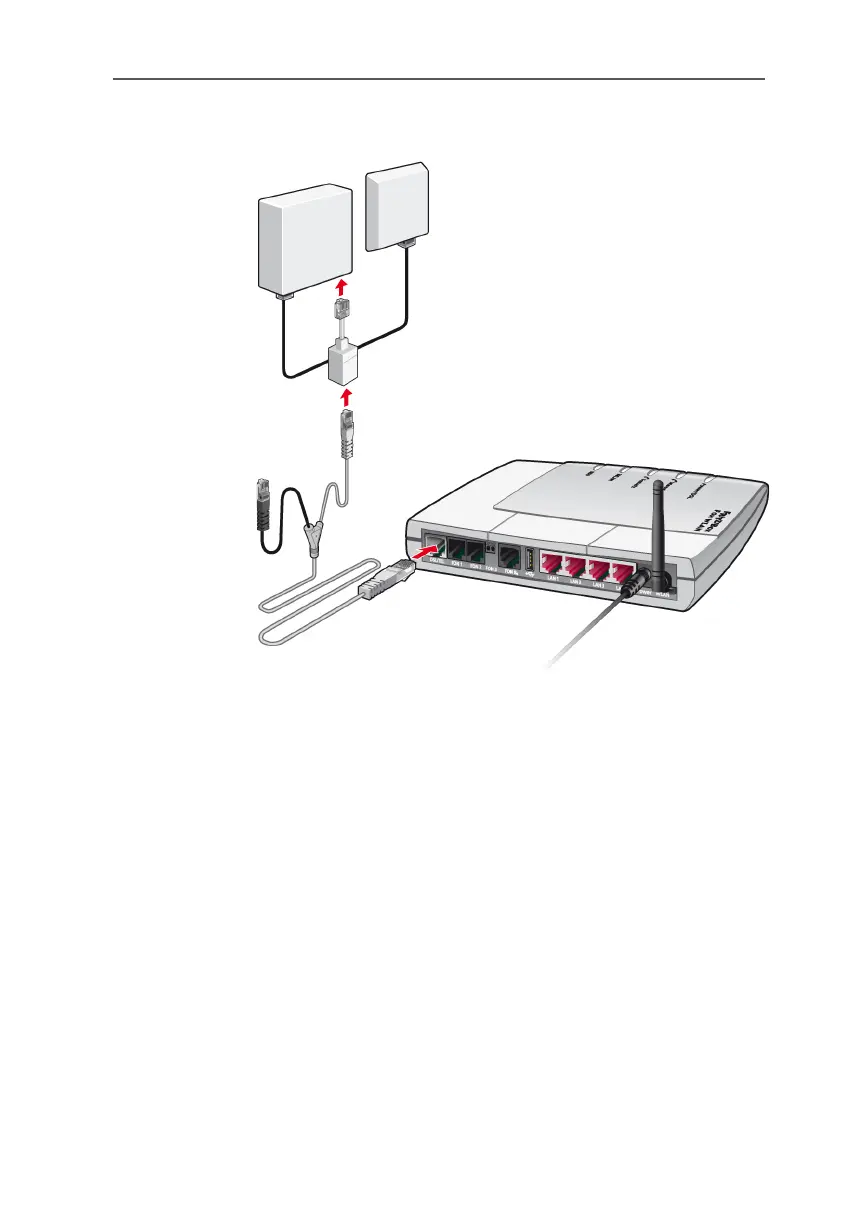
The gray and black Y-shaped cable is for connecting to the
DSL splitter. This cable is a combination of a DSL cable and a
telephone cable.
Connecting
1. Connect the longer of the two gray branches of the ca-
ble to the socket labeled DSL/TEL, located at the far left
of the back panel of the FRITZ!Box Fon WLAN.
2. Then connect the other end of the cable to the socket
on the DSL splitter labeled “DSL”. If the DSL line cable
does not fit in the splitter, insert the cable into the gray
RJ45-RJ11 adapter enclosed in the package and then
plug the adapter into the splitter socket.



 To Next Page
 Loading...