16 17
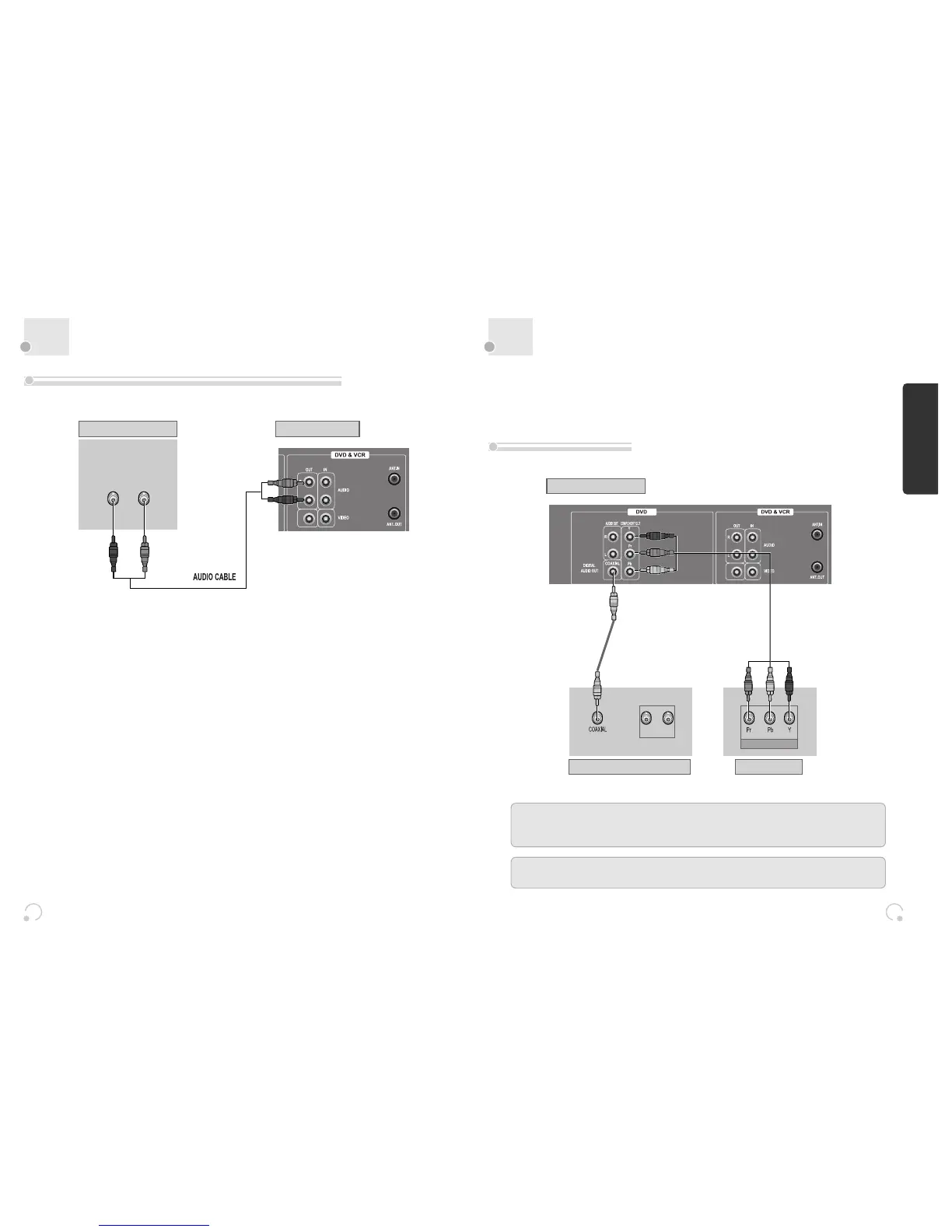
Connecting with Audio
16 17
Connecting to a television with
Component jack and a Dolby Digital Amp.
Installation
How to Connect with Stereo Unit such as Audio
How to Connect
(L) AUDIO (R)
REAR PANEL OF DVD-VIDEOREAR PANEL OF STEREO UNIT
¡ Connect Audio jack. Connect AUDIO OUT in rear panel of DVD-Video to In jack of stereo sound unit.
™ For Input Select in stereo unit, Select “External Input” connected with DVD-Video.
£ Playback DVD disc or Hi-Fi videotape, you can hear sound in speaker of stereo unit.
■ Use in COMPONENT In jack attached in TV or amp supporting Dolby Digital.
(NOT SUPPLIED)
(L) AUDIO IN (R)
REAR PANEL OF DVD-VIDEO
DOLBY DIGITAL DECODER-AMPLIFIER
TV CONNECTIONS
COMPONENT IN
CONNECTING CABLE
Manufactured under license from Dolby Laboratories.
"Dolby" and the double-D symbol are registered trademarks of Dolby Laboratories.
“DTS” and “DTS Digital Out” are trademarks of Digital Theater Systems, Inc.


 To Next Page