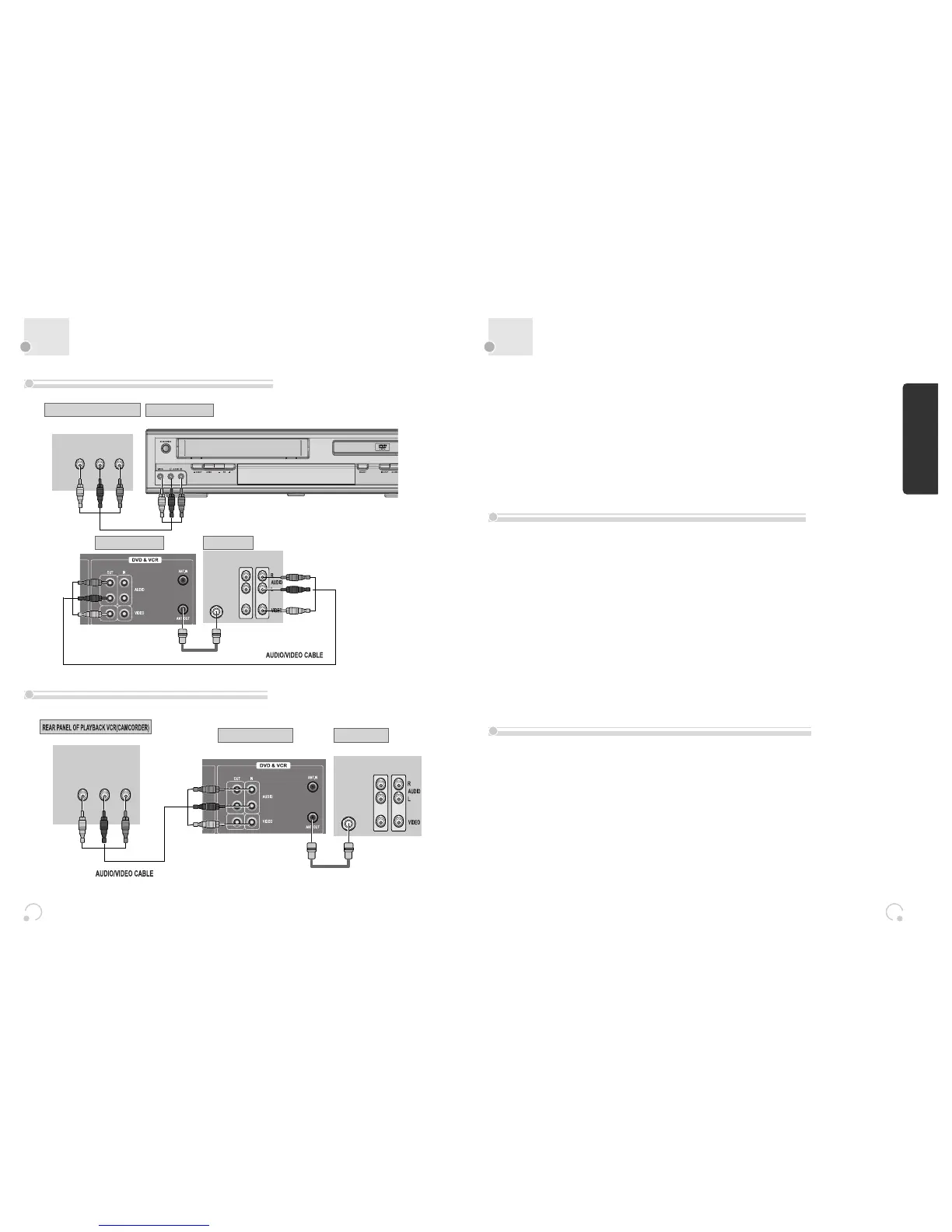
¡ Connect Audio/Video Out jack in Camcorder(or playback video) to Audio/Video In jack in rear
panel (or front panel) of DVD-Video with connecting cable.
™ Connect “ANT. IN” jack in TV to “TV” jack in DVD-Video with RF cable.
£ To record contents of camcorder or playback video with DVD-Video, insert recording tape attached
recording tab in DVD-Video.
¡ Turn on DVD-Video.
™ Press [INPUT] button of remote control and adjust DVD-Video to display “AV” or “AV.F” in TV
screen.
£ Press [PLAY] button in Camcorder or playback video.
¢ Press [REC] button in DVD-Video if you want to record contents of camcorder or playback video.
∞ Press [Pause] button in DVD-Video when unnecessary or undesired scene is displayed in recording.
(Caution) Recording is released automatically after 5 minutes since pressing [PAUSE]
button. Press [REC] button if you want to record again.
¡ Turn DVD-Video on.
™ Press [INPUT] button of remote control and adjust DVD-Video to display “AV” or “AV.F” in TV screen.
£ Insert tape in camcorder and play it back.
How to Copy(Edit) Tape with Other VCR or Camcorder
How to Playback Chapter Photographed by Camcorder


 To Next Page