10 11
Identification of Controls
10 11
Remote Control
Product information
Remote control 2 Batteries RF cable
Instruction Manual
• To purchase accessories or not supplied parts additionally, contact your nearest dealer or service center.
• Operate remote control within 7m from the unit.
• Do not press 2(two) buttons at the same time.
• Do not light up sending and receiving part of remote control.
• Do not keep in the place with much dust and humidity.
Instructions in using REMOTE
Accessories
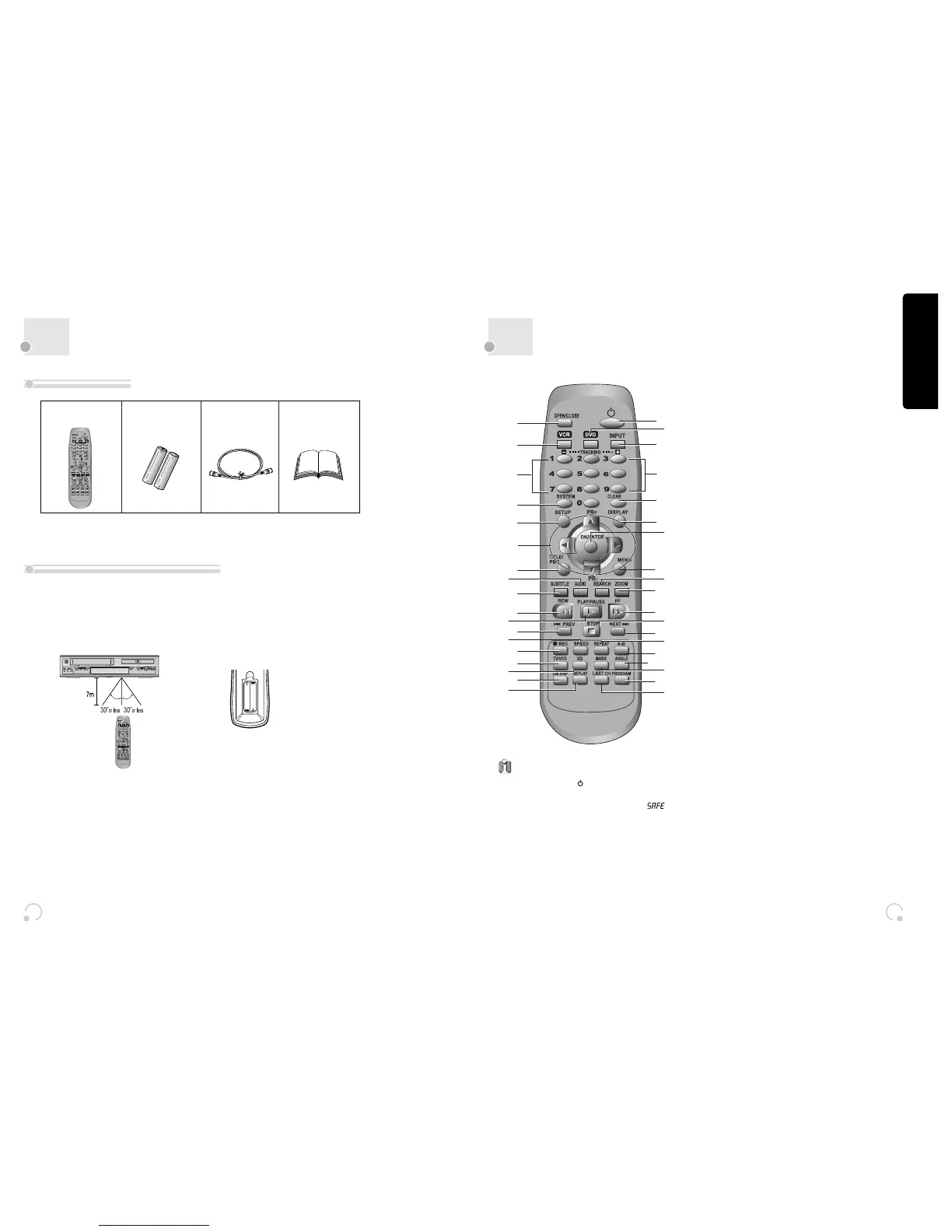
! [DVD] Open/Close button, [VCR] Eject button
@ VCR SELECT button
# [DVD, VCR] Number button, [VCR] Tracking -/+ button
$ System button [VCR] This button is not available for
this set [DVD] Activates Progressive Scan button
% SETUP button
^ [DVD, VCR] Move/Select in OSD, [VCR] Channel Up/Down
button
& [DVD] Title /PBC button
* [DVD] AUDIO Language Select, [VCR] AUDIO Select
button
( [DVD] Subtitle Select button
) Reverse Search button
1 Play/Pause button
2 [DVD] PREVIOUS button (move into a previous
chapter or track)
3 [VCR] Record Speed button
4 [VCR] Record button
5 [VCR] TV/VCR button
6 3D button (This button is not available for this set)
7 [VCR] CM SKIP
8 [VCR] Replay button
9 Power button
0 DVD SELECT button
“ [VCR] INPUT Selection button
‘ Clear button
+ [DVD, VCR] OSD Display button
= OK/ENTER button
Q [DVD] Menu button
q [DVD] Chapter/Title/Time Search button
W [DVD] Zoom button
w Forward Search button
E Stop button
e [DVD] Next button (Move into a next chapter or
track) , [VCR]
Frame Advance button in pause mode
R
[DVD] Repeat Playback button
r [DVD] REPEAT a defined period from A to B button
T [DVD] Angle button
t
[DVD] Mark button
Y
[DVD, VCR] PROGRAM button
y [VCR] LAST CHANNEL button (If you move channels
using the [PR+/PR-] button, return to the previous TV
channel which was being watched)
Press the power
[
] button of the remote for
about 5 seconds. No buttons of front panel can
then operated and Lock indicator (“ ”)
will be displayed on window display. To release
child lock, press any button on the remote
control.
POWER ON
Player will be POWER ON if any button of the
remote control is pressed.
Child Lock !


 To Next Page