OXYGEN REMOTER - SETTINGS|MONITORS SECTION
OXYGEN 1000 & OXYGEN 2000 · User Manual · ENG
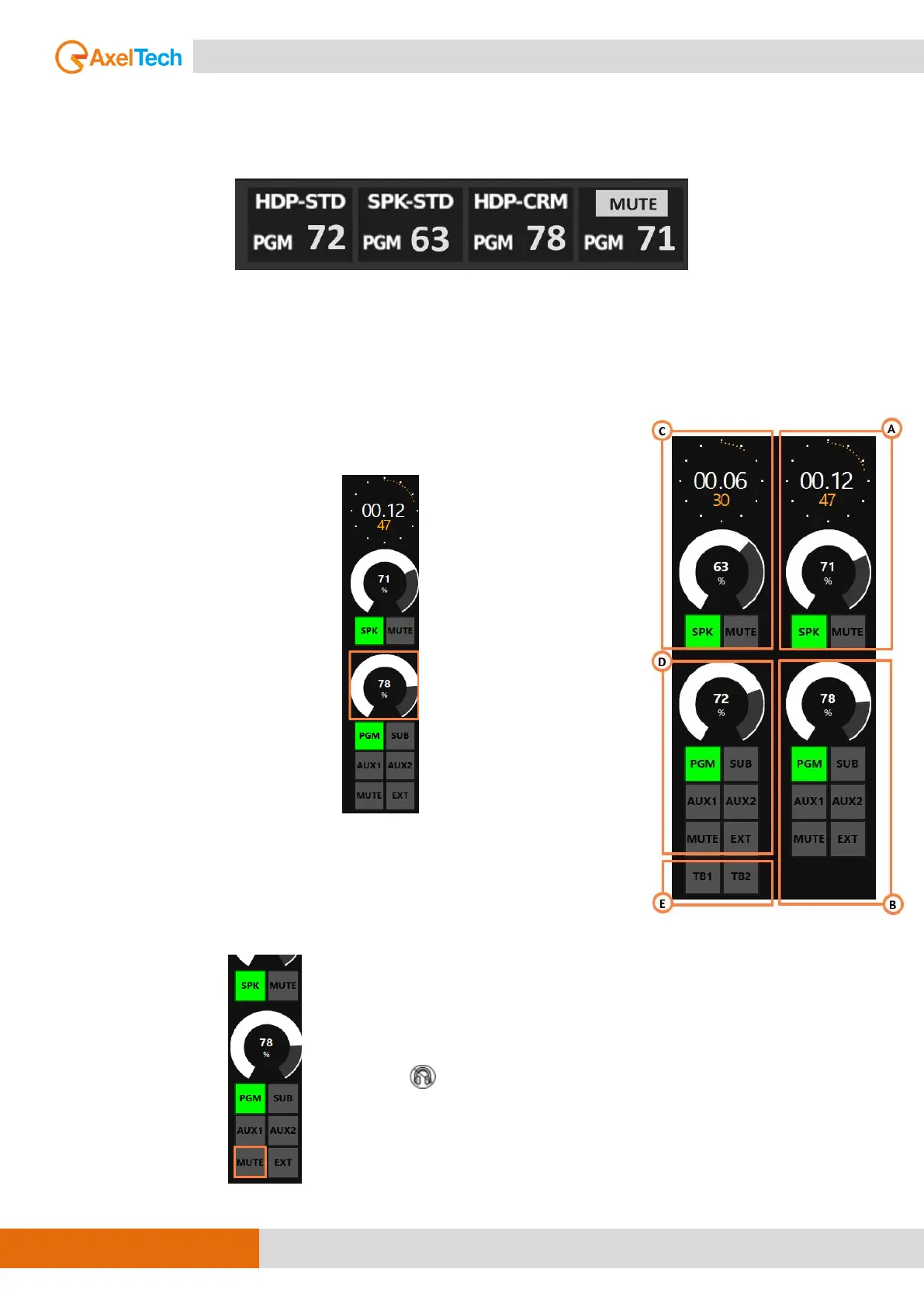
The status of MUTE-SPK-CRM is indicated by the following MUTE label on the bottom-right of the
HDMI display:
B. CONTROL ROOM HEADPHONES (HDP-CRM)
This section is used for the management of the 🎧 CONTROL ROOM
HEADPHONES.
The rotary control knobs allow you to amplify/attenuate the audio level.
The headphone audio level goes from 0 % to 99 % is the maximum
allowed level. Can set the maximum level by going to this page:
SETUP / AUDIO / OUTPUTS / MONITOR / HEADPHONE / HDP-CRM
The step of the headphone adjustment is 1 dB and the level goes from
-80 dB to the maximum of +19 dB.
By pressing on you can mute or play the HDP-CRM if it is already muted.


 To Next Page