AXIS M3114-VE Network Camera
Detectors
Set up motion detection
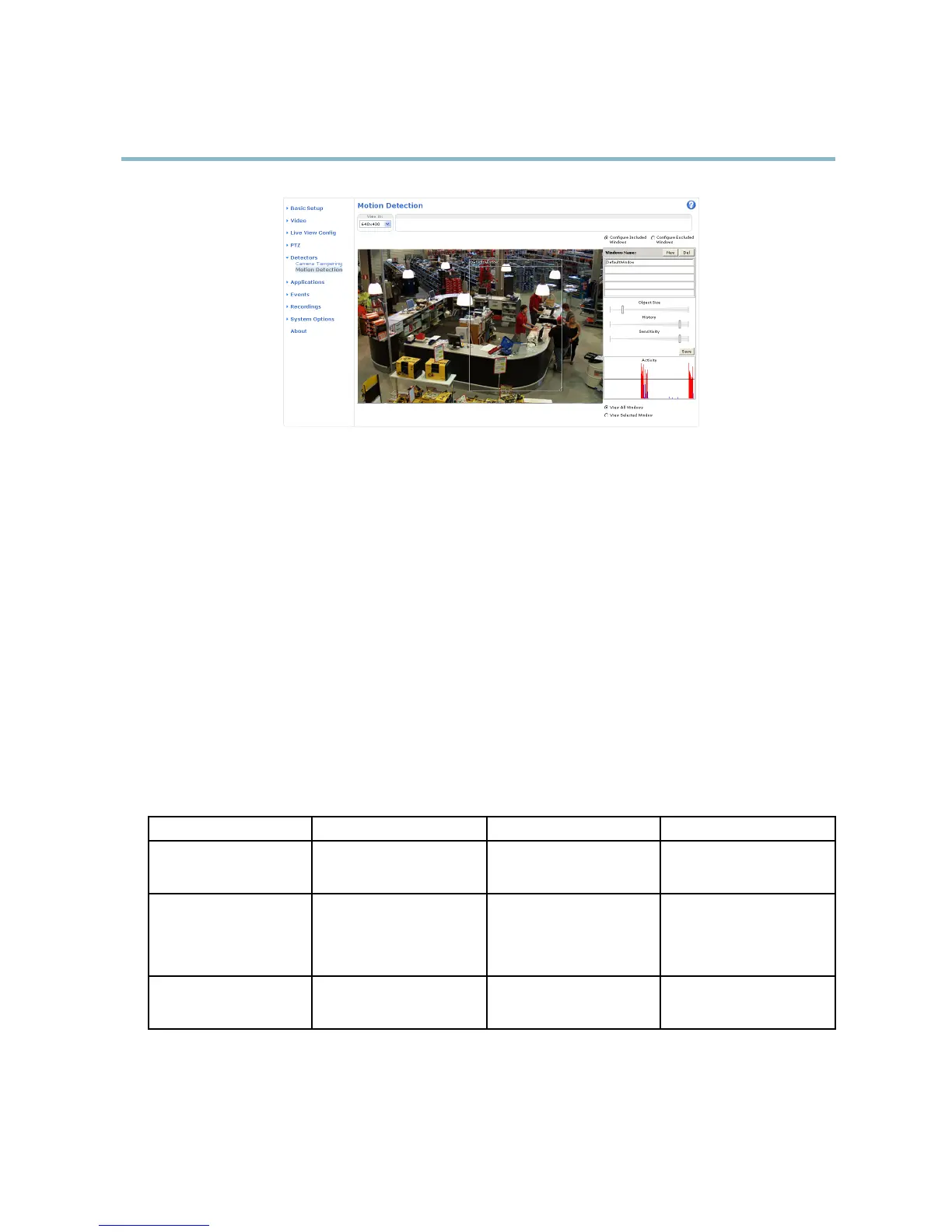
To set up a motion detecti on Include W indow , follow these instructions :
1. Go to Detectors > Motion Detection.
2. Select the Configure Included Windows option and cl ick New. Select the new window in the list of windows and enter
adescriptivename.
3. Adjust the size (drag the bottom right-hand corner) and the position (click on the text at the top and drag to the desired
position) of the a ctive window (window w ith red frame).
4. Adjust the Object Size, History and Sensitivity profile sliders (see Motion detection parameters for details). Any detected
motion within an active window is indicated by red peaks in the Activity window.
5. Click Save.
To exclude parts of the include window, select the Configure Excluded Windows and position the exclude window within the
include window.
To delete an include or exclude window, select the window in the list of windows and click Del.
Motion detection parameters
The parameters controlling motion detection
are described in the table below:
Parameter
Object Size
History
Sensitivity
Description
Object size relative to window
size.
Object memory length.
Difference in luminance
between background and
object.
High level (100%)
Only very large objects trigger
motion detection.
An object that appears
in
the window triggers motion
detection for a long time
before it is consi
dered as
non-moving.
Ordinary colored objects on
ordinary backgrounds trigger
motion detection.
Medium level (50%)
A large difference in luminance
is required to trigger motion
detection.
23



 To Next Page