AXISQ8752-EBispectralPTZCamera
10.Placethetransparentbaseunitcoveronthebaseunitandtthecablegasketsinside
theholes.
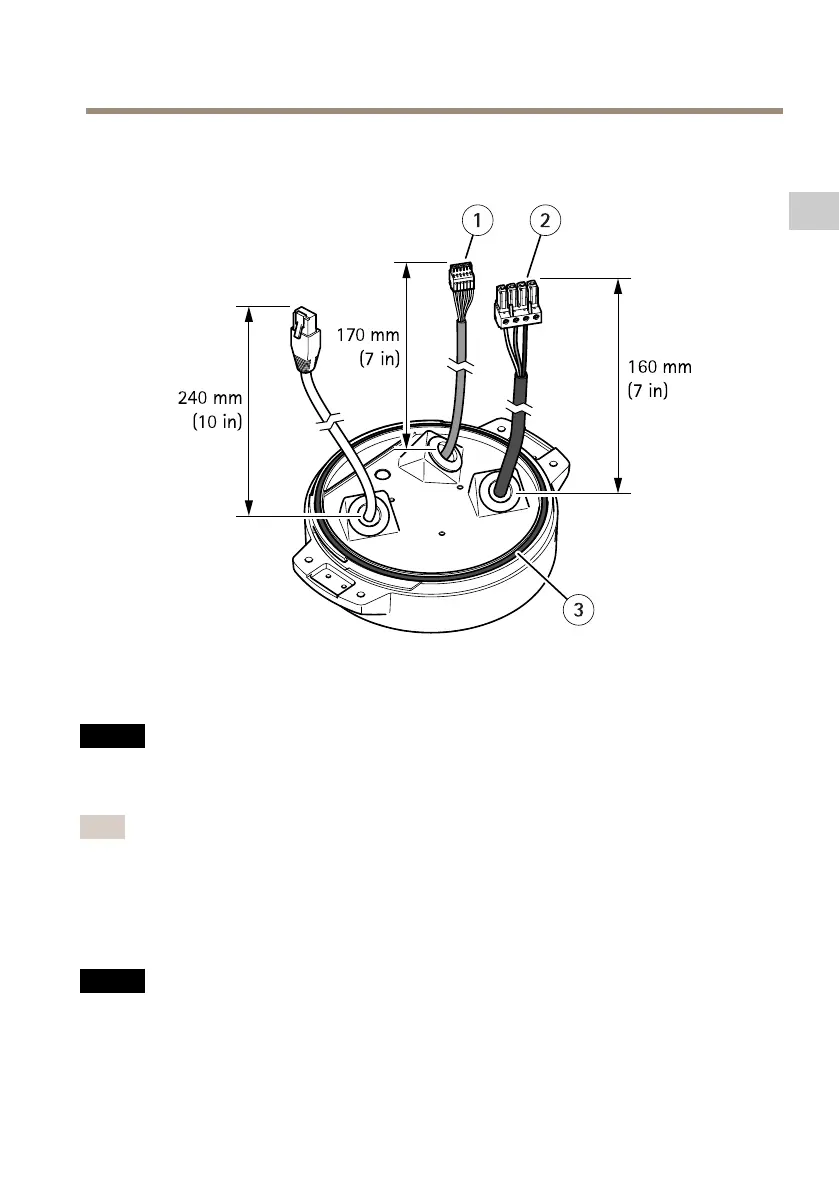
1
I/Oconnector
2
Powerconnector
3
O-ring
NO NO
NO
TICE TICE
TICE
Tonotaccidentallydisconnecttheunitfrompowerifthecableispulled,lettheprotective
groundingwirebeabout10mm(0.4in)longerthantheothertwowires(inthepower
cable).
Note
Tomaketheinstallationaseasyaspossible,werecommendyoutostripapproximately90
mm(3.5in)ofthepowercablejacketand70mm(2.8in)oftheI/Ocablejacket.
11.InstallthepowerandI/Oconnectors.
12.Adjustthenetwork,I/Oandpowercablessothatthedistancefromthecablegasketto
theendoftheconnectoris240mm(10in),170mm(7in),and160mm(7in)respectively.
NO NO
NO
TICE TICE
TICE
MakesurethattheO-ringisttedcorrectlyaroundthetransparentbaseunitcover.
15
EN



 To Next Page