AXISQ8752-EBispectralPTZCamera
Installthenetworklink
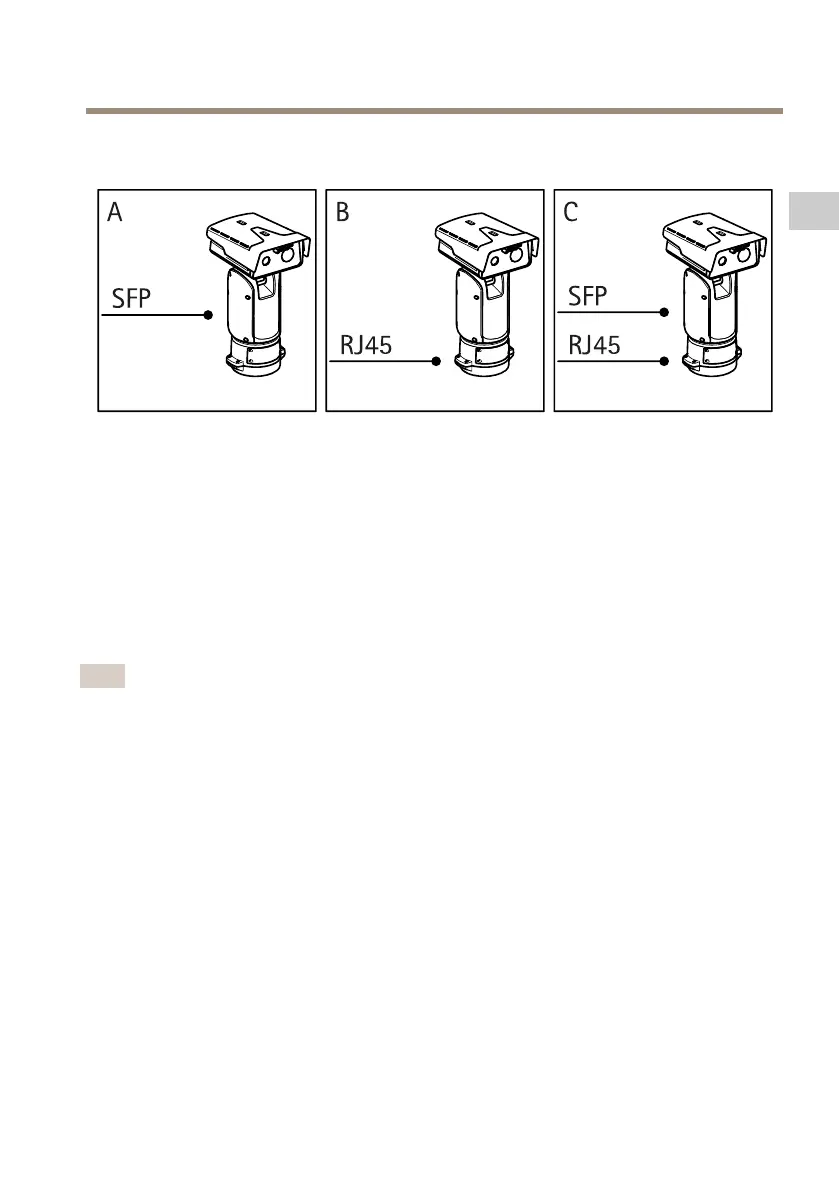
Youcanchoosebetweendifferentoptionswhenyouinstallthenetworklink:
•A:viaanopticalberorRJ45cableconnectedtotheSFPmodule(witharespective
connector)intheSFPslot.
•B:viaanRJ45cableconnectedtothexedRJ45connector.
•C:viabothoftheabove,inwhichcasetheSFPmoduleconnectionfunctionsasthe
primarynetworklink,andthexedRJ45connectionfunctionsasthefail-overlink.
Formoreinformationonnetworkconnectorlocations,seeProductoverviewonpage8.
Note
•SFPmoduleisnotincluded.FormoreinformationonavailableSFPmodules,seeaxis.com
•IfyouinstallanetworklinkonlyviatheopticalbercableusingtherespectiveSFP
module,itworksasastand-alonesolutionforlongrangecablinginstallations.
17
EN



 To Next Page