10
BF-UM-C-DP C080.CB-EN April 2024
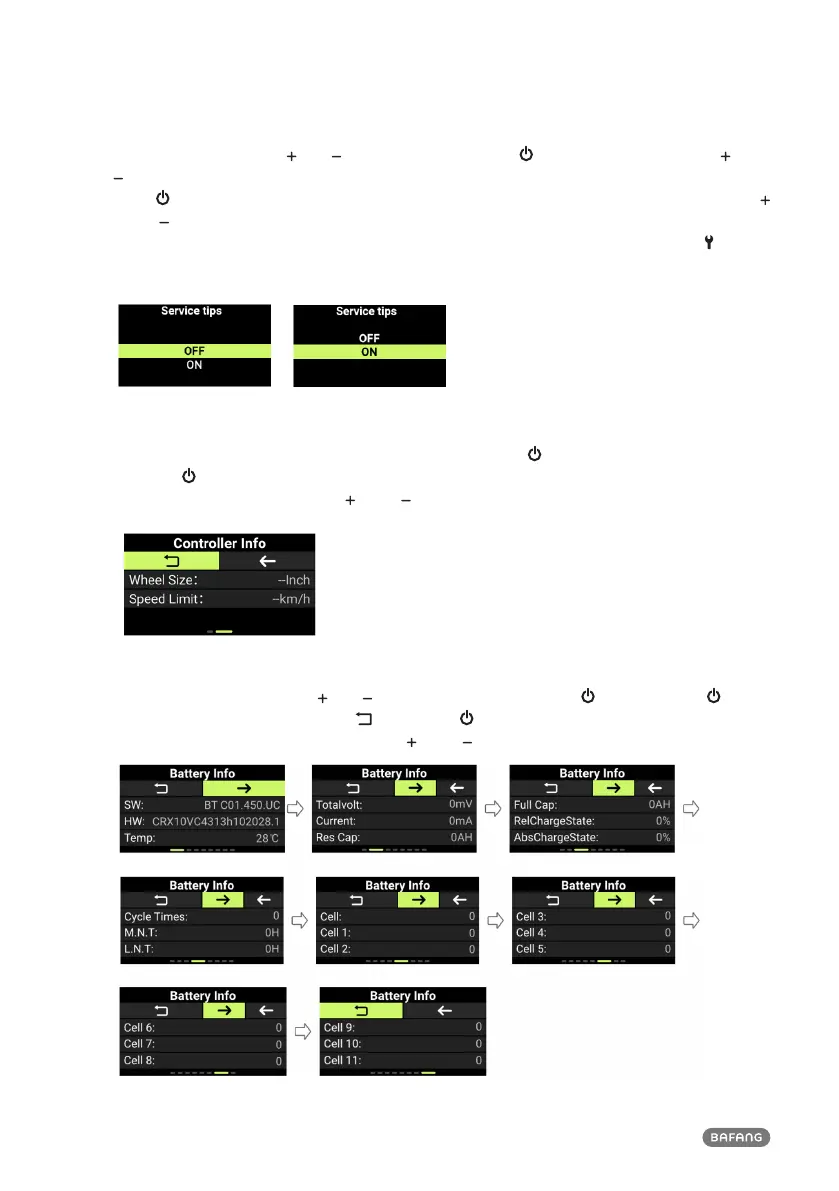
7.7.6 Maintenance Prompt
Enter the "Setting", press " " or " " to select "Service". Press " " to enter the setting, press " " or "
" to select "OFF"/"ON" ("OFF" means to turn off the function; "ON" means to turn on the function).
Press " " to save and return to "Service". To save and return to the main interface, press and hold "
" and " " simultaneously, or press "BACK" → "EXIT". (Note: The maintenance prompt function is
turned off by default. When it is turned on and the ODO of the e-bike exceeds 5,000 km, " " will
appear on the HMI.)
7.7.7 View the Wheel Size & Speed Limit
Enter the "Information", select "Controller Info", and press the " " to enter. Select the "→" icon, and
press the " " to enter to view the "Wheel Size" and "Speed Limit" information. To save and return to
the main interface, press and hold " " and " " simultaneously, or press "BACK" → "EXIT".
7.7.8 View the Battery Info
Enter the "Information", press " " or " " to select "Battery Info". Press " " to enter. Press " " to
view the battery information. Select " ", and press " " to return to "Battery Info". To save and
return to the main interface, press and hold " " and " " simultaneously, or press "BACK" → "EXIT".












 To Next Page