6
BF-UM-C-DP C080.CB-EN April 2024
7.6.3 View the Data
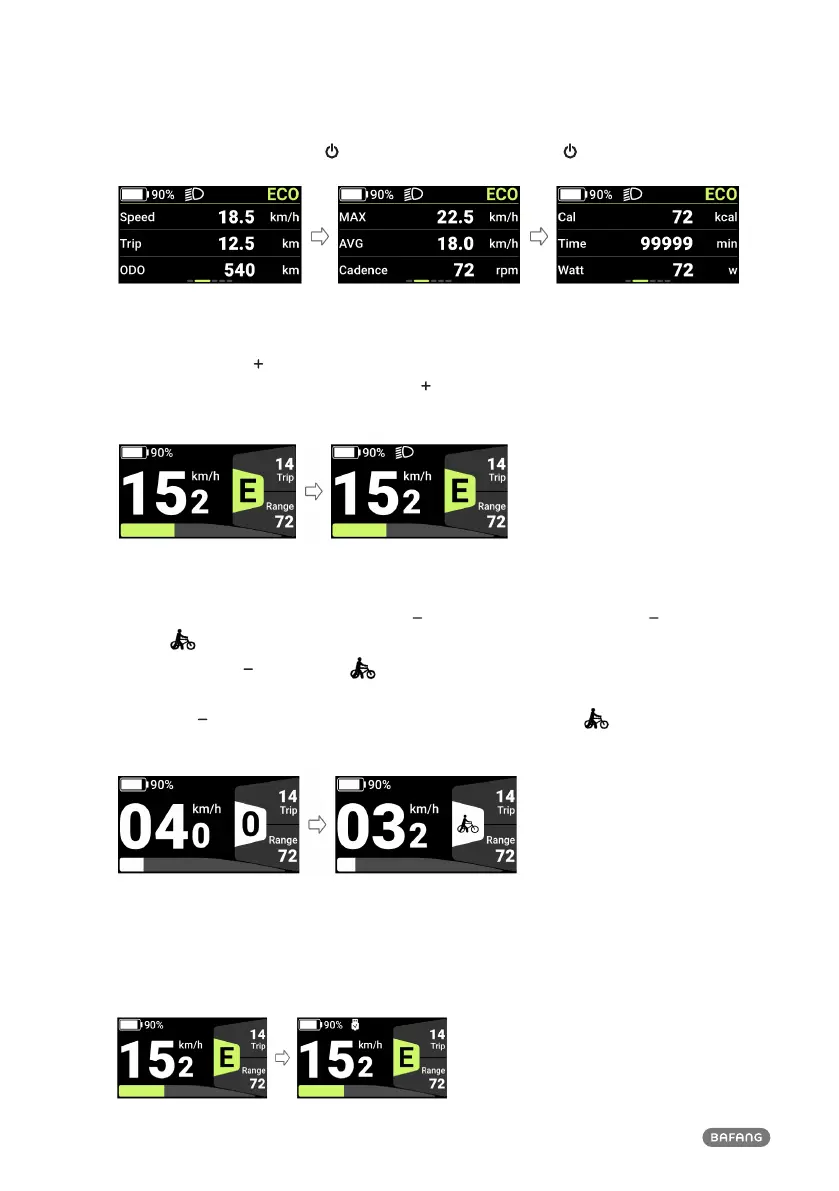
In the main interface, press the " " to enter the interface. Press the " " to switch data displays.
7.6.4 Adjust the Headlight/backlight
Press and hold (≥2s) " " to turn on the headlight, the backlight luminance of the HMI will decrease,
and the light icon appears. Press and hold the " " again to turn off the headlight, the HMI backlight
luminance will increase, and the light icon will disappear.
7.6.5 Walk Assistance
When the system not in operation, press the " " to shift to 0, and then press the " " again, and the
symbol " " will appear and be normally on.
Press and hold the " ", the symbol " " will flash (frequency 500ms), and the e-bike will go into
walk assistance mode (If no speed signal is detected, the HMI will display a speed of 2.5 km/h).
Release the " " to exit from the walk assistance mode, and the symbol " " will stop flashing and
be will normally on. If no operation within 5s, the mode will be automatically switched to 0.
7.6.6 Type-C Charge
To charge the HMI, connect the Type-C cable with the HMI. If the HMI is OFF, connect the Type-C
cable with the HMI and power ON the HMI. Maximum charging voltage is 5V; maximum charging
current is 500 mA.












 To Next Page