9
BF-UM-C-DP C080.CB-EN April 2024
USER MANUAL FOR DISPLAY
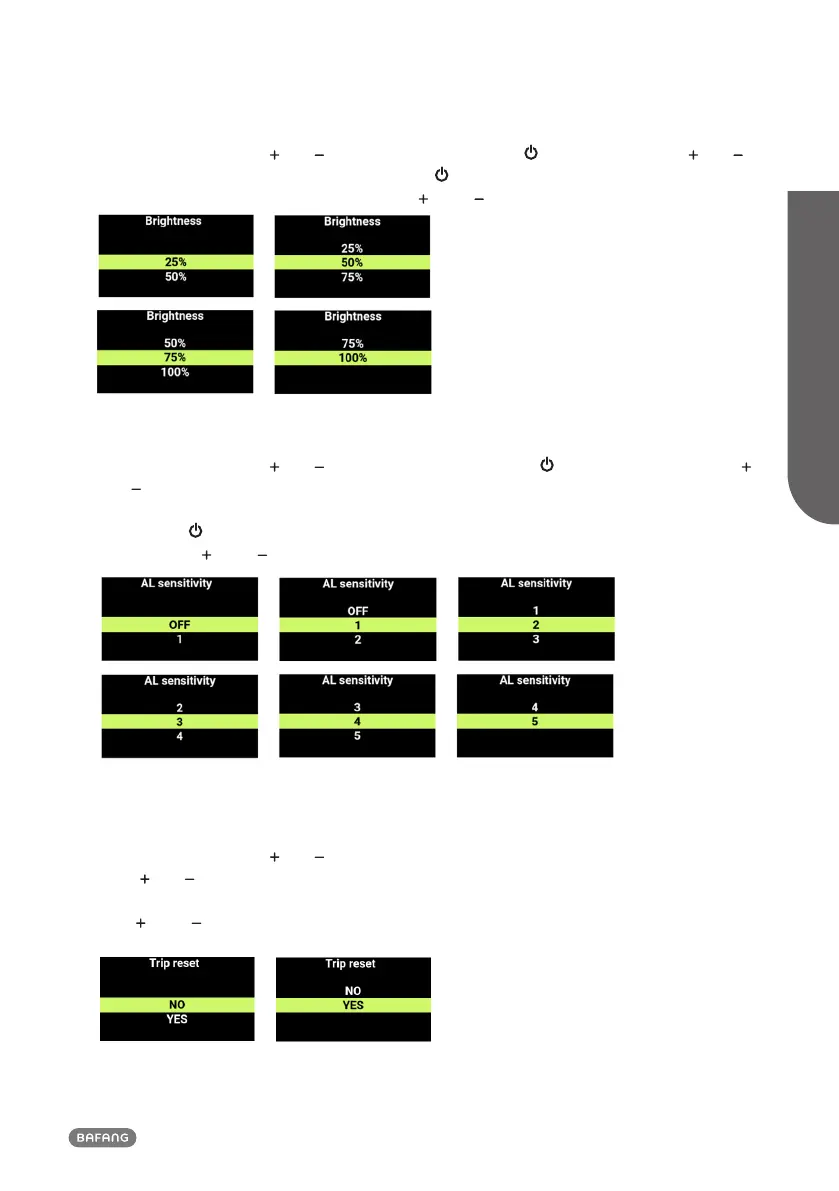
7.7.3 Set the Backlight
Enter the "Setting", press " " or " " to select "Brightness". Press " " to enter the setting, " " or " "
to select “100%”/“75%”/“50%”/“25%”, and press " " to save and return to "Brightness". To save
and return to the main interface, press and hold " " and " " simultaneously, or press "BACK"
→"EXIT".
7.7.4 Set the Light Sensitivity
Enter the "Setting", press " " or " " to select "AL sensitivity". Press " " to enter the setting, press "
" or " " to adjust the light sensitivity, "OFF"/“1”/“2”/“3”/“4”/“5”. "OFF" means to turn off the
function. The numbers 1 through 5 correspond to different levels of light sensitivity, from weak to
strong. Press " " to save and return to "AL sensitivity". To save and return to the main interface,
press and hold " " and " " simultaneously, or press "BACK" → "EXIT".
7.7.5 Reset the Trip
Enter the "Setting", press " " or " " to select "Trip reset". Press "Power button" to enter the setting,
press " " or " " to select "NO"/"YES" ("YES" means to clear, "NO" means not to clear), and press the
power button to save and return to "Trip reset". To save and return to the main interface, press and
hold " " and " " simultaneously, or press "BACK" → "EXIT".












 To Next Page