11
BF-UM-C-DP C080.CB-EN April 2024
USER MANUAL FOR DISPLAY
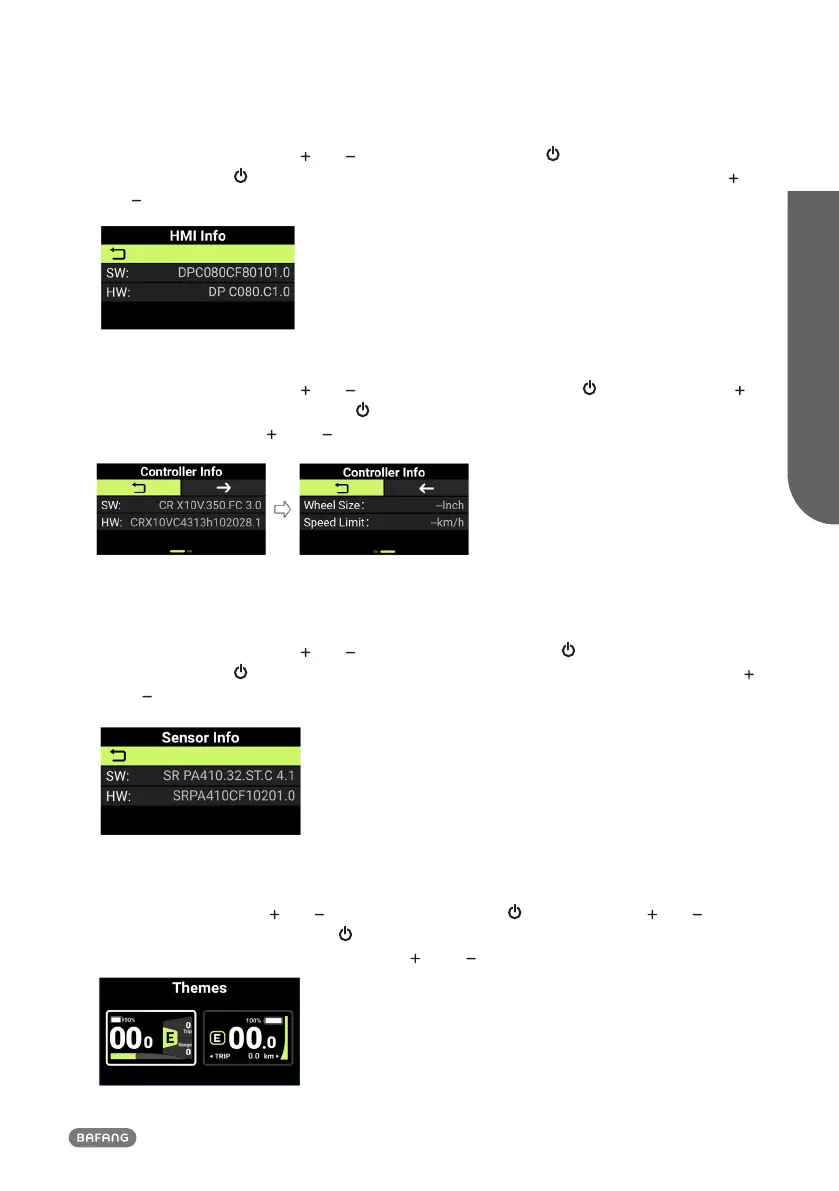
7.7.9 View the HMI Info
Enter the "Information", press " " or " " to select "HMI Info". Press " " to enter. The sequence is
"SW: → HW:". Press " " to return to "HMI Info". To return to the main interface, press and hold " "
and " " simultaneously, or press "BACK" → "EXIT".
7.7.10 View the Controller Info
Enter the "Information", press " " or " " to select "Controller Info". Press " " to enter and press "
". The sequence is "SW: → HW:". Press " " to return to "Controller Info". To return to the main
interface, press and hold " " and " " simultaneously, or press "BACK" → "EXIT".
7.7.11 View the Sensor Info
Enter the "Information", press " " or " " to select "Sensor Info". Press " " to enter. The sequence is
"SW: → HW:". Press " " to return to "Sensor Info". To return to the main interface, press and hold "
" and " " simultaneously, or press "BACK" → "EXIT".
7.7.12 Set the UI Theme
Enter the "Setting", press " " or " " to select "Themes". Press " " to enter it. Press " " or " " to
select the UI theme you want. Press " " to save and the HMI will be reset and restarted. If you do
not want to change the theme, press and hold " " and " " simultaneously to exit to the main
interface.












 To Next Page