8
BF-UM-C-DP C080.CB-EN April 2024
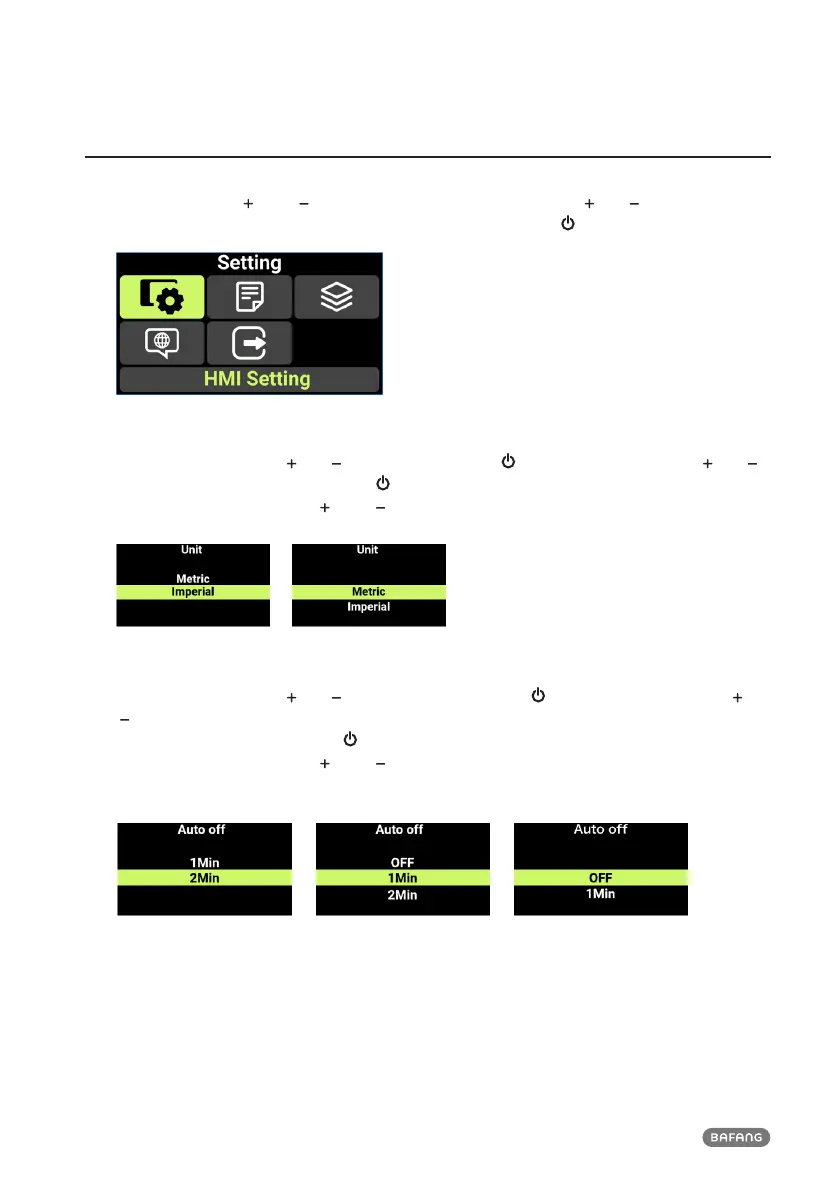
7.7 SETTINGS
Press and hold the " " and " " simultaneously to enter "Setting". Press " " or " " to select "HMI
Setting", "Information", "Themes", "Language" or "EXIT," and press " " to enter.
7.7.1 "Imperial" / "Metric"
Enter the "Setting", press " " or " " to select "Unit". Press " " to enter the setting, press " " or " "
to select "Metric"/"Imperial", and press " " to save and return to "Unit." To save and return to the
main interface, press and hold " " and " " simultaneously, or press "BACK" → "EXIT".
7.7.2 Set the Automatic Shutdown Time
Enter the "Setting", press " " or " " to select "Auto Off". Press " " to enter the setting, press " " or
" " to select "OFF" / “1 Min” / “2 Min” / “3 Min” / “4 Min” / “5 Min” / “6 Min” / “7 Min” / “8 Min” /
“9 Min” / "10 Min", and press the " " to save and return to "Auto Off". To save and return to the
main interface, press and hold " " and " " simultaneously, or press "BACK" → "EXIT". "OFF" means
to cancel the automatic shutdown function.












 To Next Page