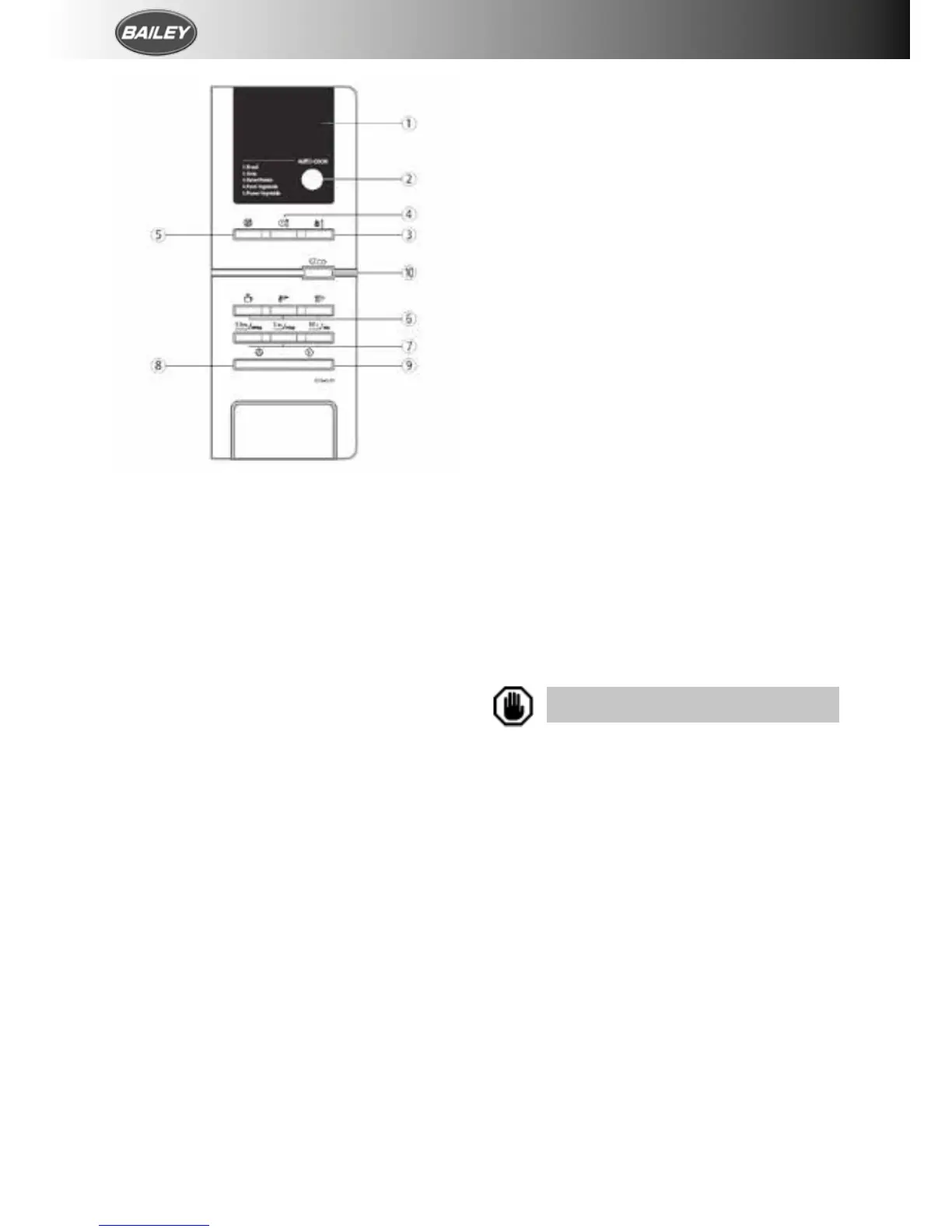
MICROWAVE OVEN
1. DISPLAY - Cooking time, power level are
displayed.
2. AUTO COOK - Used to cook or reheat many
favourite foods.
3. WEIGHT DEFROST - Used to defrost foods by
weight.
4. TIME DEFROST - Used to defrost foods by
time.
5. POWER - Used to set power level.
6. ONE TOUCH COOK - Used to cook or reheat
specific quantities of food.
7. TIME SET BUTTON - Used to set the cooking
time and weight.
8. STOP/CLEAR - Used to stop the oven
operation or to delete the cooking data.
9. START/+30 SEC - Used to start the oven and
also used to set a reheat time.
10. ECO - Used to turn the AC power on the
oven.
1. Plug power supply cord into 230V AC 50Hz
power outlet.
2. Press eco button until beep sounds and
display is turned on.
3. After placing the food in a suitable
container, open the oven door and put it on the
glass tray. The glass tray and roller guide
must always be in place during cooking.
4.Close the door. Make sure that it is firmly
closed.
5. The oven door can be opened at any time
during operation by pushing the door open
button. The oven will automatically shut off.
To restart the oven, close the door and then
push the START button.
6. The oven automatically cooks on full power
unless set to a lower power level.
7. The display will show “ : 0” when the oven is
plugged in, press and hold Eco button until
display is turned on and beep sounds.
8. Display will be returned to the “ : 0 “ when
the cooking time ends.
9. When the STOP/CLEAR button is pushed
during the oven operation, the oven stops
cooking and all information retained. To erase
all information, push the STOP/CLEAR button
once more.
If the oven door is opened during the oven
operation, all information is retained.
If the START button is pushed and the oven
does not operate, check the area between the
door and door seal for obstructions and make
sure the door is closed securely. The oven will
not start cooking until the door is completely
closed or the program has been reset.
Display turns off after 10 minutes.
The power level is set by pressing the
power button.
If you touch the power button once, the
power level will be at 100%, if you press it
twice the power will reduce by 20% and each
subsequent time it is pressed the power will
reduce by 20%. If it is pressed 12 times the
power will go back up to full again.
When the oven is first plugged in the display
will be blank.
1. Press and hold ECO button until display is
turned on and beep sounds. The oven is turned
AC power on.
2. Press and hold STOP/CLEAR button until
display is turned off. The oven is turned off and
will use no power.






 To Next Page