This quick start guide allows end users to
confidently use the core features of their
Alde control panel. See the operating and
installation instructions for the Alde control
panel for more details.
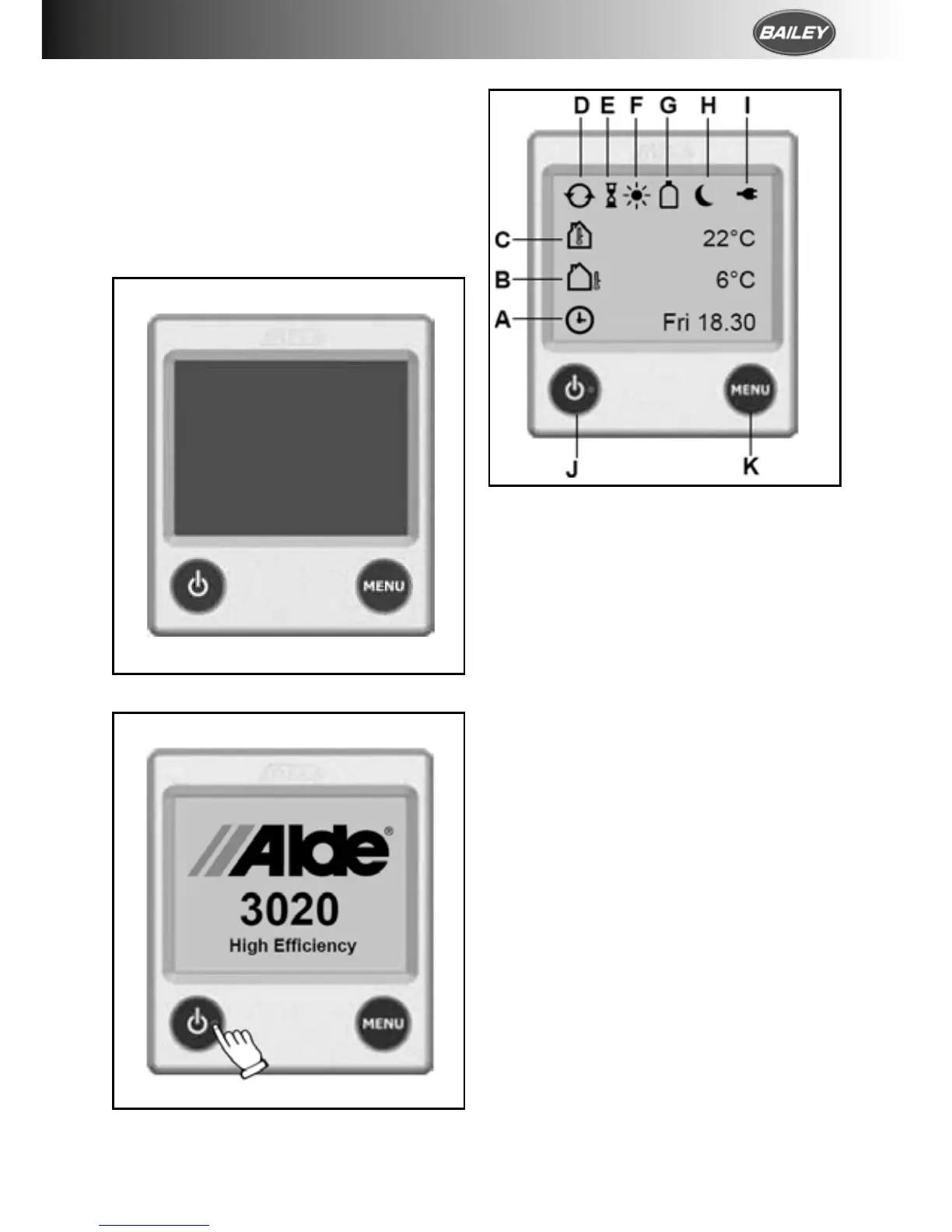
Both the control panel and boiler are off.
To start the system, press the Power button on
the control panel.
The Standby Screen is displayed after the
Splash Screen. This screen contains useful
information about the status of your heating
system.
NB: If Standby Screen is set to “Dark” in
Backlight settings the Standby Screen will not
be displayed. The screen will stay dark unless
touched.
A. Clock is enabled.
Day of the week and time shown.
B. Outdoor temperature
Optional outdoor temperature
sensor required.
C. Room temperature
Measured at the control panel.
[Optional discrete room temperature
sensors available.]
D. Central heating circulation pump is
active.
E. Delayed Start/Cycle is enabled.
F. Day Mode active.
G. Gas Cylinder Status
Full/empty and active EisEx shown.
[Additional accessories required.]
H. Night Mode active.
I. 230 V supply.
J. Power button.
K. Menu button.






 To Next Page