b&d doors ofce locations
Head Ofce 6-8 Fiveways Blvd, Keysborough 3073 Phone (03) 9791 2000
New South Wales 34 Marigold St, Revesby 2212 Phone (02) 9722 5555
Queensland 17 Oasis Court, Clontarf 4019 Phone (07) 3883 0200
Victoria 147-153 Canterbury Rd, Kilsyth 3137 Phone (03) 9237 7766
South Australia 23 Frederick Rd, Royal Park 5014 Phone (08) 8440 4747
Western Australia 96 Mulgul Rd, Malaga 6090 Phone (08) 9247 8777
International/Export 34 Marigold St, Revesby 2212 Phone +61 (0)2 9722 5555
www.bnd.com.au
Prefixed trademarks are the property of B&D Australia Pty Ltd. B&D Doors & Openers
is a division of B&D Australia Pty Ltd. ABN 25 010 473 971. © 2018 B&D Australia Pty Ltd.
29
your representative is
Smart Pro, Smart & Secure installation instructions
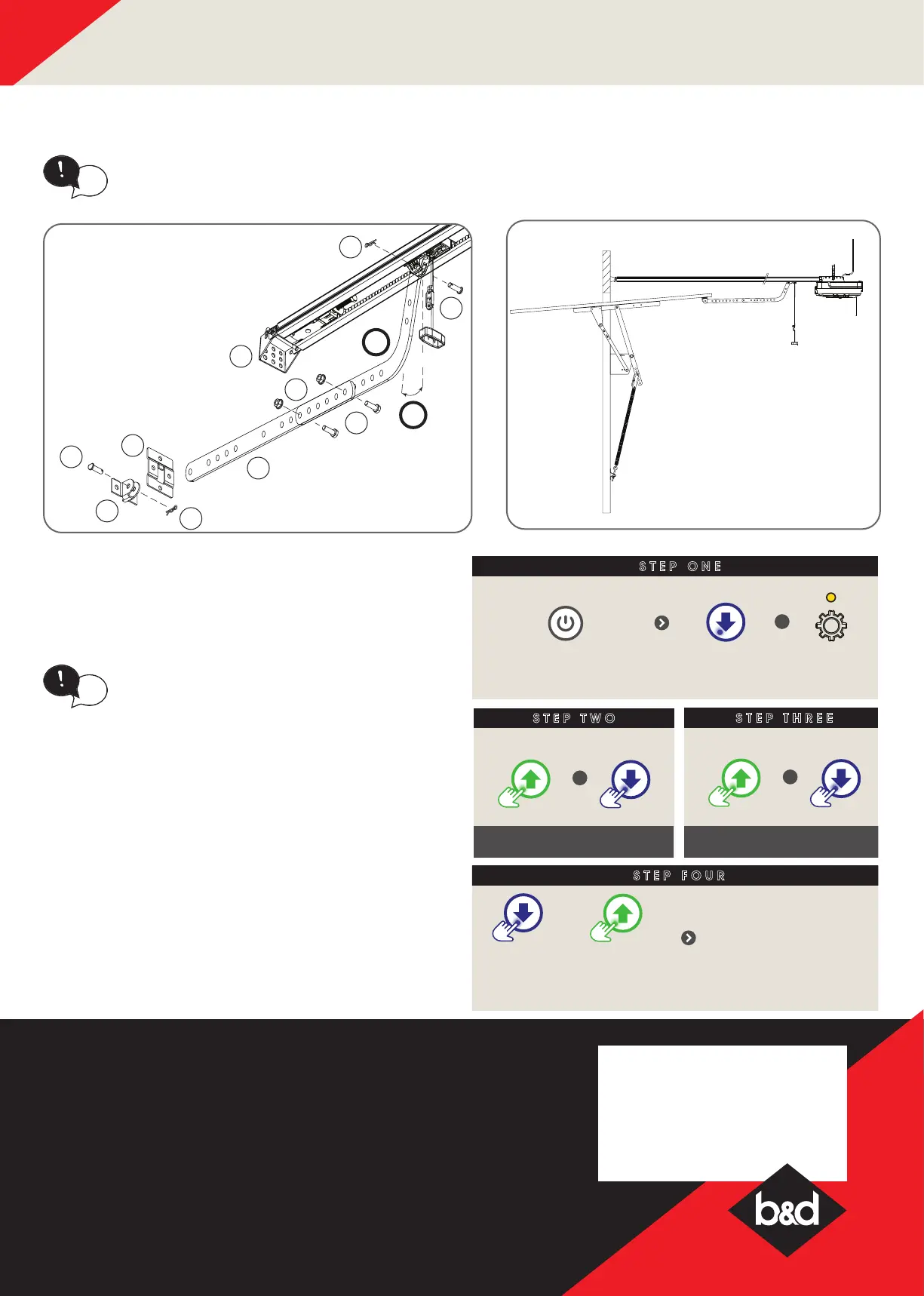
G - Setting up Tilt Door
Prior to limit set up, the opener can be set to J-Type Tilt
Prole. This process allows the opener to pre-set to J-Type
settings where the limit is not greater than 1500mm.
In JTYPE Mode the drive speed is reduced
and cannot be adjusted.
tip
STEP ONE
STEP TWO
To activate JTYPE Mode
+
Press together and opener
will beep TWICE
To return to Standard Mode
+
Press together and opener
will beep ONCE
STEP THREE
Switch power on
+
BLUE LED will ash
& gear LED lit
STEP FOUR
To move the door to the
halfway point.
OR
Proceed to Setting
Close Limit position.
If installing on a door with a bad wave action,
lengthening the arm will assist in reducing this
effect.
tip
2
A
7d
7c
7f
7i
7b
7i
7f
7e
7g
7j




 To Previous Page