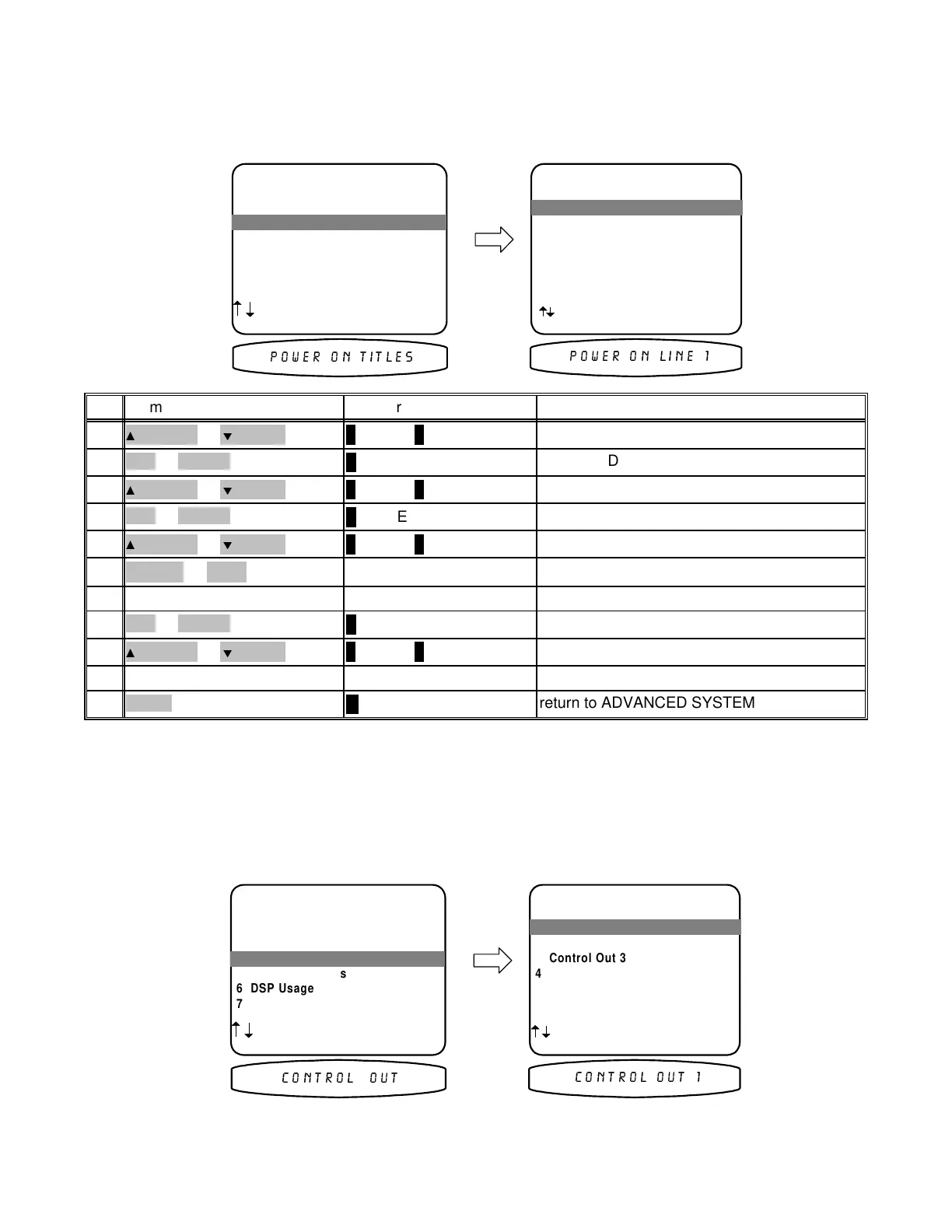
Power On Titles
When you turn your processor on it displays two lines of text. You can change this text to a personalized message.
Make sure you are in the ADVANCED SYSTEM SETUP menu and the remote is in B&K mode.
ADVANCED SYSTEM SETUP
1 Zone 1 Setu
'A'
2 Zone 2 Setu
'B'
3 Power On Titles
4 Control Out
5 Securit
O
tions
6 DSP Usa
e
7 RS-232 Control Port
next item SEL select
MENU setu
s
stem
3 Power On Titles
POWER ON TITLES
1 Power On Line 1
' BK Com
onents '
2 Power On Line 2
' * Di
ital DNA '
next item SEL edit
MENU advanced setu
1 Power On Line 1
32:(5 21 7,7/(6
32:(5 21 /,1(
return to ADVANCED SYSTEM SETUP
∠ MENU
MENU11
edit Line 2repeat 4 - 8
repeat 4 - 810
move to Power On Line 2
∧ (UP) or ∨ (DOWN)
(PAUSE) or
(STOP)
9
finish editing line 1
↵ (ENTER)
SEL or ENTER8
continue changing charactersrepeat 5 - 6
repeat 5 - 67
move to new characterVOLUME KNOB
(REW) or
(FF)
6
change blinking character
∧ (UP) or ∨ (DOWN)
(PAUSE) or
(STOP)
5
activate Line 1
↵ (ENTER)
SEL or ENTER4
move to Power On Line 1
∧ (UP) or ∨ (DOWN)
(PAUSE) or
(STOP)
3
activate ADVANCED POWER ON TITLES
↵ (ENTER)
SEL or ENTER2
move to Power On Titles
∧ (UP) or ∨ (DOWN)
(PAUSE) or
(STOP)
1
ActionFrom Front PanelFrom Remote
Control Outputs
Your processor’s control outputs allow you to control up to 4 external devices such as power amplifiers, projection
screens, etc. Each control output can be programmed on (a source of 12VDC @ 50 mA) or off (0 VDC) depending
on which source is selected. They may also be set to headphone listening, remote repeater or RS-232 (see
BKC-DIP documentation). Make sure you are in the ADVANCED SYSTEM SETUP menu and the remote is in
B&K mode.
ADVANCED SYSTEM SETUP
1 Zone 1 Setu
'A'
2 Zone 2 Setu
'B'
3 Power On Titles
4 Control Out
5 Securit
O
tions
6 DSP Usa
e
7 RS-232 Control Port
next item SEL select
MENU setu
s
stem
4 Control Out
CONTROL OUT SETUP
1 Control Out 1
2 Control Out 2
3 Control Out 3
4 Control Out 4
next item SEL select
MENU advanced setu
1 Control Out 1
&21752/ 287
&21752/ 287
68
p/n 12857 Rev. 0717A


 To Next Page