aAOFENE
www.baofengradio.us
http://www.baofengradio.us
www.foscam.us
Menu Definitions
Previously Programmed Target Channel: The TX frequency of the target channel is set
to the [A] VFO frequency. The settings of the following menus are also saved into the
target channel. Uses for this can be to update a newly created 'simplex' channel into a
'repeater' channel or a 'cross-band' channel. Another use would be to add, change or
remove a TX DCS code or TX CTCSS tone.
Menu 12 - T-DCS: Digital Coded Squelch (DCS) - Transmit/Encode
Menu 13 - T-CTCS: Continuous Tone Coded Squelch System (CTCSS) - Transmit/Encode
Note: When the TX frequency differs from RX frequency, a '+-' is indicated in the status
display.
Note: TDR should be set to OFF when manually programming.
Note: It is recommended to check above menu settings to ensure no modifications from
previous programming are left over.
Menu Item Shortcut
Description
DEL-CH 28
DELete/Erase Memory—Channel: This menu is used to erase
the programmed information from the specified channel (000
through 127) so that it can either be programmed again or be
left empty.
Availability: Global
Settings/Notes
000- 127 Default: 000
Menu Item Shortcut
Description
WT-LED 29
Standby (WaiT) - Back Light LED Color: Display Illumination
Color
Availability: Global
Settings/Notes
OFF [0] | BLUE [1] | ORANGE [2] | PURPLE [3] Default: PURPLE
57
aAOFENE
www.baofengradio.us
http://www.baofengradio.us
www.foscam.us
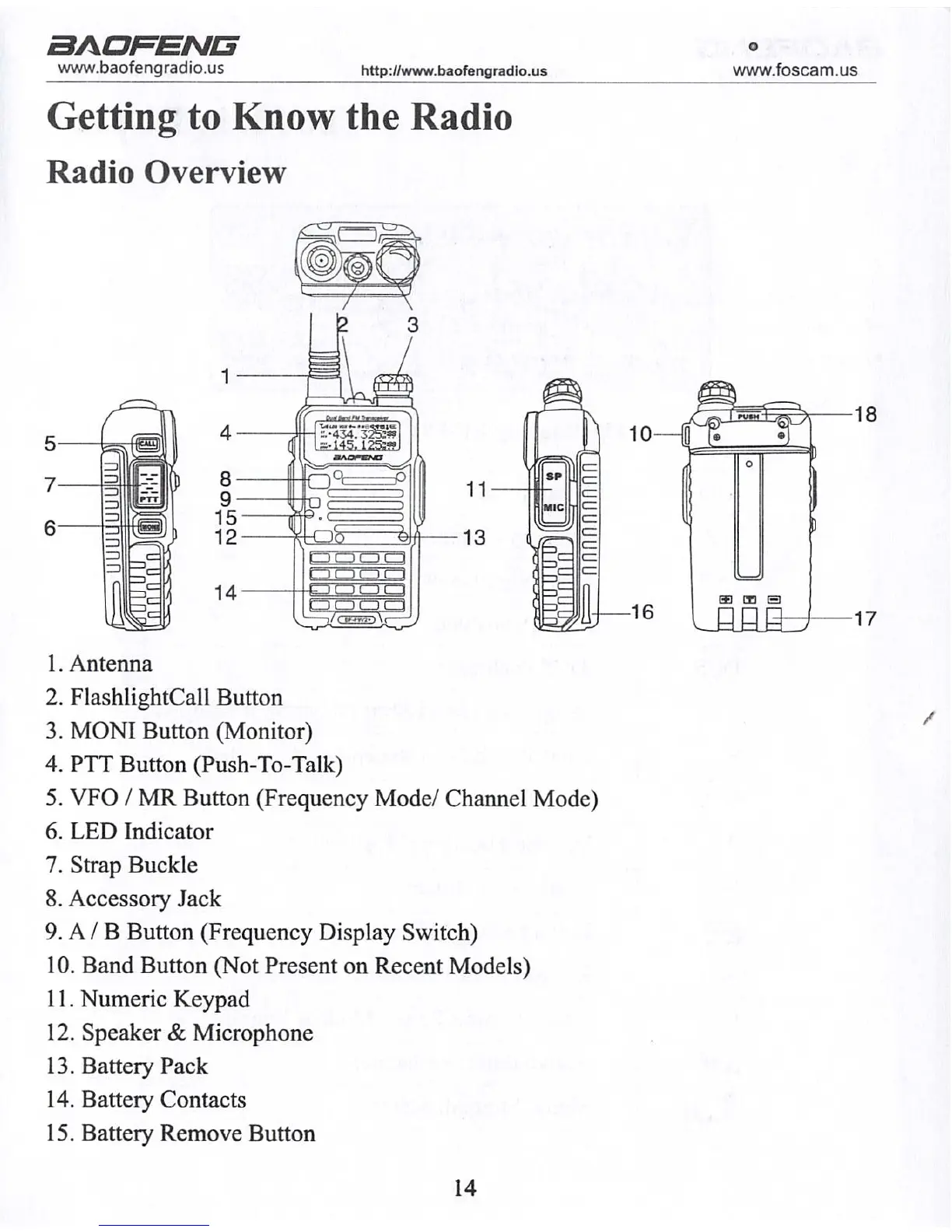
Getting to Know the Radio
Radio Overview
1. Antenna
2. FlashlightCall Button
3. MONI Button (Monitor)
4. PTT Button (Push-To-Talk)
5. VFO / MR Button (Frequency Mode/ Channel Mode)
6. LED Indicator
7. Strap Buckle
8. Accessory Jack
9. A / B Button (Frequency Display Switch)
10. Band Button (Not Present on Recent Models)
11. Numeric Keypad
12. Speaker & Microphone
13. Battery Pack
14. Battery Contacts
15. Battery Remove Button
14



 To Next Page