aAOFENE
www.baofengradio.us
http://www.baofengradio.us
www.foscam.us
Menu Definitions
Menu Item Shortcut Description
PTT-LT 20
PTT-Lagged Transmission (PTT-ID Delay in milliseconds):
Length of time after [PTT] is pressed until PTT-ID is transmitted
Availability: Global
Settings/Notes
(SSBFB290) 0-30 Default: 5
(>BFB291) 0-50 Default: 5
Note: Requires menu 19 to be enabled.
Menu Item
Shortcut
Description
MDF-A 21 Memory Display Format - [A]
Availability: Global
Settings/Notes
CH [0] | NAME [1] | FREQ [2] Default: NAME
CH: Displays the channel number.
NAME: Displays the channel name. Names must be entered using software. A channel
without an assigned name with have the channel number displayed.
FREQ: Displays programmed Frequency.
53
aAOFENO
www.baofengradio.us http://www.baofengradio.us www.foscam.us
Getting to Know the Radio
Menu and Function Buttons
The BE) button is used to access the menu and to confirm menu options.
The0:i:iilQ buttons are used to navigate through the menu items, as well as to
select channels, and to step up or down in frequency (depending on operating mode).
The ISUfl button is used to exit menus and cancel menu options.
Accessory Jack
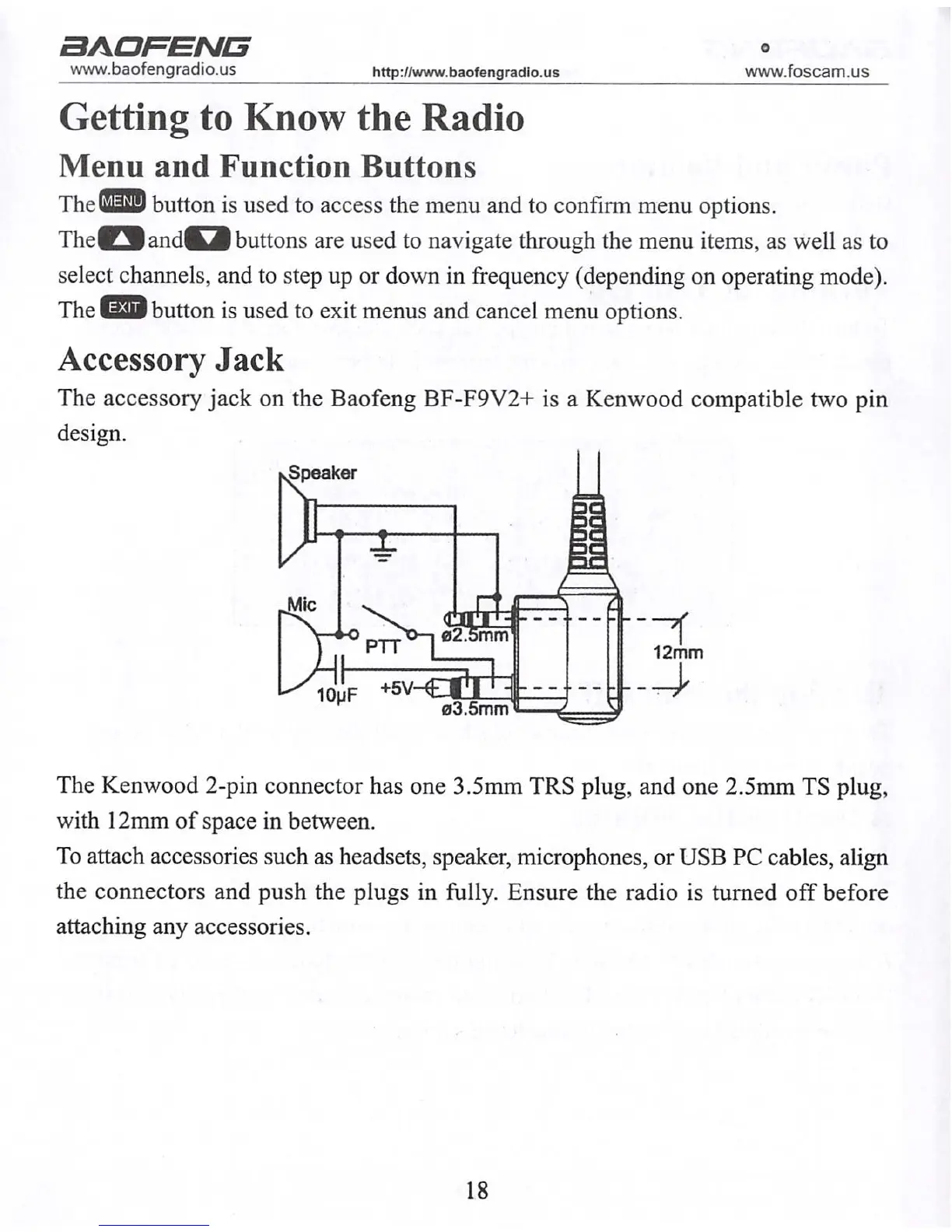
The accessory jack on the Baofeng BF-F9V2+ is a Kenwood compatible two pin
design.
The Kenwood 2-pin connector has one 3.5mm TRS plug, and one 2.5mm TS plug,
with 12mm of space in between.
To attach accessories such as headsets, speaker, microphones, or USB PC cables, align
the connectors and push the plugs in fully. Ensure the radio is turned off before
attaching any accessories.
18



 To Next Page