3AOFENE
www.baofengradio.us http://www.baofengradio.us www.foscam.us
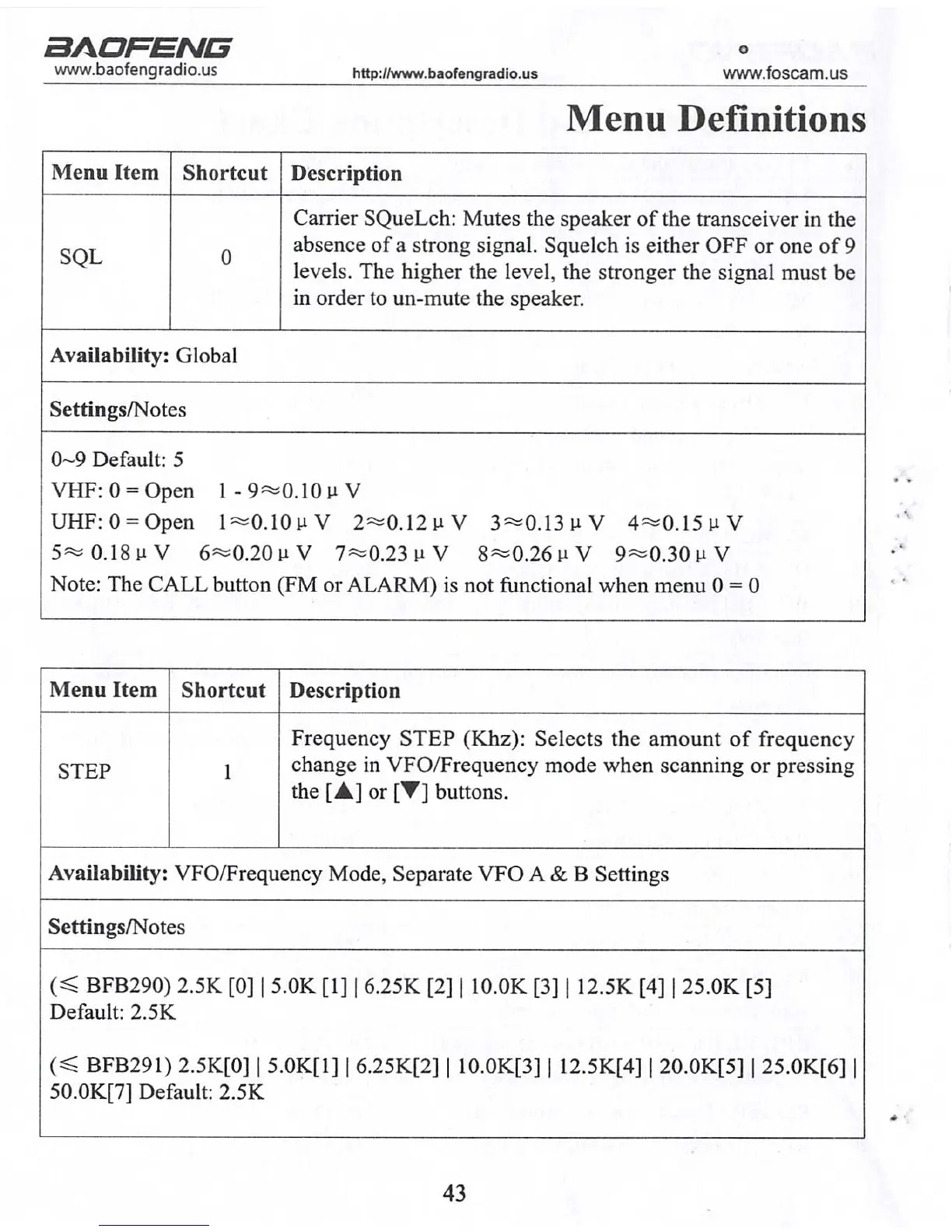
Menu Definitions
Menu Item Shortcut
Description
SQL
Carrier SQueLch: Mutes the speaker of the transceiver in the
absence of a strong signal. Squelch is either OFF or one of 9
levels. The higher the level, the stronger the signal must be
in order to un-mute the speaker.
Availability: Global
Settings/Notes
0-9 Default: 5
VHF: 0 = Open l-9==0.10uV
UHF:0 = Open l=0.10uV 2=0.12uV 3=»0.13uV 4=0.15uV
5«=0.18uV 6«=0.20uV 7«<0.23 u V 8«0.26uV 9«=0.30uV
Note: The CALL button (FM or ALARM) is not functional when menu 0 = 0
Menu Item
Shortcut
Description
STEP
Frequency STEP (Khz): Selects the amount of frequency
change in VFO/Frequency mode when scanning or pressing
the [A] or [▼] buttons.
Availability: VFO/Frequency Mode, Separate VFO A & B Settings
Settings/Notes
(< BFB290) 2.5K [0] | 5.0K [1] | 6.25K [2] | 10.0K [3] | 12.5K [4] | 25.0K [5]
Default: 2.5K
(« BFB291) 2.5K[0] | 5.0K[1] | 6.25K[2] | 10.0K[3] | 12.5K[4] | 20.0K[5] | 25.0K[6] |
50.0K[7] Default: 2.5K
43
aAOFENE
www.baofengradio.us http://www.baofengradio.us
www.foscam.us
Selective Calling
CTCSS
CTCSS settings are accessed from the menu with shortcuts 11 for R-CTCS and 13
for T-CTCS.
For a full list of available CTCSS codes and corresponding sub-tone frequencies, see
the CTCSS Table in the Technical Specifications section near the end of this manual.
Procedure: Setting up CTCSS
1. Press the [MENU] button to enter the menu.
2. Enter [1] [1] on the numeric keypad to get to Receiver CTCSS (R-CTCS).
3. Press the [MENU] button to select.
4. Enter the desired CTCSS sub-tone frequency in hertz on the numeric keypad.
5. Press the [MENU] button to confirm and save.
6. Enter [1] [3] on the numeric keypad to get to Transmitter CTCSS (T-CTCS).
7. Press the [MENU] button to select.
8. Enter the desired CTCSS sub-tone frequency in hertz on the numeric keypad.
9. Press the [MENU] button to confirm and save.
10. Press the [EXIT] button to exit the menu.
To turn CTCSS off, follow the same procedure but enter [0] for steps 4 and 8 instead
of entering a sub-tone frequency.
28



 To Next Page