aAOFENE
www.baofengradio.us
http://www.baofengradio.us
www.foscam.us
aAOFENE
www.baofengradio.us http://www.baofengradio.us
www.foscam.us
Selective Calling
DCS
DCS settings are accessed from the menu with shortcuts 10 for R-DCS and 12 for
T-DCS.
For a full list of available DCS codes and corresponding sub-tone frequencies, see
the DCS Table in the Technical Specifications section near the end of this manual.
Procedure: Setting up DCS
1. Press the [MENU] button to enter the menu.
2. Enter [1] [0] on the numeric keypad to get to Receiver DCS (R-DCS).
3. Press the [MENU] button to select.
4. Enter the desired DCS sub-tone frequency in hertz on the numeric keypad.
5. Press the [MENU] button to confirm and save.
6. Enter [1] [2] on the numeric keypad to get to Transmitter DCS (T-DCS).
7. Press the [MENU] button to select.
8. Enter the desired DCS sub-tone frequency in hertz on the numeric keypad.
9. Press the [MENU] button to confirm and save.
10. Press the [EXIT] button to exit the menu.
To turn DCS off, follow the same procedure but enter [0] for steps 4 and 8 instead
of entering a sub-tone frequency.
1750Hz Tone Burst
To send out a 1750Hz tone burst, press the [A/B] button (or [BAND] button on some
older models) while holding down the PTT button.
This feature also works even when they keypad lock is enabled on the radio.
X
X
X
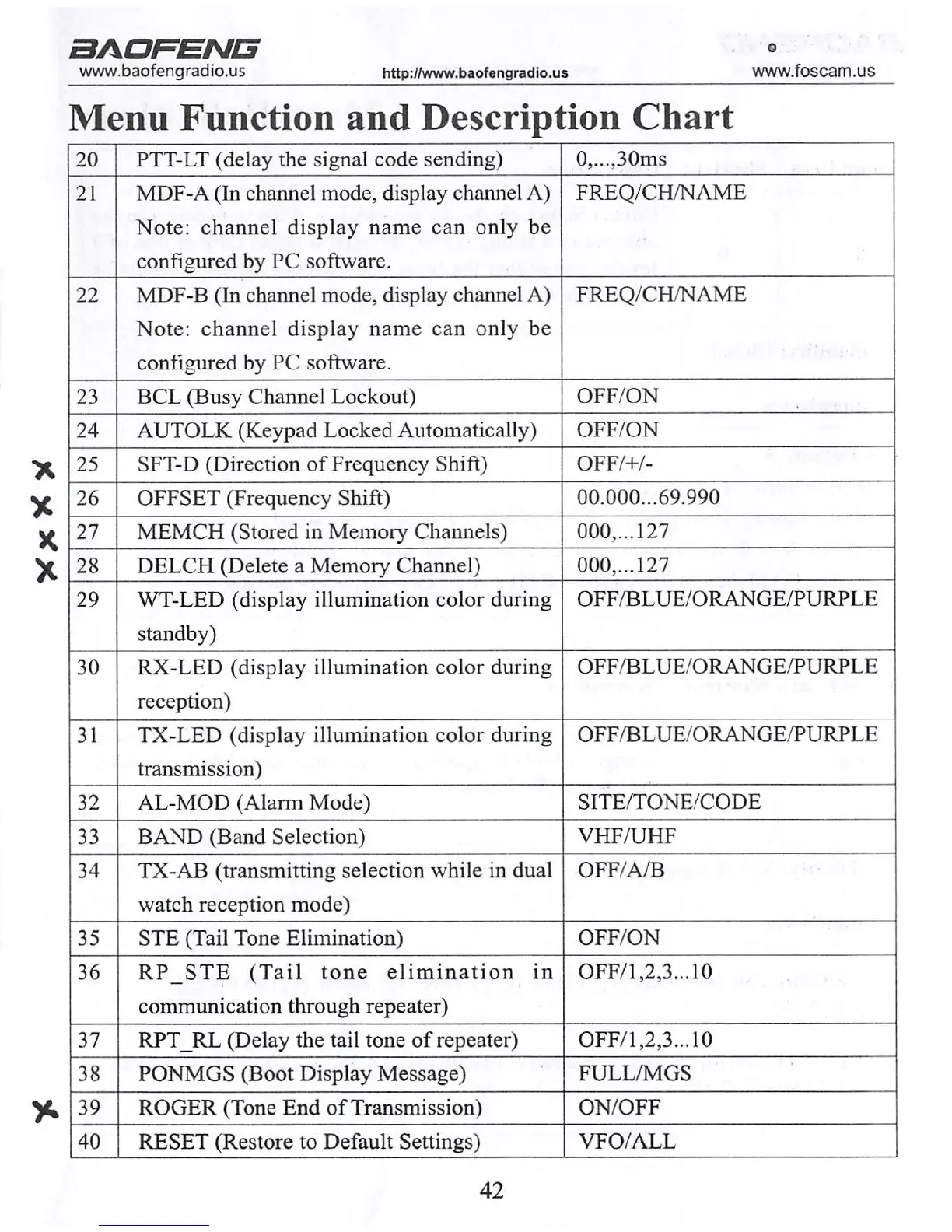
Menu Function and Description Chart
20 PTT-LT (delay the signal code sending)
0,...,30ms
21
MDF-A (In channel mode, display channel A)
Note: channel display name can only be
configured by PC software.
FREQ/CH/NAME
22
MDF-B (In channel mode, display channel A)
Note: channel display name can only be
configured by PC software.
FREQ/CH/NAME
23 BCL (Busy Channel Lockout)
OFF/ON
24 AUTOLK (Keypad Locked Automatically) OFF/ON
25 SFT-D (Direction of Frequency Shift) OFF/+/-
26 OFFSET (Frequency Shift)
00.000...69.990
27 MEMCH (Stored in Memory Channels)
000,...127
28 DELCH (Delete a Memory Channel)
000,...127
29
WT-LED (display illumination color during
standby)
OFF/BLUE/ORANGE/PURPLE
30 RX-LED (display illumination color during
reception)
OFF/BLUE/ORANGE/PURPLE
31 TX-LED (display illumination color during
transmission)
OFF/BLUE/ORANGE/PURPLE
32 AL-MOD (Alarm Mode) SITE/TONE/CODE
33 BAND (Band Selection) VHF/UHF
34 TX-AB (transmitting selection while in dual
watch reception mode)
OFF/A/B
35 STE (Tail Tone Elimination) OFF/ON
36 R P S T E ( Ta i l t o n e e l i m i n a t i o n i n
communication through repeater)
OFF/1,2,3...10
37
RPT_RL (Delay the tail tone of repeater)
OFF/1,2,3...10
38 PONMGS (Boot Display Message) FULL/MGS
39 ROGER (Tone End of Transmission) ON/OFF
40 RESET (Restore to Default Settings) VFO/ALL
29 42



 To Next Page