aAEFENE
www.baofengradio.us http://www.baofengradio.us
www.foscam.us
Selective Calling
When working with large groups of people on the same channel, there tends to be a
lot of crowding in terms of transmissions. To counteract this crowding, there are
several methods of blocking out extra or unwanted transmissions. There are two forms
of selective calling available in two-way radio systems: Group Calling & Individual
Calling.
Group calling is a one-to-many form of communication. Every radio in the working
group is configured the same way and any radio will make contact with every other
radio in the group.
Individual calling, also known as paging, is a one-to-one form of communication.
Every radio is programmed with a unique ID code, and only by sending out a matching
code can you get that radio to open up to your transmissions. A good example of this
is a cellular phone.
The Baofeng BF-F9V2+ features three different group calling methods:
•CTCSS
•DCS
•Tone-burst (1750Hz)
The Baofeng BF-F9V2+ does not feature any form of individual calling at this time.
Note: Using group calling features does NOT mean that others won't be able to listen
in on your transmissions. These features only provide a way to filter out unwanted
incoming transmissions. Any communications sent out while using these features will
still be heard by anyone not employing filtering options of their own.
27
aACDFENE
www.baofengradio.us http://www.baofengradio.us
www.foscam.us
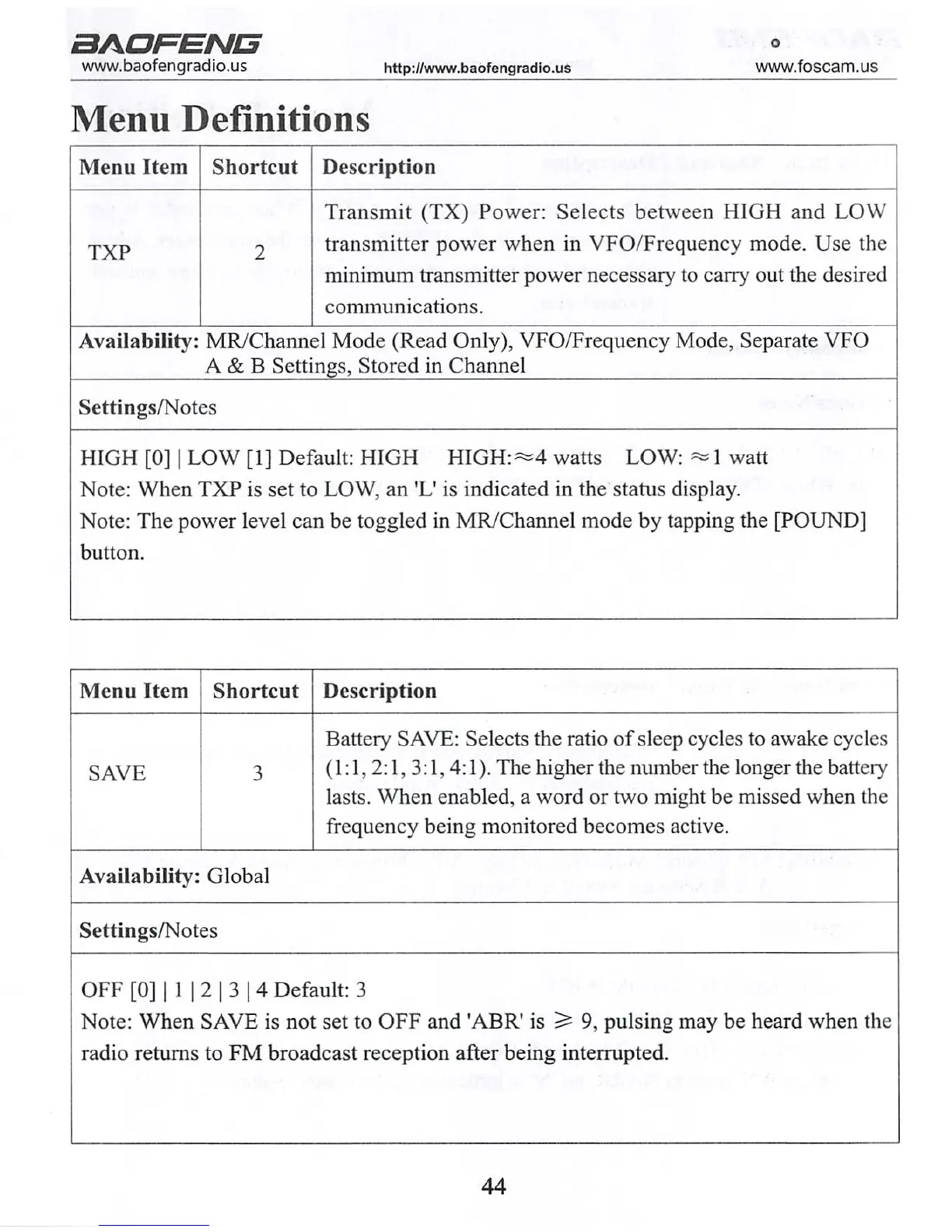
Menu Definitions
Menu Item Shortcut
Description
TXP
Transmit (TX) Power: Selects between HIGH and LOW
transmitter power when in VFO/Frequency mode. Use the
minimum transmitter power necessary to carry out the desired
communications.
Availability: MR/Channel Mode (Read Only), VFO/Frequency Mode, Separate VFO
A & B Settings, Stored in Channel
Settings/Notes
HIGH [0] | LOW [1] Default: HIGH HIGH:«=4 watts LOW: «=1 watt
Note: When TXP is set to LOW, an 'L' is indicated in the status display.
Note: The power level can be toggled in MR/Channel mode by tapping the [POUND]
button.
Menu Item Shortcut
Description
SAVE 3
Battery SAVE: Selects the ratio of sleep cycles to awake cycles
(1:1,2:1, 3:1,4:1). The higher the number the longer the battery
lasts. When enabled, a word or two might be missed when the
frequency being monitored becomes active.
Availability: Global
Settings/Notes
OFF [0] | 1 | 2 | 3 | 4 Default: 3
Note: When SAVE is not set to OFF and 'ABR' is 2* 9, pulsing may be heard when the
radio returns to FM broadcast reception after being interrupted.
44



 To Next Page