EasyManua.ls Logo

Baofeng UV-3R+ - Page 15

Baofeng UV-3R+
20 pages
Print Icon
To Next Page IconTo Next Page
To Previous Page IconTo Previous Page
Loading...
=
BAOFENG
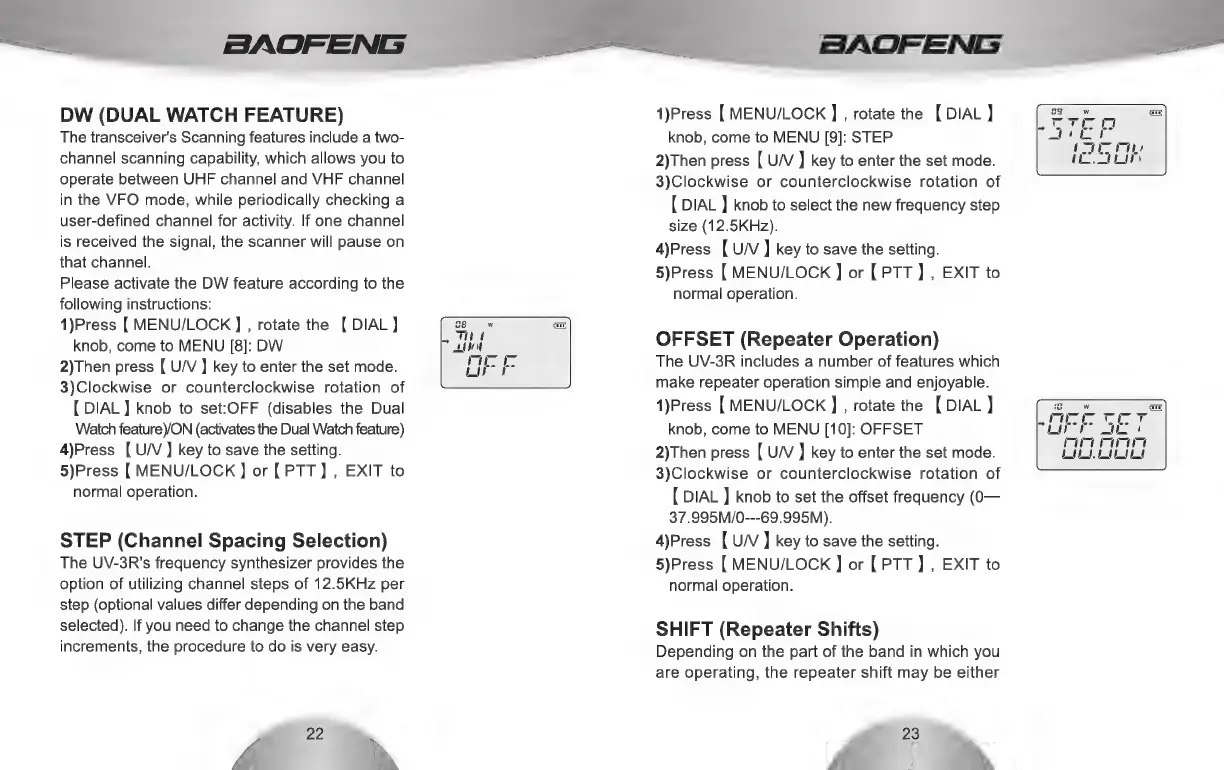
DW
(DUAL
WATCH
FEATURE)
The
transceiver's
Scanning
features
include
a
two-
channel
scanning
capability,
which
allows
you
to
operate
between
UHF
channel
and
VHF
channel
in
the
VFO
mode,
while
periodically
checking
a
user-defined
channel
for
activity.
If
one
channel
is
received
the
signal,
the
scanner
will
pause
on
that
channel.
Please
activate
the
DW
feature
according
to
the
following
instructions:
1)Press
[
MENU/LOCK
],
rotate
the
[DIAL]
knob,
come
to
MENU
[8]:
DW
2)Then
press
[
U/V
]
key
to
enter
the
set
mode.
3)Clockwise
or
counterclockwise
rotation
of
{
DIAL]
knob
to
set:OFF
(disables
the
Dual
Watch
feature)/ON
(activates
the
Dual
Watch
feature)
4)Press
[
U/V]
key
to
save
the
setting.
5)Press
[
MENU/LOCK]
or
[PTT]
,
EXIT
to
normal
operation.
STEP
(Channel
Spacing
Selection)
The
UV-3R's
frequency
synthesizer
provides
the
option
of
utilizing
channel
steps
of
12.5KHz
per
step
(optional
values
differ
depending
on the
band
selected).
If
you
need
to
change
the
channel
step
increments,
the
procedure
to
do
is
very
easy.
22
7
‘N
BAOFENG
1)Press
[MENU/LOCK
]
,
rotate
the
[
DIAL
}
knob,
come
to
MENU
[9]:
STEP
2)Then
press
[
U/V
]
key
to
enter
the
set
mode.
3)Clockwise
or
counterclockwise
rotation
of
{
DIAL
}
knob
to
select
the
new
frequency
step
size
(12.5KHz).
4)Press
[
U/V
]
key
to
save
the
setting.
5)Press
[
MENU/LOCK
]
or
[
PTT]
,
EXIT
to
normal
operation.
OFFSET
(Repeater
Operation)
The
UV-3R
includes
a
number
of
features
which
make
repeater
operation
simple
and
enjoyable.
1)Press
[
MENU/LOCK
]
,
rotate
the
[
DIAL
}
knob,
come
to
MENU
[10]:
OFFSET
2)Then
press
[
U/V
]
key
to
enter
the
set
mode.
3)Clockwise
or
counterclockwise
rotation
of
{
DIAL
}
knob
to
set
the
offset
frequency
(0O—
37.995M/0---69.995M).
4)Press
[
U/V
]
key
to
save
the
setting.
5)Press
[
MENU/LOCK
]
or
[
PTT]
,
EXIT
to
normal
operation.
SHIFT
(Repeater
Shifts)
Depending
on
the
part
of
the
band
in
which
you
are
operating,
the
repeater
shift
may
be
either
23
4
NX

Related product manuals