EasyManua.ls Logo

BASF 6106 - Page 16

Default Icon
78 pages
Print Icon
To Next Page IconTo Next Page
To Previous Page IconTo Previous Page
Loading...
2.
2.
1.1.
INPUT
INTERFACE
2.2.
1.2. OUTPUT INTERFACE
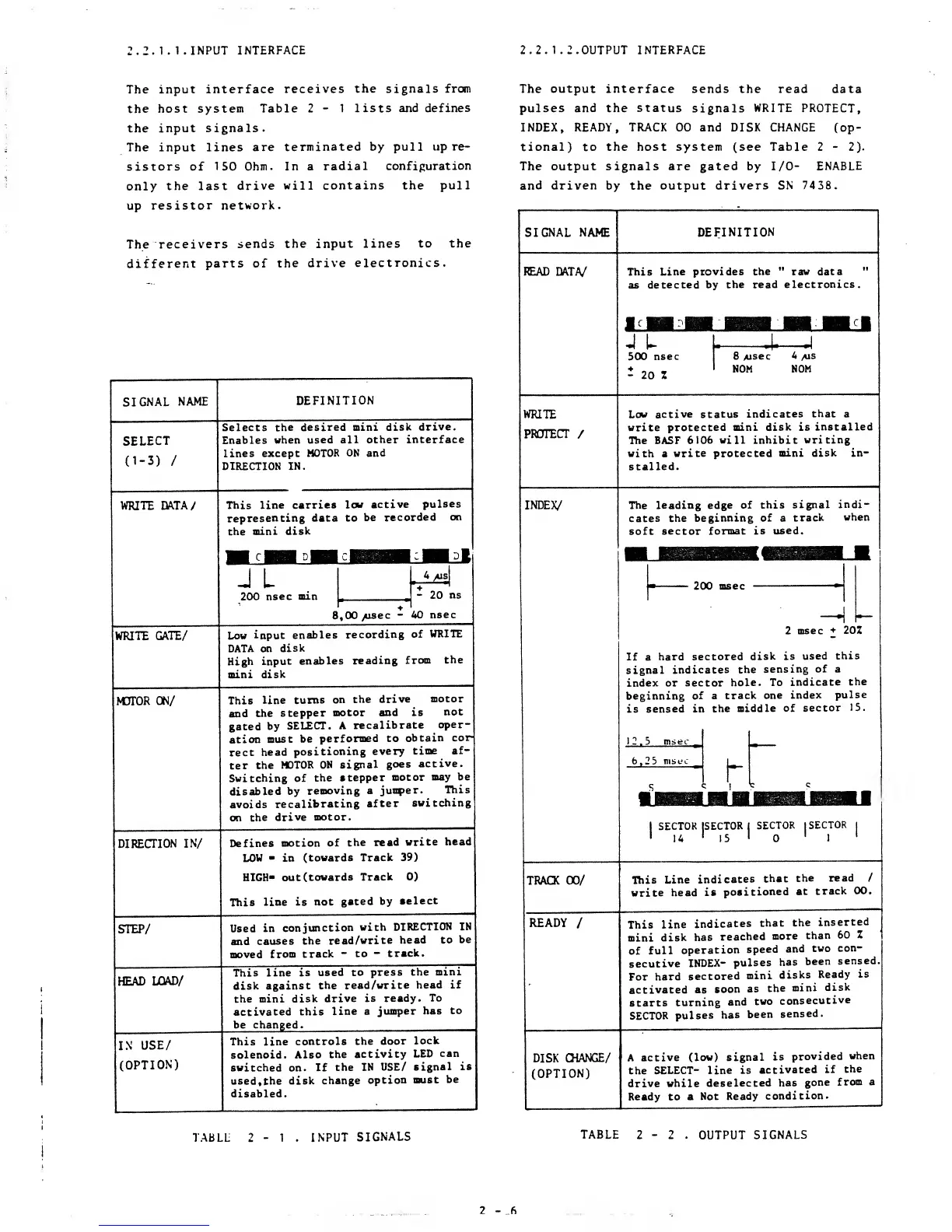
The
input interface
receives
the signals from
the host
system Table 2
-
1 lists and
defines
the
input
signals.
The input lines
are
terminated by pull
up re-
sistors of
150 Ohm. In a
radial
configuration
only
the last
drive
will contains the pull
up
resistor network.
The
receivers
sends
the input lines
to the
different
parts of
the
drive electronics.
SIGNAL
NAME
SELECT
d-3)
/
WRITE
DATA/
WRITE
GATE/
MOTOR
ON/
DEFINITION
Selects the
desired mini
disk
drive.
Enables
when
used all
other interface
lines except
MOTOR
ON and
DIRECTION
IN.
This
line
carries
low
active
pulses
representing
data to
be
recorded on
the
mini disk
A
200
nsec min
L
.
A
H
20
ns
8,00
>usec
-
40
nsec
Low
input
enables
recording
of
WRITE
DATA
on
disk
High input
enables
reading
from
the
mini
disk
DIRECTION
IN/
STEP/
HEAD
LOAD/
IN
USE/
(OPTION)
This
line turns
on
the
drive
motor
and
the
stepper
motor and is
not
gated
by
SELECT.
A
recalibrate
oper-
ation
must be
performed
to
obtain
cor
rect
head
positioning
every
time
af-
ter
the
MOTOR
ON signal
goes
active.
Switching of
the
stepper
motor
may be
disabled
by
removing
a
jumper.
This
avoids
recalibrating
after
switching
on
the
drive
motor.
Defines
motion
of
the read
write
head
LOW
-
in
(towards Track 39)
HIGH-
out
(towards
Track
0)
This
line
is not
gated by
aelect
Used
in
conjunction
with
DIRECTION
IN
and
causes
the
read/write
head
to
be
moved
from
track
-
to
-
track.
This line is
used
to press
the
mini
disk against
the read/write
head if
the mini
disk
drive is
ready.
To
activated this
line a
jumper
has
to
be changed.
This line
controls
the
door
lock
solenoid.
Also
the
activity
LED
can
switched
on.
If
the
IN USE/
signal
is
used, the
disk
change
option must
be
disabled.
The
output interface
sends the read data
pulses and the
status
signals
WRITE
PROTECT,
INDEX, READY,
TRACK
00 and DISK CHANGE (op-
tional) to the host system (see Table 2
-
2).
The output signals
are
gated by I/O-
ENABLE
and driven
by the
output drivers SN
7438.
SIGNAL NAME
READ DATA/
WRITE
PROTECT
/
INDEX/
TRACK
00/
READY
/
DEFINITION
This
Line provides
the
"
raw data
as
detected by
the read
electronics.
500
nsec
-
20 1
4**—
•*!
8
/usee
4
ais
NOM
NOM
Low
active status
indicates
that
a
write
protected mini disk is
installed
The BASF
6106
will
inhibit
writing
with
a
write protected
mini
disk in-
stalled.
The leading
edge of
this
signal
indi-
cates the
beginning of a
track
when
soft
sector format
is used.
200
msec
DISK
CHANGE/
(OPTION)
2
msec
202
If a
hard
sectored
disk is
used
this
signal
indicates
the
sensing
of a
index or sector
hole. To
indicate
the
beginning
of a
track
one
index
pulse
is
sensed in
the
middle
of
sector
15.
12.5 msec
t
6,2
5
msec
S
c
SECTOR
ISECTOR
14
'
15
SECTOR
(SECTOR
This
Line
indicates
that
the
read
/
write
head
is
positioned
at
track
00.
This
line
indicates
that
the
inserted
mini
disk
has
reached
more
than 60
Z
of
full
operation
speed
and
two
con-
secutive
INDEX-
pulses
has
been
sensed
For
hard
sectored
mini
disks
Ready
is
activated
as
soon
as
the
mini
disk
starts
turning
and
two
consecutive
SECTOR
pulses
has
been
sensed.
A
active
(low) signal
is
provided
when
the
SELECT- line
is
activated
if
the
drive while
deselected
has
gone
from
a
Ready to a
Not
Ready
condition.
TABLL 2
-
1 . INPUT
SIGNALS
TABLE
2 2 . OUTPUT
SIGNALS

Other manuals for BASF 6106