EasyManua.ls Logo

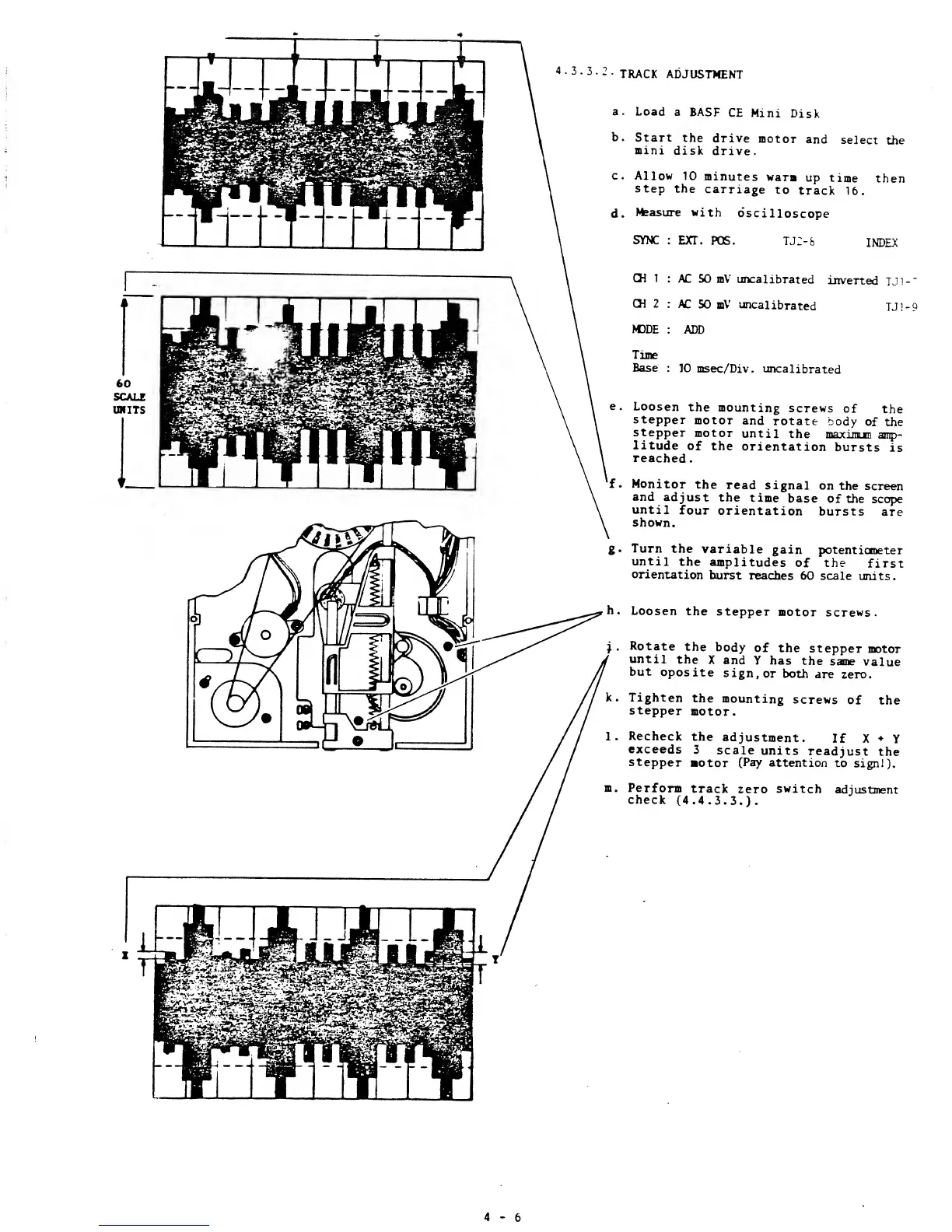
BASF 6106 - Track Adjustment

Default Icon
78 pages
Print Icon
To Next Page IconTo Next Page
To Previous Page IconTo Previous Page
Loading...
2
TRACK
ADJUSTMENT
a.
Load
a
BASF
CE
Mini
Disk
b.
Start
the
drive
motor
and
se]ect
the
mini
disk
drive.
c.
Allow
10 minutes
warm
up
time
then
step
the
carriage
to
track
16.
d.
Measure
with
oscilloscope
SYNC
: EXT.
POS.
TJ2-&
INDEX
CH 1
CH 2
MODE
AC
50 mV uncalibrated
inverted
TJ1-"
AC
SO
mV
uncalibrated
TJ1-9
ADD
Time
Base
: 10 msec/Div.
uncalibrated
e.
Loosen
the
mounting
screws
of
the
stepper
motor
and
rotate
body
of
the
stepper
motor
until
the
maximum
amp-
litude
of
the
orientation
bursts
is
reached.
f
.
Monitor
the
read
signal
on
the screen
and
adjust
the
time
base
of
the
scope
until
four
orientation
bursts
are
shown.
g.
Turn
the
variable
gain
potentiometer
until
the
amplitudes
of the
first
orientation
burst
reaches
60 scale
units.
h.
Loosen
the
stepper
motor
screws.
Rotate
the
body
of
the
stepper
motor
until
the
X
and
Y
has
the
same
value
but
oposite
sign,
or
both
are
zero.
Tighten
the
mounting
screws
of
the
stepper
motor.
Recheck
the
adjustment.
If X
+
Y
exceeds
3
scale
units
readjust
the
stepper
motor
(Pay
attention
to signl).
Perform
track
zero
switch
adjustment
check
(4.4.3.3.).
4-6

Other manuals for BASF 6106