EasyManua.ls Logo

BASF 6106 - Jumper Options; Auto Select

Default Icon
78 pages
Print Icon
To Next Page IconTo Next Page
To Previous Page IconTo Previous Page
Loading...
2.
2. 1.3.
JUMPER
OPTIONS
The
following
options
can be
selected by
jumpers:
Select
Options
Head
Load
Options
IN USE
Options
Door
Lock
Latch
Option
Door
Lock
Options
Activity
LED
Option
Write
Protect
Option
Stepper
Motor
Switching
Select
Options
There
are
two
possibilities
to
select the
mini
disk
drive.
Auto
Select
Radial Select
Auto
Select
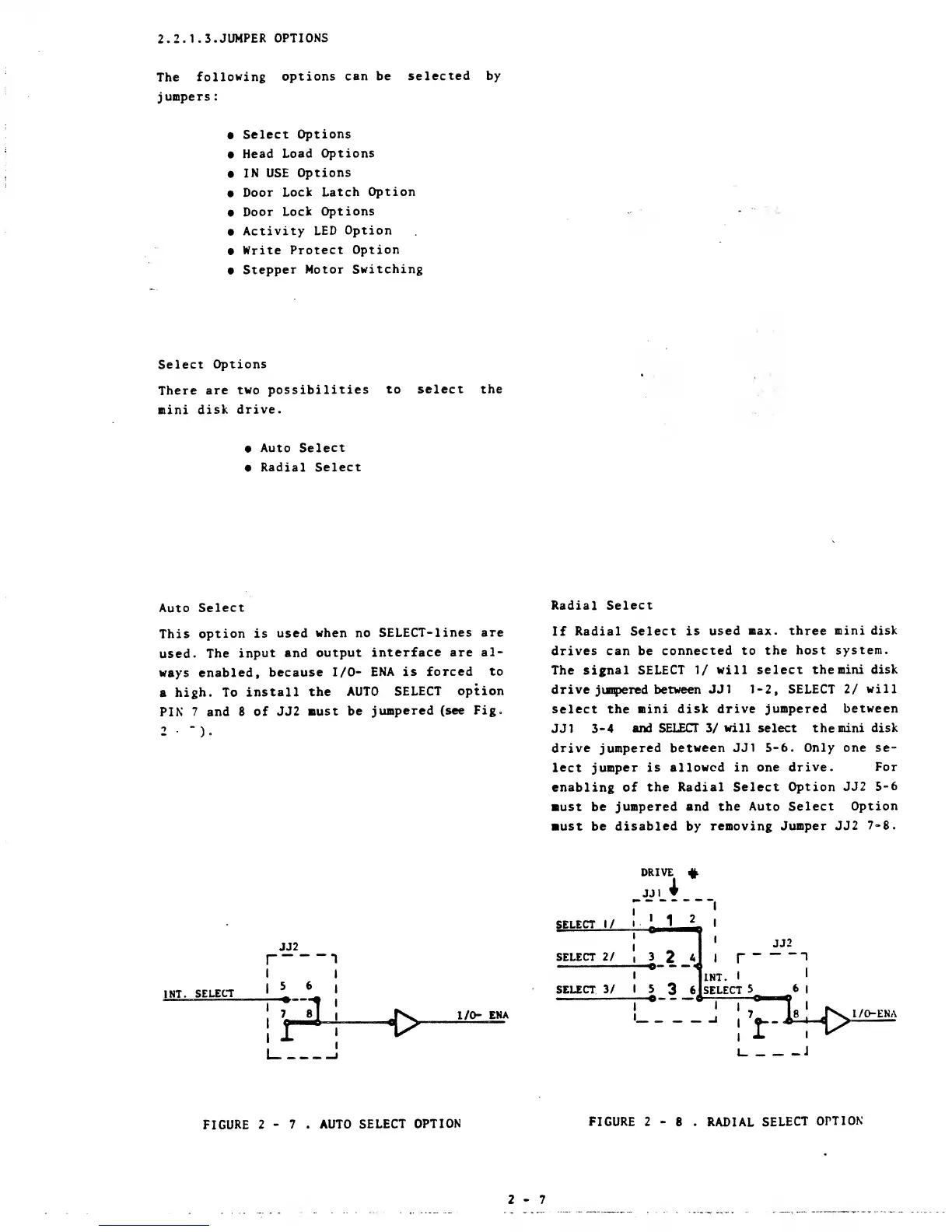
This
option is
used
when
no
SELECT-lines are
used.
The
input and
output
interface
are
al-
ways enabled,
because I/O-
ENA is
forced
to
a
high. To
install the
AUTO
SELECT
option
PIN
7
and 8 of
JJ2
Bust be
jumpered
(see Fig.
2
).
Radial
Select
If
Radial
Select is
used max. three
mini disk
drives can be
connected to
the host
system.
The signal
SELECT
1/
will
select the mini
disk
drive
jumpered
between
JJ1 1-2, SELECT
2/
will
select the
mini disk
drive jumpered
between
JJ1
3-4
and SELECT
3/
will
select the
mini disk
drive jumpered
between JJ1
5-6.
Only
one se-
lect jumper is
allowed in
one drive.
For
enabling
of
the Radial
Select
Option JJ2
5-6
must be
jumpered and the
Auto Select
Option
must be
disabled
by
removing
Jumper JJ2
7-8.
JJ2
SELECT
1/
SELECT 2/
SELECT 3/
DRIVE
#
JJI
1
1
2
I
a
n<
3
2
A
<
5
3
6^
'
JJ2
I
I
"J
INT.
I
'
SELECT
5
6
|
I
I
i
j
l/O-ENA
FIGURE
2
-
7 .
AUTO
SELECT
OPTION
FIGURE 2
-
8 .
RADIAL
SELECT
OPTION
2-7

Other manuals for BASF 6106