13-14 9440300990
Metering DECS-250
RTD Input 5 Threshold 3 Trip
RTD Input 5 Threshold 4 Trip
RTD Input 6 Out of Range
RTD Input 6 Threshold 1 Trip
RTD Input 6 Threshold 2 Trip
RTD Input 6 Threshold 3 Trip
RTD Input 6 Threshold 4 Trip
RTD Input 7 Out of Range
RTD Input 7 Threshold 1 Trip
RTD Input 7 Threshold 2 Trip
RTD Input 7 Threshold 3 Trip
RTD Input 7 Threshold 4 Trip
RTD Input 8 Out of Range
RTD Input 8 Threshold 1 Trip
RTD Input 8 Threshold 2 Trip
RTD Input 8 Threshold 3 Trip
RTD Input 8 Threshold 4 Trip
SCL
Thermocouple 1 Threshold 1 Trip
Thermocouple 1 Threshold 2 Trip
Thermocouple 1 Threshold 3 Trip
Thermocouple 1 Threshold 4 Trip
Thermocouple 2 Threshold 1 Trip
Thermocouple 2 Threshold 2 Trip
Thermocouple 2 Threshold 3 Trip
Thermocouple 2 Threshold 4 Trip
Transfer Watchdog Alarm
UEL
Underfrequency VHz
Unknown NLS Protocol Version
Var Limiter
Alarm Configuration
BESTCOMSPlus Navigation Path: Settings Explorer, Alarm Configuration, Alarms
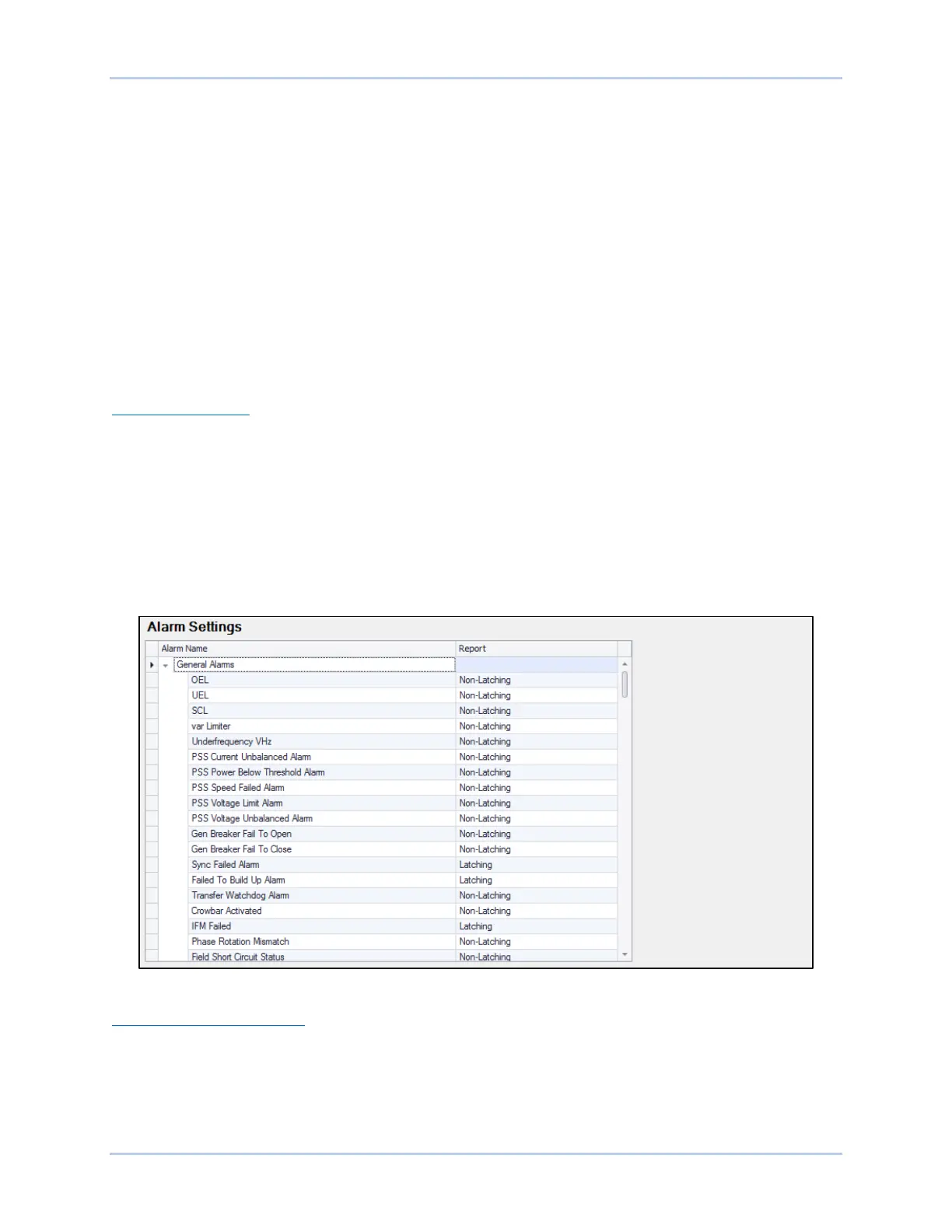
Alarms are configured using BESTCOMSPlus. Customize the reporting style of each alarm by choosing
Disabled, Latching, or Non-Latching. Latching alarms are stored in nonvolatile memory and are retained
even when control power to the DECS-250 is lost. Active alarms are shown on the front panel LCD and in
BESTCOMSPlus
until
they are cleared. Non-latching alarms are cleared when control power is removed.
Disabling an alarm affects only the annunciation of the alarm and not the actual operation of the alarm.
This means that the alarm will still trip when trip conditions are met and the occurrence will appear on the
sequence of events reports.
The BESTCOMSPlus Alarm Settings screen is illustrated in Figure 13-20 below.
Figure 13-20. Alarm Settings Screen
User-Programmable Alarms
BESTCOMSPlus Navigation Path: Settings Explorer, Alarm Configuration, User Programmable Alarms
Sixteen user programmable alarms are available. User alarm labels are entered on the User
Programmable Alarms screen (Figure 13-21). If the trip condition exists for the duration of the Activation
Delay, the alarm is tripped. When active, the label of a user programmable alarm is displayed on the
BESTCOMSPlus Alarms screen, on the front panel display, and in the sequence of events reports.



 To Next Page