21-12 9440300990
BESTlogic™Plus DECS-250
Name Description Symbol
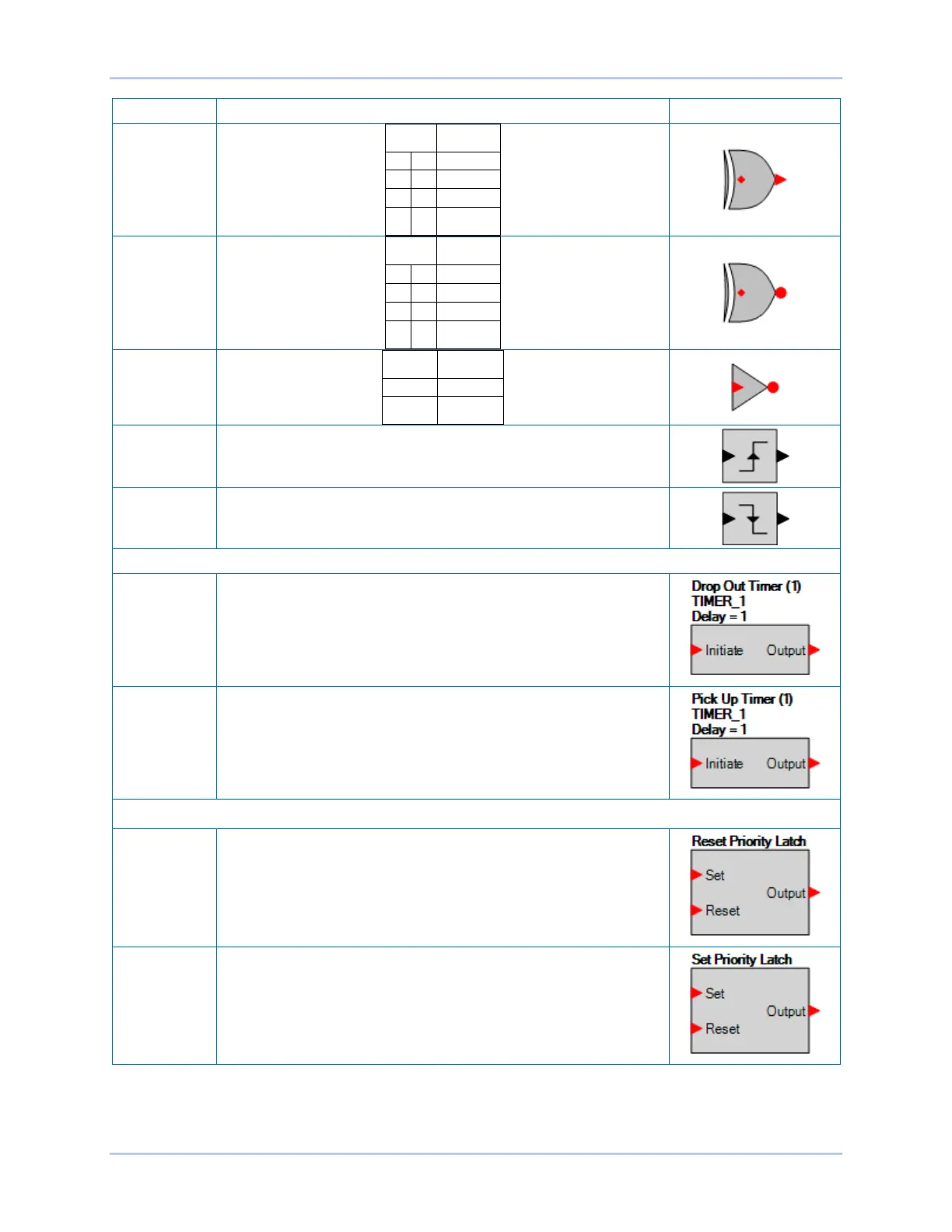
XOR
XNOR
NOT
(INVERTER)
Rising Edge
The output is true when the rising edge of a pulse is detected on the
input signal.
Falling Edge
The output is true when the falling edge of a pulse is detected
on the input signal.
Pickup and Dropout Timers
Drop Out
Timer
Used to set a delay in the logic.
For more information, refer to Programming BESTlogicPlus, Pickup
and Dropout Timers, later in this chapter.
Pick Up Timer Used to set a delay in the logic.
For more information, refer to Programming BESTlogicPlus, Pickup
and Dropout Timers, later in this chapter.
Latches
Reset Priority
Latch
When the Set input is on and the Reset input is off, the latch will go to
the SET (ON) state. When the Reset input is on and the Set input is
off, the latch will go to the RESET (OFF) state. If both the Set and
Reset inputs are on at the same time, a reset priority latch will go to
the RESET (OFF) state.
Set Priority
Latch
When the Set input is on and the Reset input is off, the latch will go to
the SET (ON) state. When the Reset input is on and the Set input is
off, the latch will go to the RESET (OFF) state. If both the Set and
Reset inputs are on at the same time, a set priority latch will go to the
SET (ON) state.



 To Next Page