TA202
44 www.baumer.com
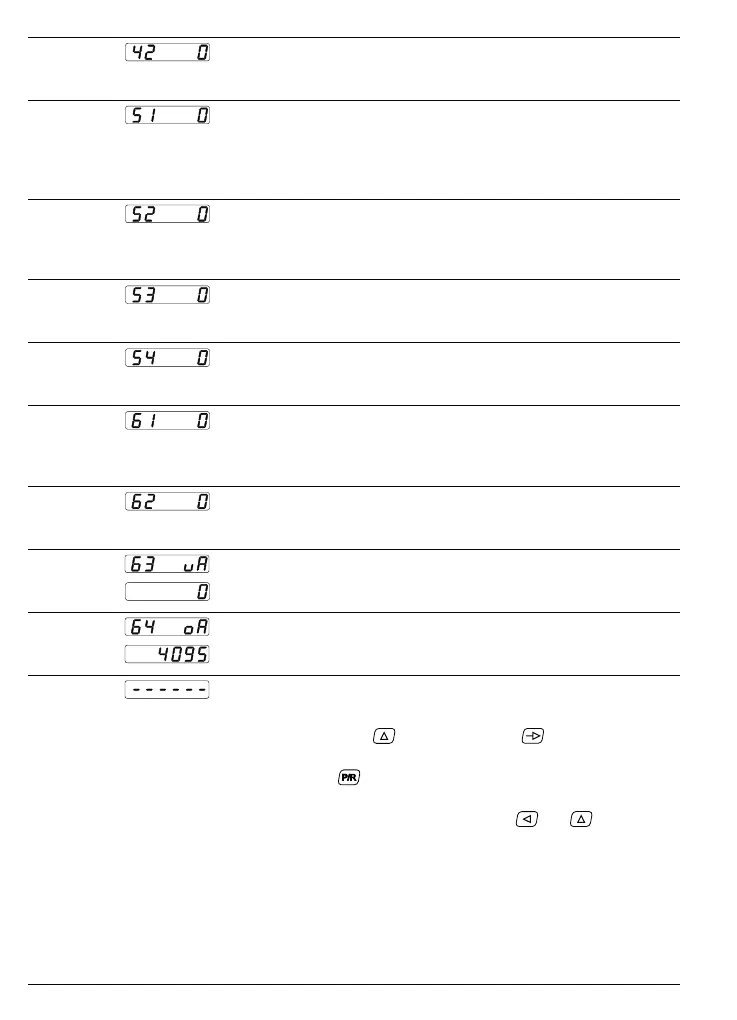
Line 42 Output behaviour of lower limit value
0 * with start inhibit (only responds after fall below value)
1 without start inhibit
Line 51
Baud rate
0 * 4800 baud
1 2400 baud
2 1200 baud
3 600 baud
Line 52
Parity
0 * Even Parity
1 Odd Parity
2 No Parity
Line 53
Stop bit
0 * 1 Stop bit
1 2 Stop bits
Line 54
Device address
0 * 0
1...99
Line 61
Assignment of the analog output
0 * Output F1
1 Output F2
2 Output F3
Line 62
Offset for analog output
0 * No Offset
1 Offset 2 V/4 mA
Line 63
Lower analog limiting value
0 * Default
0...999999
Line 64
Upper analog limiting value
4095 * Default
0...999999
The dotted line represents the end of the third programming field.
Switching back through ➜ Hold down the key
and press the key again.
the program lines
Switching off the ➜ Press the key
.
programming mode ● The device is now on the operating level again.
Reprogramming the ➜ Switch on the device and press the keys
and
at the
device with the default same time.
setting ● All values which have already been programmed are returned to
the default settings. Display shows for a short time „Clr Pro“.



 To Next Page