27
USER Section (en)
7219620.01 (1-04/15)
1. COMMISSIONING THE BOILER
Select the required heating mode (section 1.2).
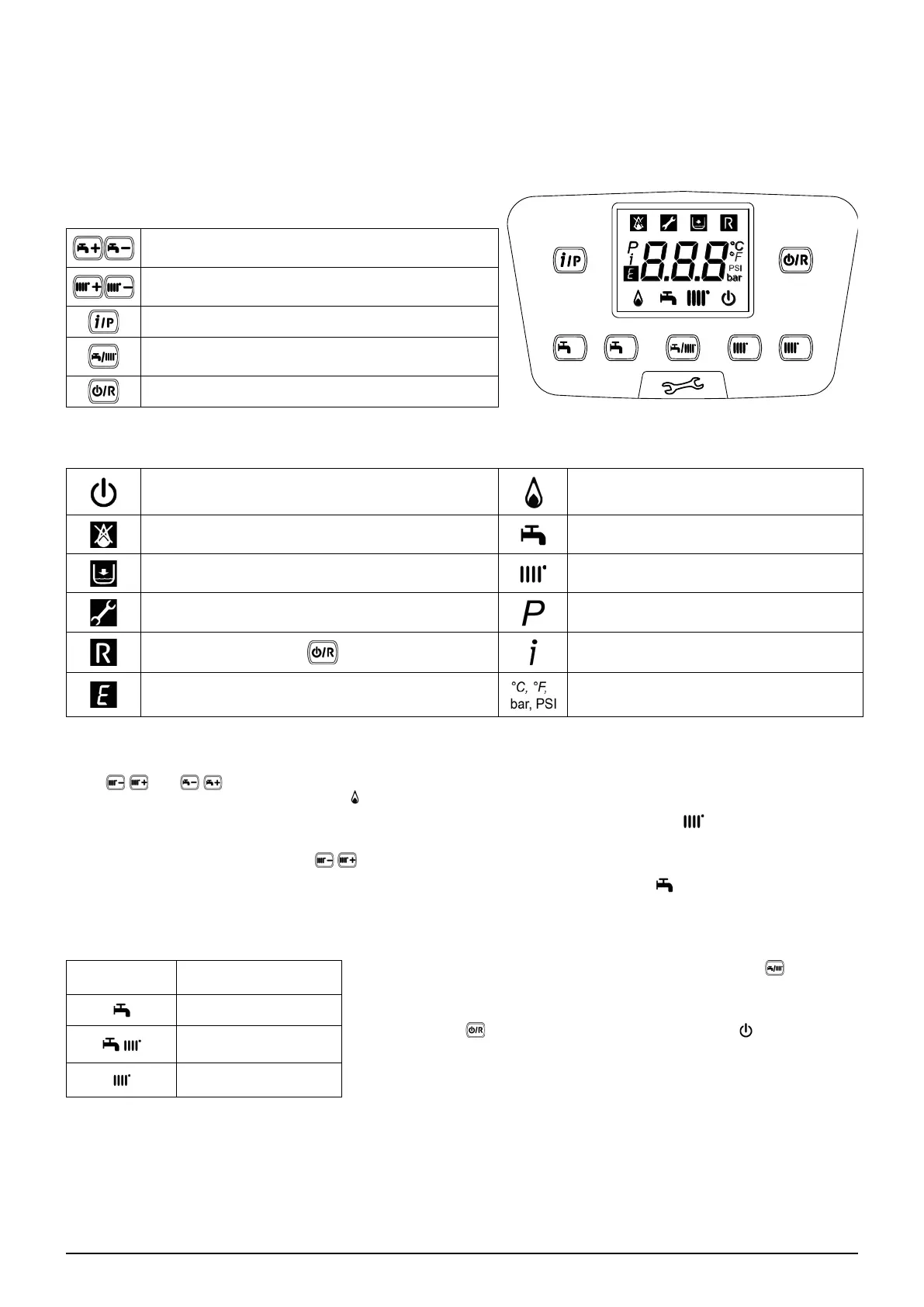
Key to BUTTONS
DHW temperature adjustment
(+ to increase the temperature and – to decrease it)
(+ to increase the temperature and – to decrease it)
Boiler operating information
Operating mode:
DHW – DHW & Heating – Heating Only
Off – Reset – Exit menu/functions
Key to SYMBOLS
Off: heating and DHW disabled
Burner lit
Fault preventing the burner from lighting DHW operating mode enabled
Heating mode enabled
Technical Service Centre call-in Programming menu
)
Boiler information menu
Fault in progress Set unit of measurement (SI/US)
1.1 ADJUSTING THE CH AND DHW FLOW TEMPERATURE
Press and
.
HEATING
When connected to an External Sensor,
DHW
1.2 OPERATING MODES
SYMBOL
DISPLAYED
OPERATING MODE
To enable the appliance in DHW - Heating or Heating only press
and choose one of the three available modes.
enabled, press
appears on the
DHW
DHW & HEATING
HEATING ONLY



 To Next Page