PROGRAMMABLE FEATURES OF THE DS MODULES
(con’t)
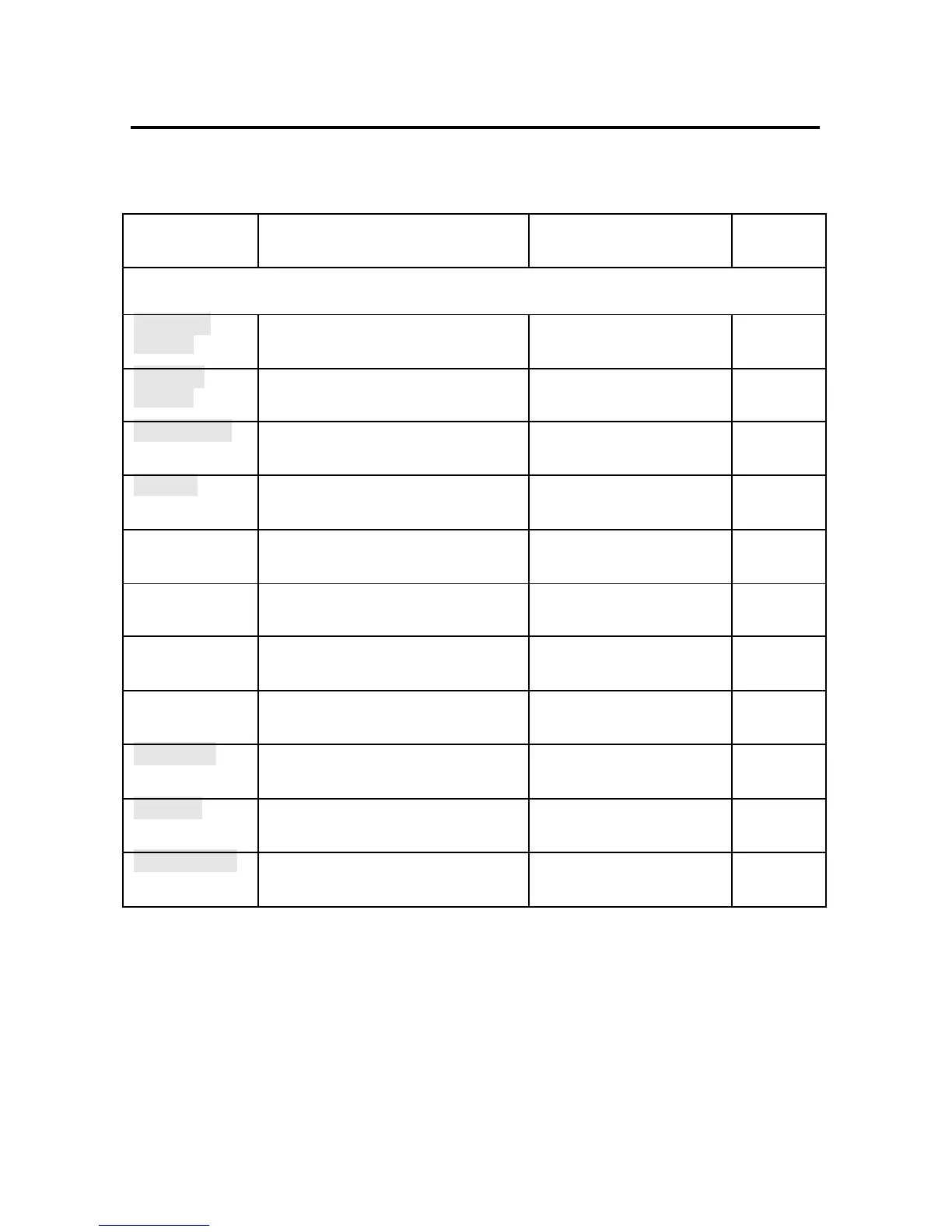
FEATURE DESCRIPTION ACTION PAGE
NO.
DS73TP NETWORK MODULE
Module IP
Address
IP Address for the DS73TP to access the
network. Default = 0.0.0.0
Enter the IP Address in
dotted decimal format 0.0.0.0
52
Dial-in IP
Address
IP Address for the network to access the
DS73TP. Default = 0.0.0.0
Enter the IP Address in
dotted decimal format 0.0.0.0
53
Subnet Mask
Consists of four bytes, each byte ranging
from 0 to 255. Default = 0.0.0.0
Enter the Subnet Mask in
dotted decimal format 0.0.0.0
54
Gateway
Consists of four bytes, each byte ranging
from 0 to 255. Default = 0.0.0.0
Enter the Gateway in dotted
decimal format. 0.0.0.0
55
Primary DNS
Primary Domain Name System address.
Default = 0.0.0.0
Enter Primary DNS Address 55
Secondary DNS
Secondary Domain Name System
address. Default = 0.0.0.0
Enter Secondary DNS
Address
56
Primary NBNS
Primary Net BIOS Name Server.
Default = 0.0.0.0
Enter Primary NBNS
Address
57
Secondary
NBNS
Secondary Net BIOS Name Server.
Default = 0.0.0.0
Enter Secondary NBNS
Address
57
User Name
Unique User ID. Default = user1 Enter User Name up to 8
characters
58
Password
Password for the Dial-Up PPP.
Default = BTA
Enter Password up to 8
characters
58
Module Name
Unique ID for the module.
Default = DS73TP
Enter Module Name up to 8
characters
59



 To Next Page