The Menus
bbe BenthoTorch Manual Page 66
3. Choose the type of view that is to be generated or edited (in the example “Table view / single value
view”).
4. Choose one existing view to edit or as a template for a new one.
In case of a pre-defined view, the view can be reset to the original status (“R
ESET
”).
In case of a user-defined view, the view can be deleted (choose a custom view and click “D
ELETE
”).
5. Click “N
EXT
”.
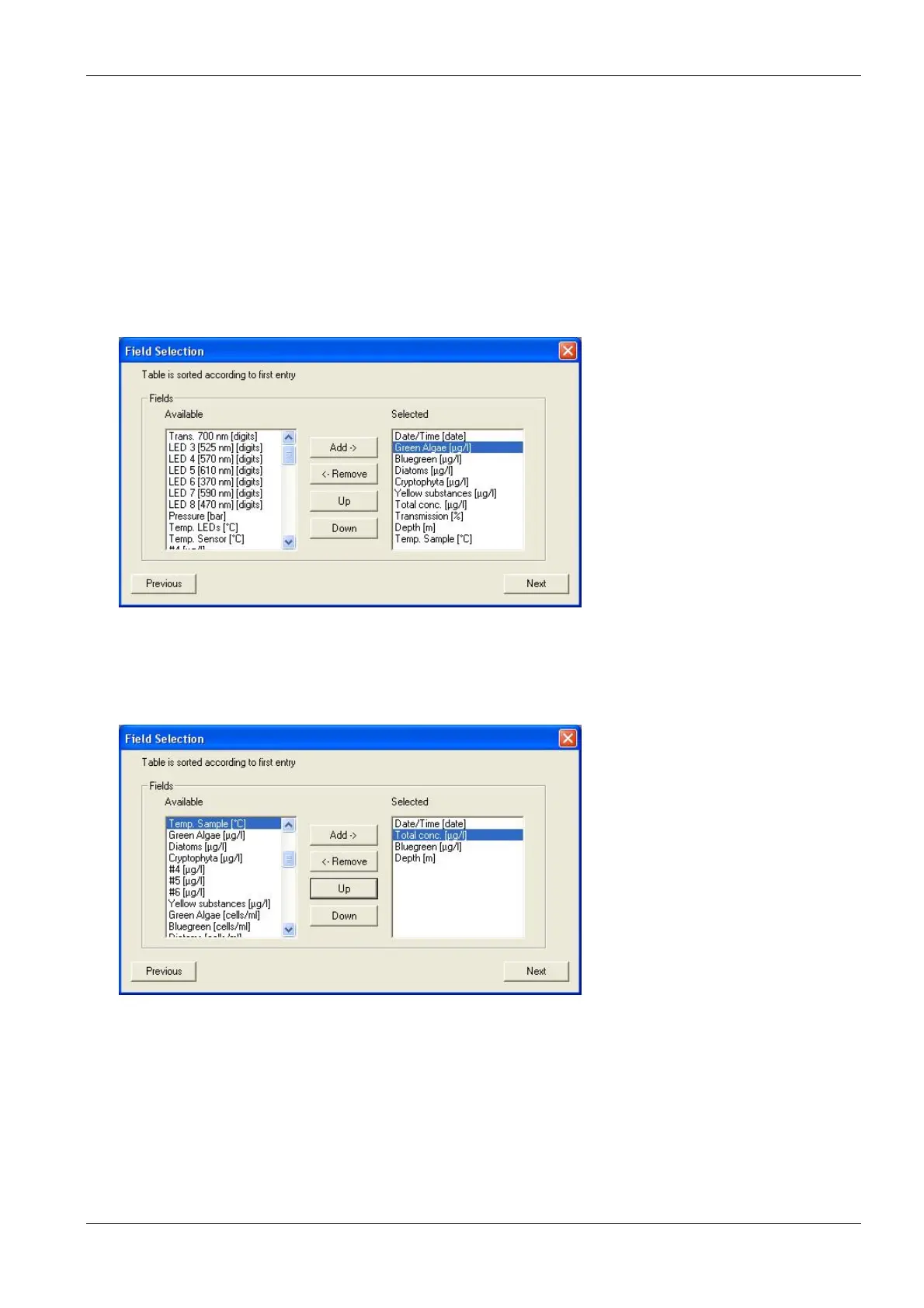
Field Configuration
This window shows all available data of the selected instrument. The left column shows the data that is currently
not used in the chosen view. In the right column are data that will be displayed in the resulting view. The order in
the right column corresponds to the order in the table.
6. Click on “Green Algae [µg/l]” and “
R
EMOVE
” to remove the concentration of green algae from the view.
7. Repeat with all entries but “Date/Time (date)”; “Bluegreen [µg/l]”, “Total conc. [µg/l]” and “Depth [m]”.
8. Click on “Total conc. [µg/l]” and ”U
P
” to change the order.
9. Click “Next”.
General Properties
The General Properties page allows the user to change the background color of a “Single value” view.



 To Next Page