ENGLISH
8 BD LASER MAX Man. cod. B409652FG Class C Solutions Group
SETUP
5Setup
5.1.0 Main Menu
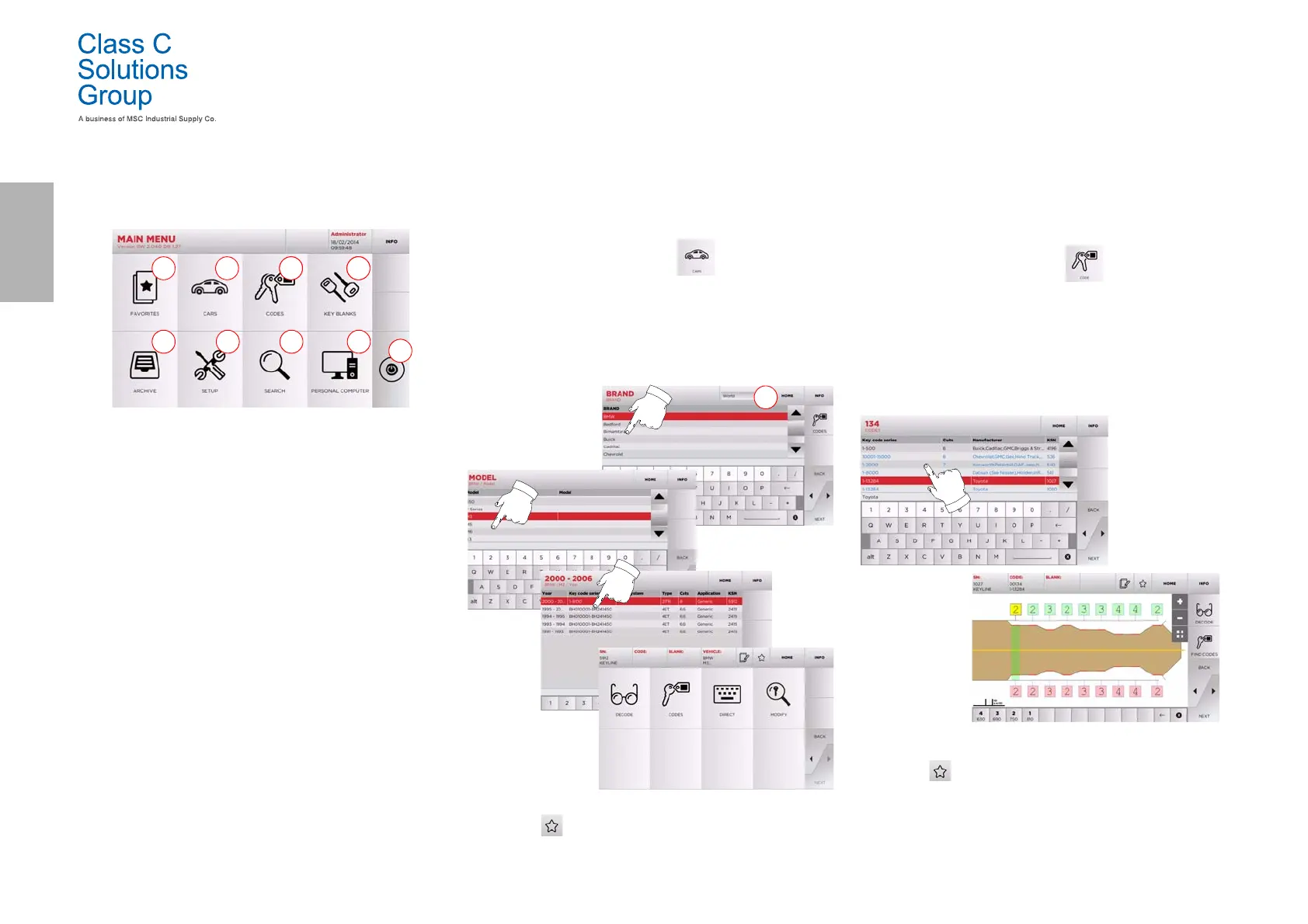
Options displayed:
1. This function gives access to a collection of "Bookmarks"
previously saved by the user, for faster access to the
most frequently saved keys/systems.
2. This allows you to search and select data via the car
brand and model.
3. This allows you to search and select data via the original
indirect code (profile and series).
4. This allows you to search and select data via the Class C
Solutions Group key article and similar blank keys made
by other manufacturers.
5. This function makes it possible to access the archive
containing the keys identified during the search and
decoding processes, so that they can be retrieved quickly
every time the user needs them.
6. To access the menu for adjusting the cutting and
decoding process, updating and diagnostics of the
machine and calibrating the operating parameters.
7. This function allows access to the database on the
machine to search for coded processing data or
deciphering.
8. Set of functions used to connect the machine to
programmes being executed on remote PCs and import
DAT files.
9. Back to login page.
5.1.1 Search by car brand
The “CAR” menu makes it possible to search and duplicate a key
through a list of car brands included in the database.
How to proceed:
• From the MAIN MENU, select “ ”.
• Select one of the options in the top drop-down menu (A).
• Input the brand or scroll the menu and select the desired
brand (e.g., BMW), then press “
►”.
• Choose the car model first, then the year of production, and
press “
►”.
• From the operating menu, choose one of the search or key
modification options: DECODE, CODE, DIRECT and MODIFY.
Note: From now on, please refer to chapter 7 on page15.
Note: The “ ” symbol makes it possible to save the selected
key in the list of bookmarks. See paragraph6.2.0.
5.1.2 Search by code
The search by code is made when one wishes to search for a key using
the indirect code pertaining to the key's series, as provided by the ma-
nufacturer.
How to proceed:
•From the MAIN MENU, select “ ”.
•Input the complete original code (or part of the same)
through the keypad and scroll the list of articles to choose
the desired one.
Note: All the series and the records that may contain the
inserted code are displayed in ascending order, with
attached application / brand of use.
•Press “
►” to access the key modify menu.
Note: From now on, please refer to chapter 7 on page15.
Note: The “ ” symbol makes it possible to save the selected
key in the list of bookmarks. See paragraph6.2.0.
• To go back to the previous page, press the “
◄” key.


 To Next Page