ENGLISH
10 BD LASER MAX Man. cod. B409652FG Class C Solutions Group
SETUP
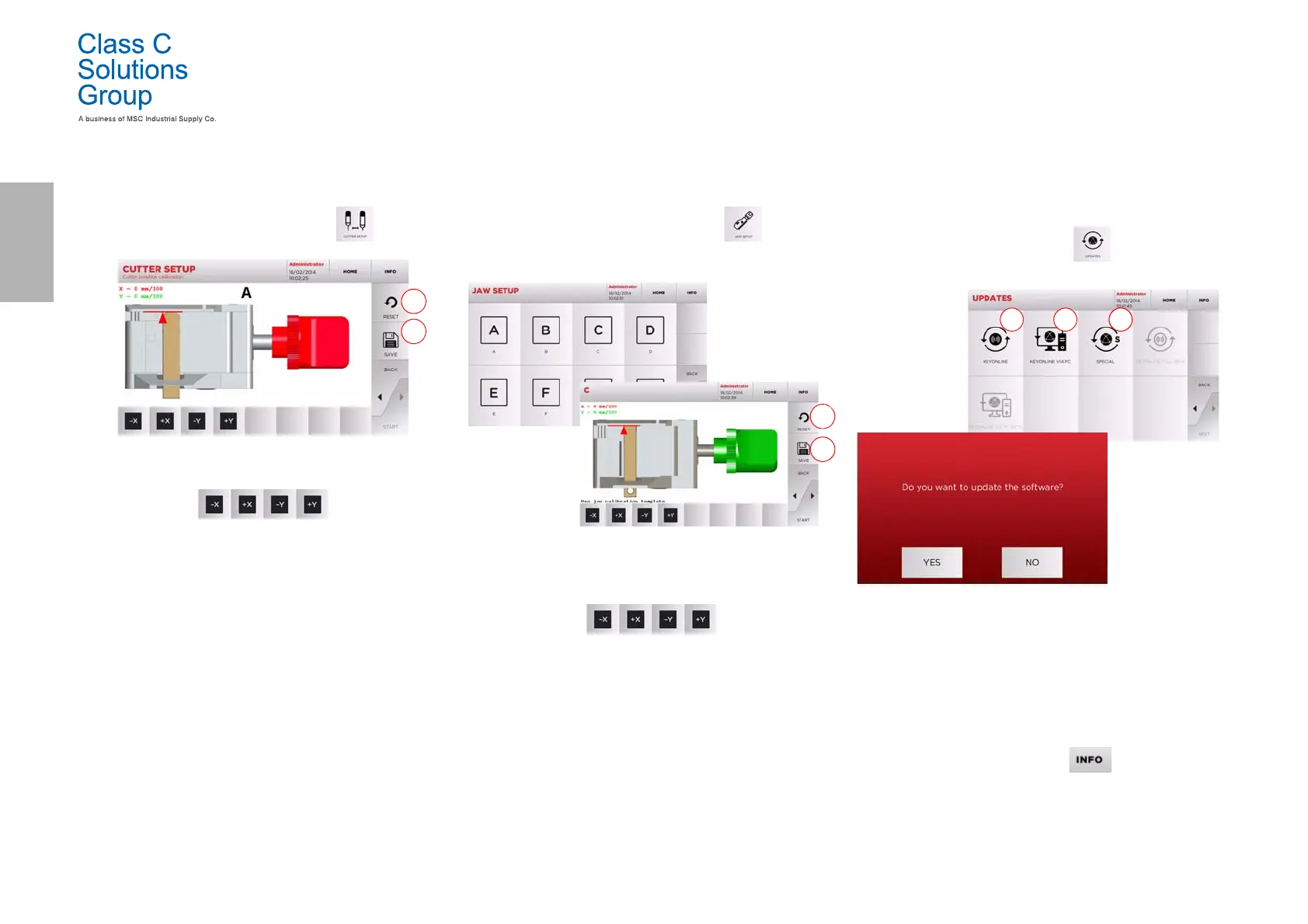
5.3.1 Cutter Setup
How to proceed:
•From the CALIBRATIONS MENU, select:
• Change the position of the X-Y axes with the buttons:
• On the top left of the display it is possible to view the
height to be modified.
• Save your changes by pressing “1”.
Note: If you leave the page without pressing the "1" key , all
changes shall be lost.
• To reset the changes and go back to the previous setting,
press “2”.
5.3.2 Jaw Setup
How to proceed:
•From the CALIBRATIONS MENU, select:
• Install the required jaw and select the corresponding code
from the JAW SETUP MENU.
• Insert the calibration template as requested.
• Then press “1” to launch the jaw self-calibration process.
• Change the position of the X-Y axes with the buttons:
• On the top left of the display it is possible to view the
height to be modified.
• Save your changes by pressing “1”.
Note: If you leave the page without pressing the "1" key , all
changes shall be lost.
• To reset the changes and go back to the previous setting,
press “2”.
•Press “
►” and follow the instructions on screen to
calibrate the jaw correctly.
5.4.0 Update
It is possible to update the machine through the graphic interface.
How to access the page:
•From the SETUP MENU, select:
Options displayed:
1. To proceed with the online software and database
update, through the "Keyonline" service.
2. The update package is downloaded through a normal PC
connected to the internet and saved on a USB flash drive,
so as to be able to install it later on in the machine.
3. To proceed with the software and database update,
taking the data from a USB flash drive.
• For further information select “ ” from the display.


 To Next Page