ENGLISH
Class C Solutions Group BD LASER MAX Man. cod. B409652FG 15
MODIFY AND CUT
7Modify and cut
7. 1 . 0 D e c o d e
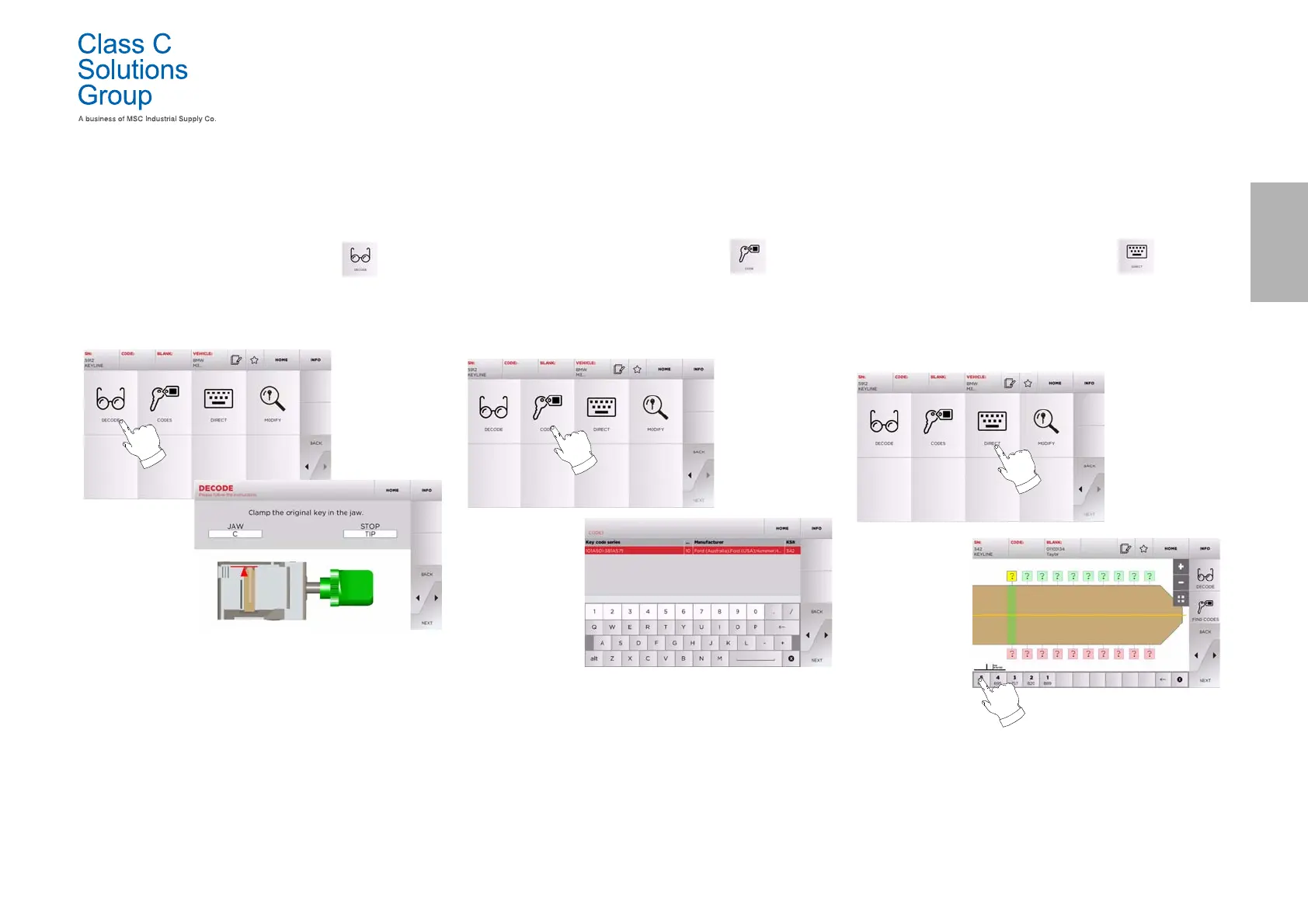
This function makes it possible to decode the key using the selected
key system.
How to proceed:
• From the key search sub-menu, select “ ”.
• Insert the original key in the jaws and lock it in place.
• Then follow the instructions on screen until the end of the
decoding process.
7. 2 .0 C o d e
This function makes it possible to search for a specific code
contained in the data base and obtain the relevant coding.
How to proceed:
• From the key search sub-menu, select “ ”.
• Input the blind code.
•Then press
►” to go to the following screen, the key
“CUTTING” one (for additional information, please refer to
paragraph7.5.0 on page16).
7. 3 . 0 D i r e c t
This function makes it possible to insert the bitting code for the key
directly.
How to proceed:
• From the key search sub-menu, select “ ”.
• Input a value for each cut that shall correspond to the
bitting code.
•Then press
►” to go to the following screen, the key
“CUTTING” one (for additional information, please refer to
paragraph7.5.0 on page16).


 To Next Page