ENGLISH
Class C Solutions Group BD LASER MAX Man. cod. B409652FG 11
SETUP
5.4.1 Keyonline Update
Note: Before updating, check that the console is connected to
a LAN Network.
Pressing the "KEYONLINE" key, the programme proceeds to send the
necessary information to the Keyonline service and later to download
the update package.
According to the quantity of the data to be downloaded,
the process might require a waiting time.
Note: During this phase, some error messages might appear,
stating that the machine is not registered or that it is
impossible to download the updates. In such cases,
please check that all the preliminary operations have
been concluded and that all the network parameters are
configured correctly. For further help, please contact the
Class C Solutions Group Service Centre.
How to proceed:
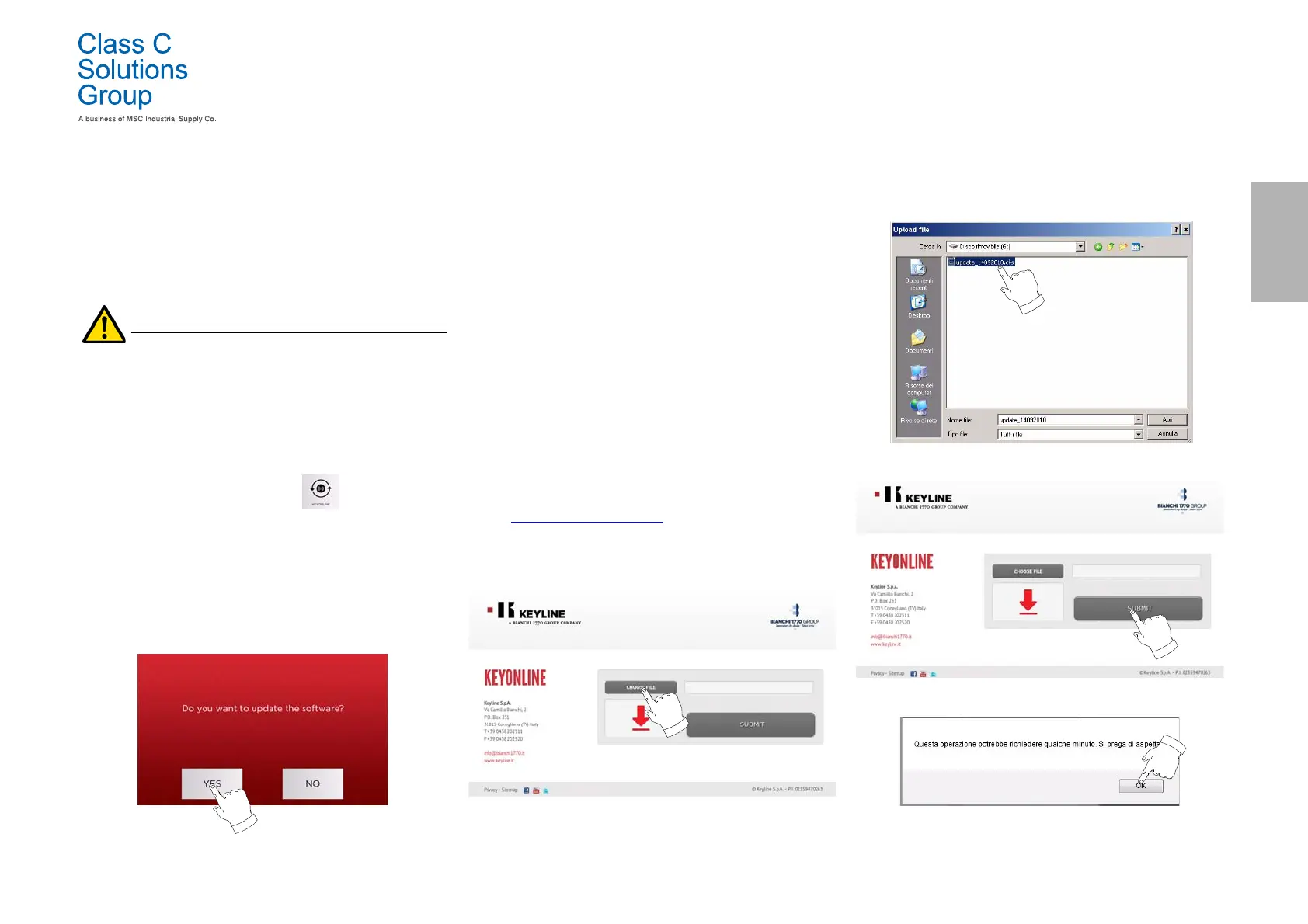
• From the UPDATES menu select:
• Disconnect any USB flash drives connected to the machine
and press the "YES" key.
• The programme shall reboot and the update software
executed; the user might be required to turn off and reboot
the machine.
• Follow the instructions and wait until the end of the
procedure, whereupon the most recent versions of the
software and database shall be available.
• To annul the operation, press NO.
5.4.2 Keyonline via PC Update
If it is not possible to configure the machine to connect to the internet,
this procedure makes it possible to update it by connecting to
Keyonline through a PC with internet connection.
How to proceed:
• Press the "VIA PC" button; a message asking to connect a
USB flash drive to the machine shall appear.
• Then, press the "NEXT" button to proceed, or the
"CANCEL" one to cancel the operation.
• The programme shall copy a file with a .csk extension on
the USB flash drive, containing the information to be sent
to Keyonline to update the machine.
• After a few seconds a message stating that the operation
is finished shall appear and the user will be asked to
download the update from Keyonline.
• Interrupt the operation by pressing "CANCEL" or proceed
with the following instructions:
1. disconnect the USB flash drive and connect it to a PC
with an internet connection.
2. Using the browser, connect to the following web page:
http://keyonline.keyline.it/
3. Select the "CHOOSE FILE" button to access the file
selection dialogue box.
4. Search and select the .csk file previously saved in the flash drive,
then press "OPEN".
5. Press the "SUBMIT" button.
6. The following message shall appear:
7. Press "OK" to start downloading the file and when the
browser asks where to save it, choose the USB flash drive.


 To Next Page