ENGLISH
Class C Solutions Group BD LASER MAX Man. cod. B409652FG 9
SETUP
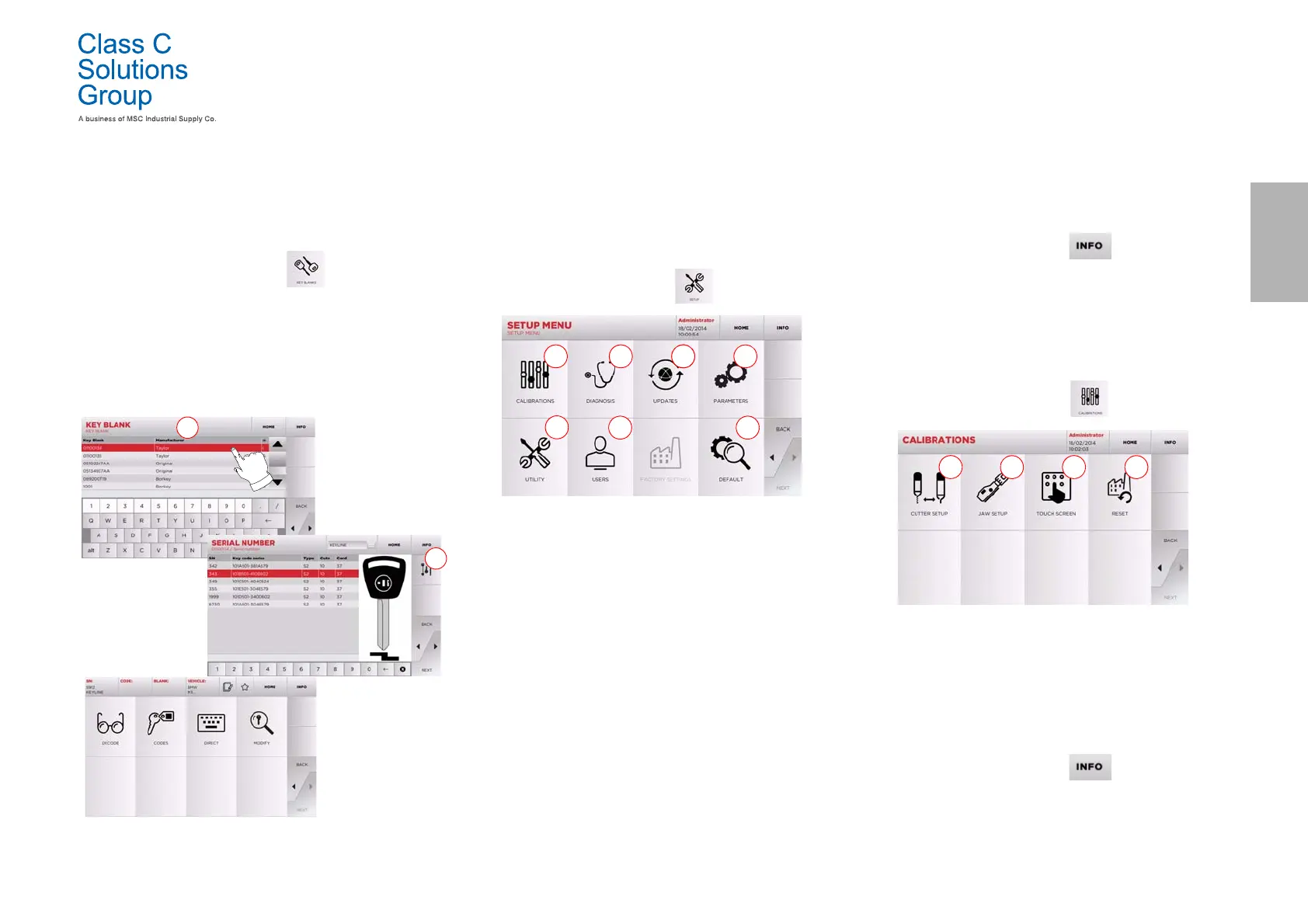
5.1.3 Search by article
Selecting the search by article function allows quick access to the in-
formation that refers to a Class C Solutions Group key article or to
other well known brands.
How to proceed:
•From the MAIN MENU, select:
• Select one of the options in the top drop-down menu (A).
• Input the article code for the Class C Solutions Group key
or other key, then press “
►”.
• Choose the desired code, or press the “B” button to select
the manufacturer of the blank key (e.g. Keyline) then enter
it with
“
►
”.
• From the operating menu, choose one of the search or key
modification options: DECODE, CODE, DIRECT and MODIFY.
Note: From now on, please refer to chapter 7 on page15.
5.2.0 Setup Menu
The main menu allows access to the set-up menu to regulate the cut-
ting and reading devices, to update the machine and use the diagno-
stic function.
How to access the page:
• From the MAIN MENU, select:
Options displayed:
1. For the calibration of the devices on the machine.
2. To access the status check menus of the main devices of
the machine.
3. To access the software and database updating procedure
of the machine.
4. To consult and set the operating parameters of the
machine.
5. To access the following functions:
•Network Status: displays the status of the connection.
• Keys History: to access the database of duplicated keys.
• Cutter change: guided procedure for cutter change.
• Tracer point change: guided procedure for tracer point change.
• Statistics: keeps track of the total number of cut keys
and of other useful counters.
• Format USB drive: to format the USB drive.
• Date and Time: to set current date and time.
• Restart: restarts the program automatically.
• Reboot: restarts the whole system automatically.
• Machine data: displays some useful pieces of information,
such as the machine serial number or the software version.
6. To access the user data management menu described in
paragraph8.1.0 on page17.
7. To access all predefined settings for some viewing
parameters, such as the unit of measure, the preferred
vehicle brand, the preset region and numbering system.
• For further information select “ ” from the display .
5.3.0 Calibrations Menu
Through the CALIBRATIONS menu it is possible to access the calibra-
tion functions of the machine's devices, in order to obtain the correct
execution of the duplication process.
How to access the page:
•From the SETUP MENU, select:
Options displayed:
1. Used to calibrate the cutter manualy and to adjust its
position in respect to the X and Y axes.
2. To select the jaw to be installed and to calibrate it
according to the type of key to be cut.
3. To regulate the Touch Screen settings.
4. To access the menu that allows the operator to reset the
tracer point and jaws.
• For further information select “ ” from the display .


 To Next Page