Page 8 of 12 75.0072.02 EAGLE ARTEK 20231023
ACCESS CODE
The access code (1 to 4 digits) is recommended to set sensors installed close to each other.
* outputs are not reset
Saving an access code:
Deleting a known access code:
Deleting an unknown access code:
Once you have saved an access code, you must always enter this code to unlock the sensor.
If you forget the access code, cut and restore the power supply. Within 1 minute, you can access the sensor
without introducing any access code.
SETTINGS
FACTORY VALUES:
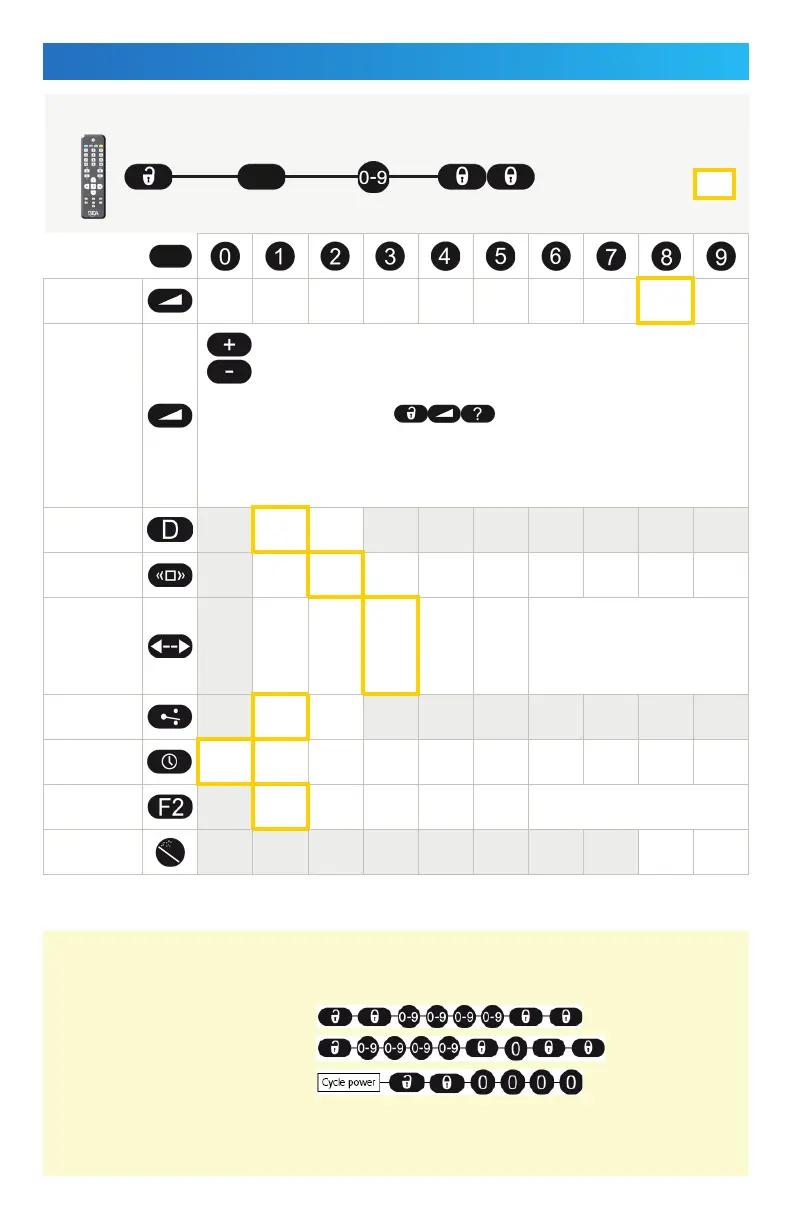
FIELD SIZE XXS XS S > > > > L XL XXL
FIELD SHAPE
= wide (default)
= narrow
To query the specific width, press .
The sensor will blink the number of times that it is set to, and then the green LED will
blink either 1 time (narrow shape) or 2 times (wide shape).
Example: If FIELD SIZE = large and FIELD SHAPE = narrow, the LED with blink 7 times,
and then 1 time.
MOUNTING
HEIGHT
< 10 ft
> 10 ft
IMMUNITY
FILTER
low
normal
high
> > > > > highest
DETECTION
MODE
bi
uni
uni MTF
uni
AWAY
MTF &
AWAY
bi = two-way detection
uni = one-way detection towards sensor
uni MTF = one-way detection with
motion-tracking feature
uni AWAY = one-way detection away
from sensor
OUTPUT
CONFIG
NO NC
HOLD-OPEN
TIME
0.5 s 1 s 2 s 3 s 4 s 5 s 6 s 7 s 8 s 9 s
DOOR
CONTROL
auto open closed
open = sensor detects constantly, LED on
closed = sensor is in standby and does not
detect, LED off
FACTORY
RESET
full partial *
via REMOTE CONTROL



 To Next Page