EasyManua.ls Logo

BEA FALCON - User Manual

BEA FALCON
7 pages
Print Icon
To Next Page IconTo Next Page
Loading...
75.5351.02 EN 20080317 (75.5350) Page 1 of 7
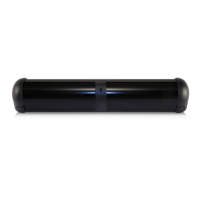
FALCON & FALCON XL
USER'S GUIDE
MOTION SENSORS FOR INDUSTRIAL DOORS
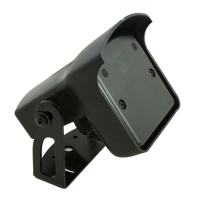
FALCON: for high mounting FALCON XL: for low mounting
Technology: Microwave and microprocessor
Transmitter frequency: 24.125 GHz
Transmitter radiated power: <20 dBm EIRP
Transmitter power density: < 5 mW/cm²
Mounting height
FALCON: from 11.5 to 23’
FALCON XL: from 6.5 to 11.5’
Tilt angle: 0° to 180° in elevation
Detection zone (typical)
Wide pattern (FALCON XL): 13’ (W) x 6.5’ (D)
for a mounting height of 8.2’
Narrow pattern (FALCON): 13’ (W) x 16’ (D)
for a mounting height of 16’
Detection mode: movement
Minimum detection speed: 2.2 in/s (measured in the
sensor axis)
Supply voltage: 12V to 24V AC +/- 10%
12V to 24V DC +30% / -10%
Mains frequency: 50 to 60 Hz
Power consumption: < 2W
Output relay: free of potential changeover contact
Max contact voltage : 42V AC/ DC
Max contact current: 1A (resistive)
Max switching power: 30W (DC) / 60 VA (AC)
Hold time: 0.5s to 9s (adjustable)
Manual adjustment:
orientation of sensing field (mechanically)
multiple functions (by push buttons).
Remote control adjustments:
Sensitivity.
Hold time.
Detection mode.
Pedestrian and parallel traffic rejection mode.
Relay configuration.
Temperature range : -22°F to 122°F (-30°C to +60°C)
Degree of protection: IP65
Product conformity:
R&TTE 1999/5/EC
EMC 89/336/EEC
Dimensions : 5 in (D) x 4 in (W) x 3 ¾ (H)
(127mm (D) x 102 mm (W) x 96mm (H))
Weight: 0.88 lbs (400 g)
Housing Material: ABS and Polycarbonate
Bracket Material: black anodized aluminum
Cable length: 33 ft (10 m)
Cable diameter: 1/8” (3 mm) (minimum)
1/4” (6.5 mm) (maximum)
The sensor must be firmly
fastened in order not to
vibrate.
The sensor must not be
placed directly behind a
panel or any kind of
material.
The sensor must not
have any object likely to
move or vibrate in its
sensing field.
The sensor must not
have any fluorescent
lighting in its sensing
field.
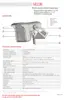
DESCRIPTION OF
THE SENSOR
INSTALLATION
TIPS
TECHNICAL
SPECIFICATIONS


Other manuals for BEA FALCON

Questions and Answers

  • K
    kellynathanJul 29, 2025
    How to fix BEA Accessories sensor if it is not capable of activation near the door?
    • M
      melissa43Jul 29, 2025
      If your BEA Accessories sensor isn't activating near the door, it might be because the tilt angle is too large. Try reducing the tilt angle.
  • E
    Eric RichardsAug 4, 2025
    What to do if the BEA FALCON Accessories sensor does not respond to the remote control?
    • K
      Kenneth MillerAug 5, 2025
      If your BEA Accessories sensor isn't responding to the remote control, here's what you can check: * **Weak Batteries:** Make sure the batteries are correctly inserted or replace them. * **Changed Access Code:** You can reset the parameters to factory values by pressing both push buttons simultaneously. Alternatively, switch off the power supply and change the access code within the first minute after powering it back on.
  • J
    Joseph NavarroAug 10, 2025
    Why does my BEA FALCON Accessories door open and close constantly?
    • J
      Jorge ColemanAug 10, 2025
      If your BEA Accessories door opens and closes constantly, it might be due to: * The sensor detecting the door's movement. You can resolve this by increasing the tilt angle or reducing the sensitivity. * Vibrations from the door closing. Ensure the sensor is correctly fixed. If the rejection mode is at level 1, change it to level 2. Also, try reducing the sensitivity or switching to unidirectional mode.
  • B
    Bob JohnsonAug 16, 2025
    What to do if BEA Accessories door opens and closes after a given time for no apparent reason?
    • C
      Christopher DoyleAug 16, 2025
      If your BEA Accessories door opens and closes after a given time for no apparent reason, it's likely that the sensor is picking up unintended traffic motion. Try reducing the sensitivity and the tilt angle to resolve this.
  • E
    evansjesseAug 22, 2025
    What to do if the BEA FALCON door will not open and the red LED does not light up?
    • M
      Michael RiddleAug 22, 2025
      If the BEA Accessories door won't open and the red LED isn't lit, the sensor power might be off. Check the power supply and the supply voltage.

Summary

FALCON & FALCON XL Product Overview

Technical Specifications

Covers transmitter frequency, power, power density, mounting height, tilt angle, detection zone.

Power, Supply, and Output Relay

Describes supply voltage, frequency, power consumption, and relay contact ratings.

Physical Dimensions, Environment, and Conformity

Lists dimensions, weight, materials, temperature range, IP rating, and conformity.

Sensor Components and Installation Tips

Diagram of sensor parts and guidelines for secure mounting and placement.

Installation and Setup Procedures

Wiring and Cable Management

US/European wire color mapping and procedure for inserting the main cable.

Opening, Closing, and Mounting the Sensor

Steps for accessing the sensor housing and diagrams for ceiling/wall mounting.

Bracket Mounting and Alignment

Guidance on bracket adjustment and alignment for optimal positioning.

Sensing Field Configuration

Sensing Field Visualization

Graphical representation of detection zones for FALCON and FALCON XL with various settings.

LED Status Indicators

Explanation of LED behavior during power-on, detection, and configuration modes.

Remote Control Operation

Infrared Remote Control Layout and Functions

Identification of buttons and their primary functions on the remote control.

Remote Control Sensor Configuration

Procedure for unlocking, adjusting parameters, and locking the sensor using the remote.

Parameter Adjustment and Modes

Checking and Modifying Parameter Values

How to check current settings and adjust Sensitivity and Hold Time with the remote.

Resetting Parameters and Selecting Modes

Procedure to reset to factory defaults and details on Relay Configuration.

Advanced Configuration and Manual Control

Detection and Rejection Mode Settings

Configuration of detection modes (uni/bi-directional) and interference rejection levels.

Manual Adjustment via Push Buttons

Using the sensor's physical buttons for configuration and interpreting LED feedback.

Troubleshooting and Support

Troubleshooting Common Issues

Lists symptoms, probable causes, and corrective actions for sensor malfunctions.

Manual Adjustment Button Operation

How to increase parameter values or numbers using the sensor's buttons.

Contacting BEA Support

Information on customer support numbers and website for assistance.

BEA FALCON Specifications

General IconGeneral
BrandBEA
ModelFALCON
CategoryAccessories
LanguageEnglish

Related product manuals