EasyManua.ls Logo

BEA Eagle - User Manual

BEA Eagle
8 pages
Print Icon
To Next Page IconTo Next Page
Loading...
1
2
5
3
4
EAGLE
75.5601.04 EAGLE 20240412 Page 1 of 8
Unidirectional activation sensor for
automatic, pedestrian doors
ENGLISH
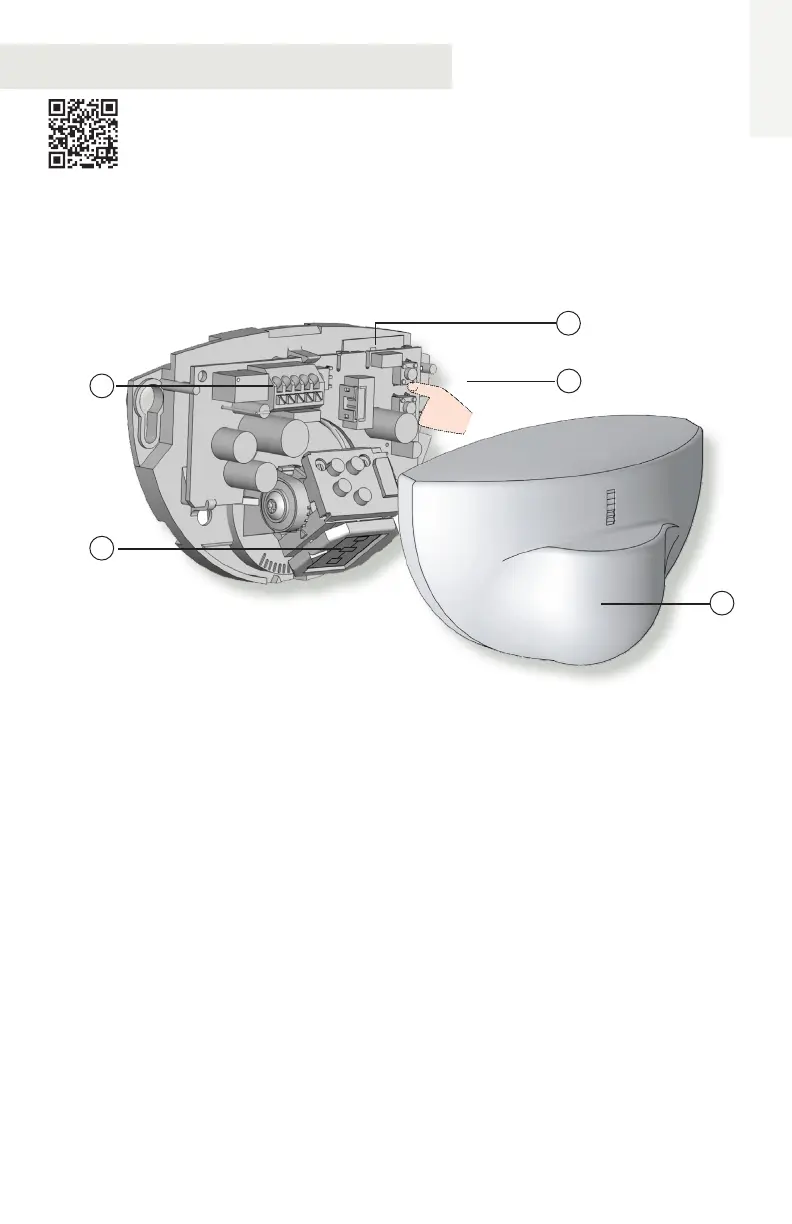
1. main connector
2. wide zone antenna
3. narrow zone antenna
4. push buttons
5. cover
Visit website for
available languages of
this document.

Other manuals for BEA Eagle

Questions and Answers

  • L
    ljamesAug 15, 2025
    How to troubleshoot BEA Security Sensors when the door remains closed and the LED is off?
    • M
      Michael DanielAug 15, 2025
      If the BEA Security Sensors door remains closed and the LED is off, it could be due to a couple of reasons. First, the sensor might not be getting power. Check the wiring and power supply to ensure everything is connected correctly. Second, the door control setting (F2) might be set to 3 (closed). If that's the case, change the door control setting (F2) to 1 (automatic).
  • M
    marychavezAug 18, 2025
    Why BEA Security Sensors does not respond to the remote control?
    • W
      wryanAug 18, 2025
      If your BEA Security Sensors do not respond to the remote control, the problem could be with the remote itself. First, check the batteries in the remote control to make sure they aren't weak or installed incorrectly. Replace them if needed. Second, ensure that you are pointing the remote control directly at the sensor when trying to use it.
  • C
    Cheryl RamosAug 21, 2025
    Why does my BEA Eagle door open for no reason?
    • S
      Sophia HoffmanAug 21, 2025
      If your BEA Accessories door opens unexpectedly, it could be due to several reasons. Rain may be detected as motion, so ensure the detection mode is unidirectional. In reflective environments or airlock vestibules, the sensor might detect objects or movement outside the intended zone; try changing the antenna angle. You can also try reducing the zone size or increasing the immunity filter. Consider installing a rain accessory.
  • D
    Donald MirandaAug 25, 2025
    What to do if BEA Eagle Accessories door opens and closes constantly?
    • M
      matthewgrahamAug 25, 2025
      If your BEA Accessories door keeps opening and closing, the sensor might be disturbed by door motion or vibrations. Make sure the sensor is properly fixed. Also, ensure the detection mode is unidirectional, increase the antenna angle, increase the immunity filter and reduce the zone size.
  • R
    Ricky TaylorAug 27, 2025
    Why is my BEA Eagle sensor not responding to the remote control?
    • G
      gkempAug 27, 2025
      If the BEA Accessories sensor isn't responding to the remote control, first check the batteries. Ensure they are not weak and are installed correctly; replace them if necessary. Also, make sure you are pointing the remote control directly at the sensor.
  • F
    Frank White DVMAug 30, 2025
    How to fix a BEA Accessories door that remains closed with the LED off?
    • C
      Caitlin LopezAug 30, 2025
      If the BEA Accessories door remains closed and the LED is off, it could be due to a couple of reasons. First, check the wiring and power supply to ensure the sensor is receiving power. Second, verify the door control setting (F2). If it's set to 3 (closed), change it to 1 (automatic).
  • A
    Adam FreemanSep 2, 2025
    What to do if LED flashes quickly after unlocking BEA Eagle?
    • H
      hwadeSep 2, 2025
      If the LED flashes quickly after unlocking your BEA Accessories device, it means the sensor requires an access code to unlock. Enter the correct access code. If you've forgotten the code, cycle the power to access the sensor without it, then change or delete the access code.
  • K
    Kathryn BoydSep 5, 2025
    Why does my BEA Security Sensors door open for no discernable reason?
    • S
      Seth WilsonSep 5, 2025
      If the BEA Security Sensor door opens for no apparent reason, several factors could be at play. It might be detecting raindrops, especially during rain. To resolve this, ensure the detection mode is unidirectional, increase the immunity filter, or consider installing a rain accessory. In highly reflective settings, the sensor might pick up objects outside its intended zone; adjust the antenna angle, reduce the zone size, or increase the immunity filter to address this. Alternatively, in airlock vestibules, the sensor could be sensing the movement of the opposite door. Try changing the antenna angle or the antenna itself, or increasing the immunity filter.
  • G
    gibsonrachelSep 8, 2025
    Why does my BEA Security Sensors door open and close constantly?
    • M
      Michael JohnsonSep 9, 2025
      If the BEA Security Sensors door opens and closes constantly, it might be due to the sensor being disturbed by door motion or vibrations. To fix this, make sure the sensor is properly fixed. Also, set the detection mode to unidirectional, increase the antenna angle and the immunity filter, and reduce the zone size.
  • D
    danielmccallSep 12, 2025
    What to do if BEA Security Sensors LED flashes quickly after unlocking?
    • K
      Karla MejiaSep 12, 2025
      If the LED on your BEA Security Sensors flashes quickly after unlocking, it means the sensor requires an access code to unlock. Enter the correct access code. If you've forgotten the code, cycle the power to access the sensor without it, then change or delete the access code.

Summary

TECHNICAL SPECIFICATIONS

INSTALLATION TIPS

How to Open the Sensor

Explains how to open the sensor for installation or maintenance.

MECHANICAL ADJUSTMENTS

LATERAL ADJUSTMENT

Details how to adjust the sensor's detection field horizontally.

VERTICAL ADJUSTMENT

Details how to adjust the sensor's detection field vertically.

SETTINGS

REMOTE CONTROL

Explains how to program the sensor using a remote control.

ACCESS CODE

Details how to save and use access codes for sensor security.

PUSH BUTTONS

Explains how to configure settings using the sensor's physical buttons.

TROUBLESHOOTING

NOTES

BEA, INC. INSTALLATION;SERVICE COMPLIANCE EXPECTATIONS

BEA Eagle Specifications

General IconGeneral
BrandBEA
ModelEagle
CategoryAccessories
LanguageEnglish

Related product manuals