Page 6 of 8 75.5601.04 EAGLE 20240412
TROUBLESHOOTING
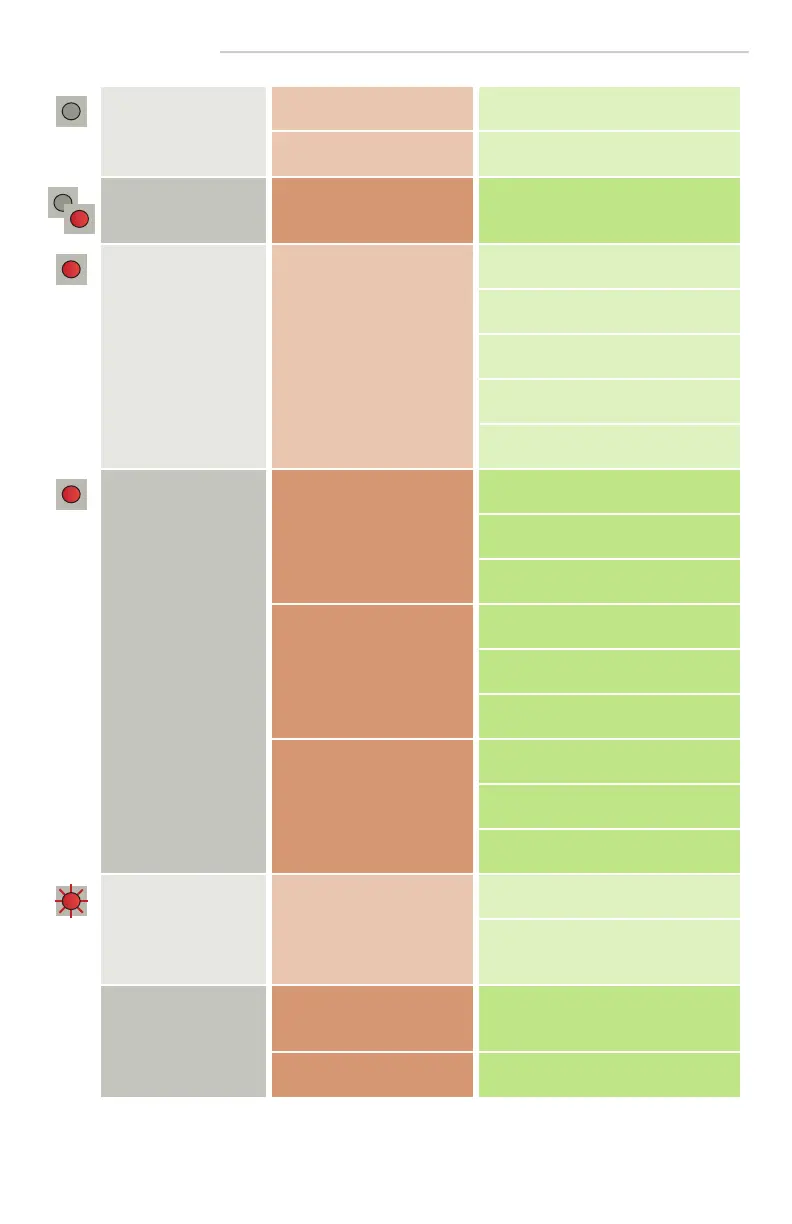
The door remains closed.
LED is off.
Sensor power is off. Check wiring and power supply.
Door control setting (F2) is set
to 3 (closed).
Change door control setting (F2) to 1
(automatic).
Door does not react as
expected
Improper output configuration
on sensor.
Change the output configuration setting
on each sensor connected to the door
operator.
Door opens and closes
constantly
Sensor is disturbed by door
motion or vibrations from door
motion.
Ensure sensor is fixed properly.
Ensure detection mode is unidirectional.
Increase antenna angle.
Increase immunity filter.
Reduce zone size.
Door opens for no
discernable reason
It rains and the sensor detects
the motion of the rain drops.
Ensure detection mode is unidirectional.
Increase immunity filter.
Install rain accessory.
In highly reflective
environments, the sensor
detects objects outside of its
detection zone.
Change the antenna angle.
Reduce zone size.
Increase immunity filter.
In airlock vestibules, the sensor
detects the movement of the
opposite door.
Change the antenna angle.
Change antenna.
Increase immunity filter.
LED flashes quickly after
unlocking
Sensor needs access code to
unlock.
Enter correct access code.
If you forgot the code, cycle the power to
access the sensor without access code.
Change or delete the access code.
Sensor does not respond
to the remote control
Batteries in the remote
control are weak or installed
improperly.
Check batteries and change if necessary.
Remote control not pointed
correctly.
Point remote control at sensor.



 To Next Page