EasyManua.ls Logo

BEA IS40 - User Manual

BEA IS40
9 pages
Print Icon
To Next Page IconTo Next Page
Loading...
2
7
8
6
1
3
5
4
1
2
DESCRIPTION SPECIFICATION
SENSOR TILT ANGLE 15° to 45°
SUPPLY VOLTAGE
12 to 24VAC ±10%
12 to 24VDC +30% / -5%
MAIN FREQUENCY 50 to 60Hz
POWER CONSUMPTION < 3.5W
RELAY OUTPUT
- Max. Voltage
- Max. Current
- Max Switching Power
2 Relays with switch-over contact (voltage free)
60 VDC / 125 VAC
1A (resistive)
30W (DC) / 60VA (AC)
INSTALLATION HEIGHT
IS40: 8 ft - 16 ft (2.5 - 6 m)
IS40XL: 6.5 ft - 11.5 ft (2 - 3.5 m)
TEMPERATURE RANGE -22°F ( -30°C) to + 140°F (60°C)
PROTECTION DEGREE IP65 / NEMA 4
NORM CONFORMITY Electromagnetic compatibility (EMC) according to 2004/108/EEC, R&TTE: 1999/5/EC
DIMENSIONS (D X W X H) 5 in. X 4 in. X 3.75 in. (127mm x 102mm x 96mm)
MATERIAL
- Housing
- Face
ABS
Polycarbonate
COLOR
- Housing
- Face
Black
Transparent Purple
CABLE LENGTH 32 feet (10m)
TECHNOLOGY MICROWAVE DOPPLER RADAR INFRARED
RADIATED FREQUENCY 24.175 GHz 875 nm
RADIATED POWER DENSITY < 5 mW/cm² < 250mW/m²
DETECTION MODE Motion Presence
MAXIMUM DETECTION FIELD
IS40: 13 ft x 16 ft (4m x 5m)
IS40XL: 13 ft x 6.5 ft (4m x 2m)
IS40: 10 ft x 10 ft (3m x 3m)
IS40XL: 7.5 ft x 7.5 ft (2.3m x 2.3m)
OUTPUT HOLD TIME 0.5 sec. to 9 sec. 0.5 sec.
REACTION TIME 100ms 250ms
MINIMUM TARGET SPEED 2 in/sec (5cm/sec) in sensor axis 0 in/sec (0cm/sec)
LED SIGNAL Green = Activation Relay Red = Presence Relay
RADAR ANGLE / SENSOR ANGLE -8° to 22° (relative to sensor front face) 15°, 30°, 45°
IS40 / IS40XL
USER’S GUIDE
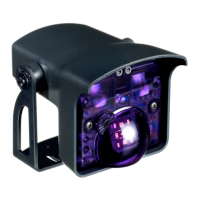
COMBINED ACTIVE INFRARED (IR) AND MICROWAVE SENSOR
75.5695.01 EN 20120113 Page 1 of 9
IS40 / IS40XL
- The IS40 uses
Microwave technology
for motion detection
and Active Infrared
technology for
presence detection.
SPECIFICATIONS
IS40: for normal to high mounting 8 ft - 16 ft (2.5 - 6 m)
IS40 XL: for low mounting 6.5 ft - 11.5 ft (2 - 3.5 m)
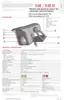
1. IR angle indicator
2. LED’s
3. IR emitters
4. Radar angle adjustment
dial
5. Radar detection antenna
6. Sensor angle adjustment
7. Bracket
8. Cable
DESCRIPTION


Other manuals for BEA IS40

Questions and Answers

  • R
    Rickey FriedmanSep 18, 2025
    What to do if rain or snow disturbs BEA Accessories microwave detection?
    • S
      Sharon GrahamSep 18, 2025
      If rain or snow is interfering with the microwave detection of your BEA Accessories, you can try the following: 1. Increase the microwave rejection during rain or snow. 2. Consider using unidirectional mode under the Detection Parameters.
  • K
    Katie WashingtonAug 25, 2025
    Why are there sporadic presence detections for no reason on my BEA Accessories?
    • C
      Christopher RamirezAug 25, 2025
      If you are experiencing sporadic presence detections for no reason with your BEA accessories, it could be due to rain or external environmental factors disturbing the presence detection. Set the AIRcurtain immunity to value 3. Also, ensure the sensor is securely installed.
  • F
    feliciacarterAug 25, 2025
    Why does my BEA IS40 Accessories sensor detect objects outside of its detection field?
    • J
      Joseph BennettAug 26, 2025
      If your BEA Accessories sensor detects objects outside of its detection field, it could be due to excessive reflection from a metallic environment. Try increasing the microwave rejection setting.
  • D
    david53Aug 26, 2025
    How to stop BEA IS40 Accessories sensor from detecting objects outside its field?
    • B
      benjaminangelAug 27, 2025
      If your BEA Accessories sensor is detecting objects outside its intended detection area, try increasing the microwave rejection setting.
  • B
    bakerjohnSep 23, 2025
    What to do if BEA IS40 Accessories asks for an access code or won't unlock?
    • S
      Susan JohnstonSep 23, 2025
      If your BEA Accessories application requires an access code or the sensor won't unlock after entering one, cut and restore the power supply. Note that no code is needed to unlock during the first minute after powering on. Unlock the sensor, then lock it and either enter a new access code or enter '0000' to delete the current access code.
  • L
    Lauren HarrisSep 23, 2025
    Why is the red LED on my BEA Accessories staying on?
    • R
      Robert Vance PhDSep 23, 2025
      If the red LED on your BEA Accessories stays on, wait for the learn time setting to expire.
  • D
    Duane BoydSep 10, 2025
    What to do if my BEA IS40 Accessories door never closed and the LED(s) is off?
    • J
      Jeffrey EstradaSep 10, 2025
      If your BEA Accessories door never closes and the LED(s) is off, the output relay(s) might be incorrectly wired or configured. Try changing the wiring at the output(s) or adjusting the relay configuration.
  • J
    julie59Sep 12, 2025
    Why is the red LED on during rain or snow on my BEA Accessories?
    • B
      brownkristinSep 12, 2025
      If the red LED is on during rain or snow with your BEA Accessories, it's likely that the presence detection is being disturbed by the weather. To fix this, increase the immunity of the IR field to a value of 2 or 3.
  • D
    Dan HernandezSep 3, 2025
    Why does my BEA Accessories sensor not respond to the remote control?
    • T
      Toni HolmesSep 3, 2025
      If your BEA accessories sensor does not respond to the remote control, check the batteries in the remote control and replace them if necessary. Ensure that the remote control is aimed towards the sensor. Also, verify the power supply to the sensor.
  • N
    Nicole SingletonSep 1, 2025
    Why is the red LED permanently ON on my BEA IS40 Accessories after setup?
    • S
      Sharon PorterSep 1, 2025
      If the red LED on your BEA accessories is permanently ON after a setup, the sensor may have failed the AIR setup. Step out of the detection field and launch a new setup.

Summary

Product Description

Technical Specifications

Safety Precautions

Product Dimensions

Installation Tips

Mounting Instructions

Wiring and Relay Configuration

Sensor Angle Adjustment

IR Pattern Size Configuration

Microwave Field Adjustments

Microwave Field Tilt Angle

Remote Control Parameters

Motion Detection Settings

Configure sensitivity, detection mode, hold time, and rejection mode for motion detection.

Rejection Mode Configuration

Select levels of rejection for traffic types and interference immunity.

Output Configuration

Define activation logic for motion and presence relays based on object detection.

IR; Presence Settings

Adjust frequency, IR immunity, and automatic learn time for presence detection.

Sensor Setup Sequence and Access Code

Sensor Setup Sequence

Steps for saving changes, launching setup, and managing parameters.

Factory Values and Access Code

Procedures for resetting to factory defaults and setting/deleting access codes.

Troubleshooting Guide

Available Accessories

Company Contact Information

BEA IS40 Specifications

General IconGeneral
CategoryAccessories
Protection RatingIP54
Connection TypeScrew terminals
OutputRelay
Power Supply12 - 24 VAC/DC
Operating Voltage10-30 VDC
Sensing Range40 mm
Housing MaterialPlastic

Related product manuals