EasyManua.ls Logo

BEA IXIO-ST - User Manual

BEA IXIO-ST
12 pages
Print Icon
To Next Page IconTo Next Page
Loading...
IXIO-ST
1
2
8
6
4
3
5
7
20.5349
75.5782.08 IXIO-ST 20230913 Page 1 of 12
PRESENCE SENSOR FOR AUTOMATIC
SLIDING DOORS
ENGLISH
Visit website for
available languages of
this document.
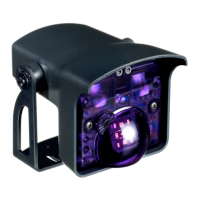
1. cover
2. LED window
3. AIR curtain width adjustment
4. LCD
5. AIR lenses
6. main adjustment knob
7. AIR curtain angle adjustment knob
8. main connector
DESCRIPTION
This device can be expected to comply with Part 15 of the FCC Rules, provided it is assembled in exact accordance with the instructions
provided with this kit. Operation is subject to the following conditions: (1) this device may not cause harmful interference, and (2) this
device must accept any interference received, including interference that may cause undesired operation.
10ICA
Ceiling accessory
10CDA
Curved door accessory
10IMB
Bracket accessory
35.1609: black cover
35.1302: white cover
35.1303: silver cover
10URA
Universal rain accessory
10IXIOSPACER
Spacer
ACCESSORIES
Download the BEA DECODER app
for a quick overview of settings

Other manuals for BEA IXIO-ST

Questions and Answers

  • F
    foxbrookeSep 12, 2025
    What to do if my BEA Door Opening System cycles open and remains open?
    • K
      Karen HallSep 12, 2025
      If your door cycles open and remains open, it might be due to the door control monitoring being set to Active High. Set the door control monitoring to Active Low. It could also be that the safety output is set incorrectly; set the safety output required for the door control.
  • K
    Kelli JacksonAug 25, 2025
    What to do if BEA Security Sensors signals an internal fault?
    • S
      Sara WestAug 25, 2025
      If your BEA Security Sensor signals an internal fault, cycle the power supply. If the orange LED flashes again, replace the sensor.
  • T
    Todd CalhounAug 25, 2025
    What to do if the LCD or remote control of BEA Accessories does not react?
    • J
      John LeeAug 26, 2025
      If the LCD or remote control does not react, it might be because the BEA Accessories sensor is protected by a password. Enter the correct password. If you've forgotten the password, cut and restore the power supply to access the sensor without needing to enter a password for one minute.
  • A
    Andrew RoblesSep 23, 2025
    What to do if the LED and the LCD displays are off on my BEA Door Opening System?
    • S
      shannonwilsonSep 23, 2025
      If the LED and the LCD displays are off, there may be no power to the sensor. Check the wiring and ensure there is correct power supply.
  • S
    stevencharlesSep 13, 2025
    What to do if my BEA Door Opening System sensor does not respond to the remote control?
    • M
      martinezstephenSep 13, 2025
      If the sensor does not respond to the remote control, the batteries may be dead. Replace the batteries.
  • L
    Lauren PatrickSep 18, 2025
    What does it mean if the ORANGE LED on my BEA Door Opening System flashes 4x?
    • V
      Vincent RiceSep 18, 2025
      If the ORANGE LED flashes 4x, the sensor may not be receiving enough AIR energy. Decrease the angle of the AIR curtains. You can also increase the AIR immunity filter or deactivate curtain #2 (C2, outer curtain).
  • V
    Vernon FullerSep 6, 2025
    How to unlock BEA Door Opening System if the LCD or remote control does not react?
    • K
      Kristi DoughertySep 6, 2025
      If the LCD or remote control of your BEA Door Opening System isn't responding, it might be because the sensor is password protected. Try entering the correct password. If you've forgotten the password, cut and restore the power supply to access the sensor without needing a password for one minute.
  • K
    Kelly HughesSep 6, 2025
    What does it mean when the orange LED flashes 8 times on my BEA Door Opening System?
    • D
      David SmithSep 6, 2025
      If the orange LED on your BEA Door Opening System flashes 8 times, it indicates that the IR power emitter is faulty. The suggested solution is to replace the sensor.
  • A
    Alicia WileySep 23, 2025
    What does it mean if the ORANGE LED on my BEA Door Opening System flashes 2x?
    • L
      lori51Sep 23, 2025
      If the ORANGE LED flashes 2x, the power supply voltage may be too low or too high. Check the power supply voltage in the diagnostics menu (menu 3) of the LCD. Also, check the wiring.
  • J
    Justin DavisAug 30, 2025
    What to do if E4 ORANGE LED flashes 4 x on BEA Accessories?
    • J
      Jacob SmithAug 30, 2025
      If the E4 ORANGE LED flashes 4 times, it suggests that the sensor isn't receiving enough IR energy. Try the following: * Decrease the angle of the IR-curtains. * Increase the IR-immunity filter (values >2.8 m). * Deactivate 1 curtain.

Summary

Product Description

Installation Guidelines

Safety Procedures

Grounding and Qualified Personnel

Mandates grounding of components and use of trained installers.

Operational Testing and Warranty

Emphasizes post-installation testing and voided warranty for unauthorized repairs.

Technical Specifications

Technology and Performance Details

Covers detection mode, IR technology, response times, and detection zones.

Using the LCD Interface

Mounting and Wiring Guide

Infrared Safety Field Configuration

Sensor Setup Procedures

Overview of Settings

Troubleshooting Common Issues

Orange LED Error Codes

Diagnosing and resolving faults indicated by orange LED flashes.

Red;Green LED Faults

Troubleshooting setup errors, vibrations, and door detection issues.

Power and Display Problems

Resolving issues with unresponsive displays or lack of power.

Response and Configuration Errors

Addressing door reaction inconsistencies and access control issues.

Monitoring and Output Failures

Troubleshooting external monitoring and safety output malfunctions.

BEA IXIO-ST Specifications

Power IconPower
supply voltage12 V - 24 V AC, 50/60 Hz; 12 V - 30 V DC
power consumption< 2.5 W
max contact voltage42 V AC/DC
Operating Environment IconOperating Environment
mounting height6.5 ft to 11.5 ft
temperature range sensor-31°F to +131°F
temperature range LCD14°F to +131°F
Detection Technology IconDetection Technology
detection modeActive infrared with background analysis
spot size5 cm x 5 cm
number of spotsmax. 24 per curtain

Related product manuals